

Governance & AI disclosure
Every agent carries a governance policy — tool access, web & browser egress, and EU AI Act transparency — configured on Configure → Governance (see Configure your agent for the form itself). This page explains what the policy actually does at runtime, and how AI disclosure reaches your end users on each channel.
Two layers: the platform floor and your policy
Section titled “Two layers: the platform floor and your policy”Enforcement is composed from two layers, and composition only ever narrows:
- The platform floor is always on and not configurable: workspace-sandbox path containment (the agent can’t read or write outside its workspace, symlinks resolved), shell-variable path hygiene, and argument checks. No agent configuration can relax it. The floor does not screen shell commands — restrict the
terminalif you need that. - Your agent policy sits on top: allow-lists intersect, deny-lists union, and the strictest egress default wins. Deny beats allow.
Turning Policy enforcement off drops your rules but keeps the floor — it is never “no governance”.
How enforcement behaves
Section titled “How enforcement behaves”- The composed gate is checked before every tool call.
- It is built once per wake and frozen for that wake, so nothing that happens mid-turn — including prompt injection — can weaken it. Saving a policy edit bumps the agent’s runtime config and invalidates live pods: sessions pick up the new policy on their next wake.
- A plain denial hands the model a
Blocked: <reason>tool result and records apolicy.deniedevent. The agent will typically tell the user it couldn’t perform the action. - Denied tools are still advertised to the model and blocked at call time — the agent may try once, get blocked, and adapt.
- MCP tools (
mcp__*) are outside both lists — the allow/deny fields only accept built-in tool names, so anmcp__*name can’t be typed into either. They’re governed by which MCP servers you attach and by what a buyer’s package includes. Egress, sandbox and argument checks still apply to them. - Protected self-tools (
worker_block,worker_complete,worker_context,share_note,read_board,expand_note,unblock_task,cancel_task) can never be denied — a policy that could strand a blocked task forever isn’t accepted.
Tools that need approval first
Section titled “Tools that need approval first”A third list sits beside allow and deny: approval-required tools. A call to one of these isn’t refused — it’s held until a human says yes.
- The model is told the call needs human approval rather than that it was refused, and an Approval needed item lands in your Inbox with Approve / Reject.
- Approve and the agent’s retry of that same call goes through; Reject leaves the denial standing. Nothing freezes in the meantime — the agent carries on with the rest of its work.
Approving records a durable grant, not just a chat message:
| Property | Behaviour |
|---|---|
| Scope | The exact call, arguments included — approving one command doesn’t approve the next one from the same tool |
| Lifetime | One hour |
| Uses | Once — a second call needs a second approval |
Once a grant has expired or been used, the next call is blocked again, and the reason says prior approval expired / exhausted rather than that the tool was never approved.
Two rules worth remembering:
- Deny still wins. The deny-list is checked first, so a tool in Denied tools is never approvable.
- MCP tool names belong here. This is the only list that accepts them (
mcp__*) — the one way to gate an individual MCP tool instead of detaching its whole server.
Both outcomes are on the record: the block emits policy.denied, and an approved retry emits policy.allowed with the reason human approval.
Network controls: three separate planes
Section titled “Network controls: three separate planes”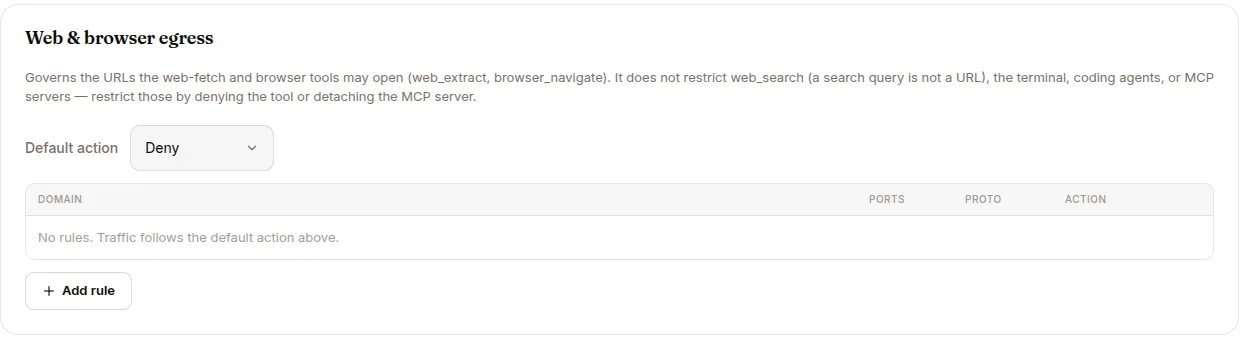
“Default action: deny” on the egress card does not mean the agent can’t reach the internet. Three independent planes exist:
- Web & browser egress (your policy) — governs only the URL arguments of
web_extractandbrowser_navigate. Domain matching is glob-based (*.acme.com); CIDR ranges are not supported, and audprule never matches a URL. - The terminal’s own sandbox allowlist — fixed per deployment (package registries, GitHub, coding-agent vendor APIs, configured SSH hosts). Your policy can’t edit it; the only lever is denying
terminal/process/run_coding_agent. - MCP server attachment — enforced by the MCP proxy; detach a server to cut its tools off.
SSH targets additionally get a per-session Kubernetes NetworkPolicy pinning their egress.
AI disclosure (EU AI Act, Art. 50)
Section titled “AI disclosure (EU AI Act, Art. 50)”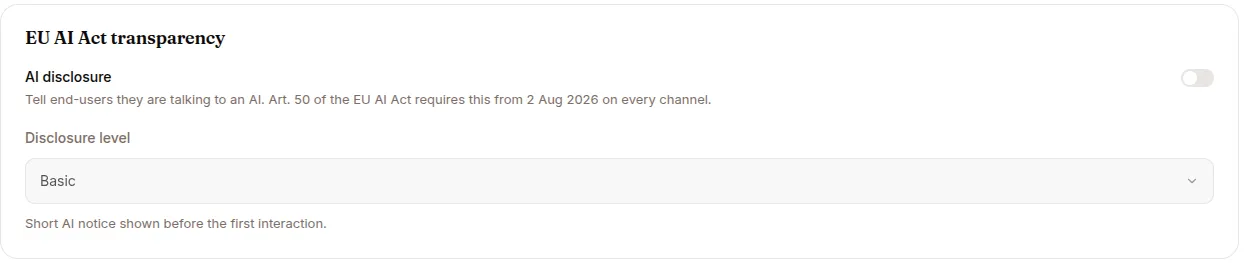
From 2 Aug 2026, Art. 50 of the EU AI Act requires telling end users they are talking to an AI, on every channel. Turn on AI disclosure in Configure → Governance and pick a level:
| Level | What users read |
|---|---|
| Basic | Short AI notice shown before the first interaction |
| Enhanced | AI notice plus a capability and limitation summary |
| Full | Complete Art. 50 disclosure with legal references |
| None | No disclosure text — not compliant for end-user chat |
The disclosure text is composed server-side per agent, so every channel shows the same content for the level you picked.
How each channel delivers it
Section titled “How each channel delivers it”| Channel | Delivery |
|---|---|
| Web (the hosted agent app) | A disclosure banner before interaction. Accept records a disclosure.confirmed event on the session; Decline blocks interaction. |
| Slack / Telegram / WhatsApp | The disclosure is posted as the first message of every new conversation, before any agent output, and recorded as a disclosure.presented event. It doesn’t repeat on established conversations, control commands like /stop don’t trigger it, and a failed delivery never drops the user’s message. |
The per-agent setting always beats the deployment-wide default — in both directions: an explicit “off” on the agent wins too. Unknown levels degrade up to Basic, never to silence.
The evidence trail
Section titled “The evidence trail”Compliance evidence lives on the session log:
disclosure.presented—{level, channel, delivery}when a messaging channel posts the notice.disclosure.confirmed—{level, source}when a web user accepts the banner.policy.denied— every blocked tool call, visible in Sessions → POLICIES.policy.allowed— always for a call let through by a human approval; for every other allowed call only when the deployment enablesgovernance.log_allowed(doubles event volume; off by default).
The disclosure events appear in the session’s EVENTS tab and the events API.
Notes for older agents
Section titled “Notes for older agents”Transparency used to be configured through SUROGATES_GOVERNANCE_TRANSPARENCY_* environment variables. Those are retired: existing agents were migrated onto the structured policy (legacy levels map partial → Enhanced, minimal → Basic), stale keys are read once as a fallback and stripped on the next Governance save, and the never-wired confirmation and emotion-recognition flags were removed.