

Sub-agents
The Sub-agents page is a catalog of the specialized helper agents your agent can delegate to — each a preset bundle of system prompt, tool filter, model, and iteration cap.
Open it from the left navigation under Library, below Knowledge Bases, or go to /work/sub-agents. The catalog is project-wide: every agent in the project sees and shares the same sub-agents, which is why it lives in the Library rather than under one agent. (The old per-agent URL, /work/agents/<agentId>/sub-agents, redirects here.)
Reading and editing the catalog goes through a running agent, so with nothing running the page says so.
What a sub-agent is
Section titled “What a sub-agent is”A sub-agent is a named definition (an AGENT.md file: YAML frontmatter plus a system prompt) that a coordinator session spawns as a child with agent_type=<name>, applying that bundle. It lets a running agent hand a focused task — code review, research, and so on — to a purpose-built persona with its own tool permissions and model.
Sub-agents managed here are project-wide: shared by every agent in the project, every operator, and every session. The page shows this warning in orange near the top.
Layout
Section titled “Layout”The page is a master-detail view:
- Left list — sub-agents grouped by source, with a search box and a New button.
- Right pane — the full definition of the selected sub-agent, or an empty-state prompt to pick one.
Sources
Section titled “Sources”Sub-agents are grouped by where they come from:
| Group | Label | Editable |
|---|---|---|
user |
My sub-agents | Yes |
org |
Organization | Yes |
platform |
Built-in | No — read-only |
Built-in (platform) sub-agents live on the runtime filesystem and can’t be edited or deleted here. Organization and user sub-agents can.
The detail view
Section titled “The detail view”Selecting a sub-agent shows:
- Header — name, a “disabled” badge if it’s off, and a description. For editable sub-agents, Edit and a delete (trash) button appear.
- Meta row — Source, and Category / Tags when set.
- Configuration panel — Model, Max iterations, Allowed tools, and Disallowed tools, when set.
- System prompt — the rendered prompt body.
Creating a sub-agent
Section titled “Creating a sub-agent”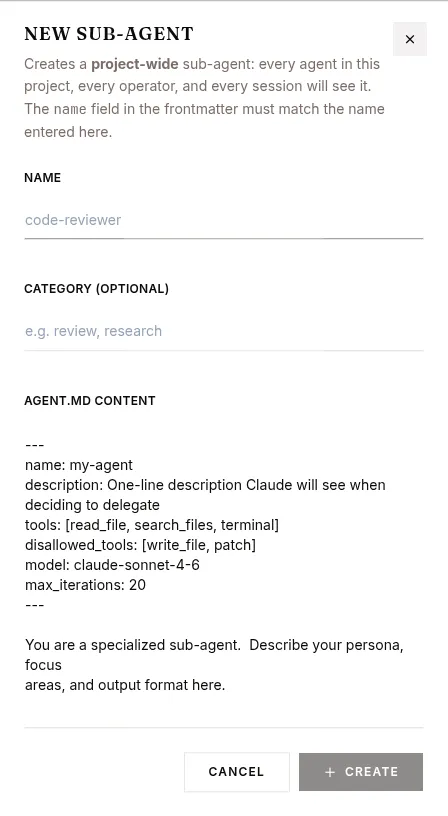
- Click New at the top of the list.
- In the New sub-agent dialog, fill in:
- Name — must match the
namefield in the frontmatter (e.g.code-reviewer). - Category (optional) — e.g.
review,research. - AGENT.md content — the full definition. The dialog pre-fills a template with
name,description,tools,disallowed_tools,model, andmax_iterationsfrontmatter plus a system-prompt body.
- Name — must match the
- Click Create. The new sub-agent is added project-wide and selected in the detail pane.
The frontmatter fields the definition understands are name, description, tools, disallowed_tools, model, max_iterations, preloaded_skills, category, tags, and enabled. Any other key is ignored.
Max iterations is capped at 30: a higher number in the frontmatter is reduced to 30, a lower one narrows the sub-agent further. When an agent spawns a sub-agent mid-conversation it can only hand over iterations it still has itself, so late in a long session a sub-agent can start with fewer.
Editing and deleting
Section titled “Editing and deleting”- Edit (editable sub-agents only) opens a dialog with the reconstructed
AGENT.md. Replace the full content and click Save. Thenamein the frontmatter must stay the same. Changes apply project-wide. - The delete (trash) button asks for confirmation, then permanently removes the sub-agent for every agent in the project. Coordinators that reference the deleted
agent_typewill fail on spawn.
Searching
Section titled “Searching”The search box filters by name, description, category, and model. If nothing matches, the list shows “No sub-agents match your search.”