

Integrations
The Integrations page connects third-party services (via Composio) to an agent, so it can use tools like Gmail, Slack, GitHub, and more.
Open it at /work/agents/<agentId>/integrations, reached from the agent’s chat. The page header reads “Integrations — Connect third-party services to enhance your agent’s capabilities.” A Back link returns you to the chat.
Layout
Section titled “Layout”- Search box — “Search integrations…” filters the list by name.
- Category sections — available toolkits are grouped under headings (the toolkit’s category, or “Other”).
- Toolkit rows — one row per integration, each with an expand toggle, a logo (or a letter fallback), the name, and a Connect / Disconnect button.
Expanding a row shows its description and an auth-mode badge — API Key or OAuth — depending on how the toolkit authenticates.
Connecting a tool
Section titled “Connecting a tool”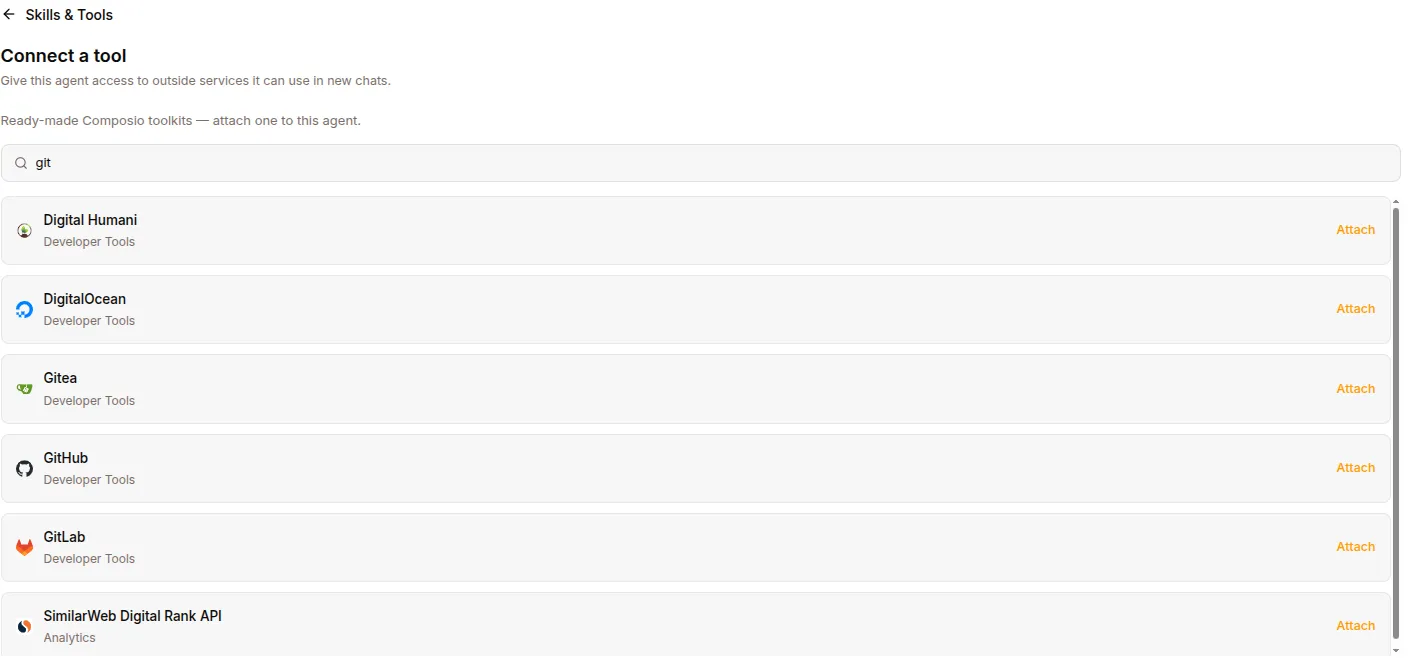
- Open the Integrations page for the agent.
- Find the service (search or browse by category).
- Click Connect on its row. The button shows “Connecting” while it works.
- If the toolkit uses OAuth, a popup window opens for you to authorize with the provider. Complete the consent flow there.
- The page polls for the connection and, once the provider reports it as connected, closes the popup and marks the row connected. The button flips to Disconnect.
The list also refreshes whenever you return focus to the window, so a connection completed in another tab is picked up automatically.
Disconnecting a tool
Section titled “Disconnecting a tool”- Find the connected toolkit’s row.
- Click Disconnect (it shows “Disconnecting” while it works).
- The row returns to the disconnected state and the button flips back to Connect.
Errors
Section titled “Errors”If starting a connection or disconnecting fails, an inline error message appears near the top of the page (for example, “Failed to start the connection” or “Failed to disconnect”). Retry the action after resolving the underlying issue.
- Integrations are managed per agent — the connections you make here apply to the agent whose page you’re on.
- The catalog and connection state come from Composio through the agent runtime; if no integrations back end is configured for the agent, the page has nothing to show.