

Skill optimization
Skill optimization automatically searches for a better SKILL.md for one of your skills. It runs the skill against a target agent, reflects on where it fell short, proposes edited candidates, scores them, and keeps the best. The live skill is never changed until you explicitly apply a candidate.
See Skills for what a skill is; this page covers optimization runs.
Starting a run
Section titled “Starting a run”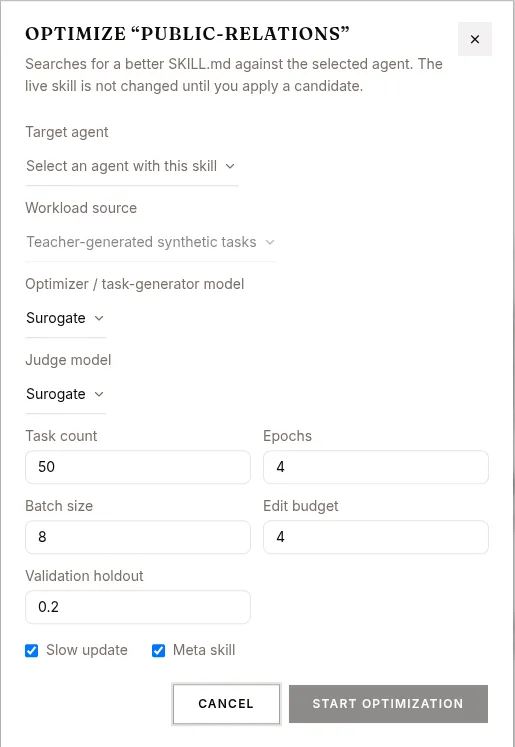
Optimization is started from the Optimize dialog for a skill. It asks for:
| Field | What it is |
|---|---|
| Target agent | The agent to optimize against. Only agents that have this skill attached (as a non-expert) are eligible. |
| Workload source | How tasks are produced. Currently Teacher-generated synthetic tasks (synthetic). |
| Optimizer / task-generator model | Model that generates tasks and proposes candidate edits. Defaults to the platform Surogate model when available. |
| Judge model | Model that scores rollouts. Also defaults to the Surogate model. |
| Task count | Number of synthetic tasks to generate (default 50). |
| Epochs | Optimization epochs (default 4). |
| Batch size | Tasks per batch (default 8). |
| Edit budget | Max edits per step (default 4). |
| Validation holdout | Fraction of tasks held out for validation (default 0.2). |
| Slow update | Toggle (on by default). |
| Meta skill | Toggle (on by default). |
Click START OPTIMIZATION. The gate used to accept candidates is strict hard-score improvement. If the skill isn’t actually attached to the chosen agent the run is rejected and the error is surfaced.
Runs are listed in the optimization runs table, showing Status, Baseline score, Best score, and Δ hard. The list polls while any run is non-terminal. Click a row to open the run page.
Run page
Section titled “Run page”/studio/skills/$skillId/optimizations/$runId shows a single run and polls every 5 seconds until it reaches a terminal state.
A banner reminds you: “Optimization has not changed the live skill. Applying a candidate writes it and republishes dependent agents.”
Status timeline
Section titled “Status timeline”The run advances through these stages:
pending → preparing_workload → baseline_rollout → reflecting → candidate_rollout → gating → publishing_artifacts → completed
Terminal states are completed, failed, and cancelled.
Header
Section titled “Header”Shows the current status, the score summary baseline → best, and the delta. The APPLY BEST CANDIDATE button is enabled only once the run is completed and a best candidate exists.
Candidate list (left)
Section titled “Candidate list (left)”Every candidate: Baseline (iteration 0) then Step 1, Step 2, … each with its hard score. Accepted steps are marked accepted; rejected ones show the rejection reason. Select any candidate to inspect it.
Detail (right)
Section titled “Detail (right)”For the selected candidate:
- Diff vs baseline — a line diff of the candidate’s
SKILL.mdagainst the baseline, with the reflection summary above it. - Rollouts — each rollout’s hard and soft scores, any failure modes, and the judge’s rationale.
Applying the best candidate
Section titled “Applying the best candidate”Click APPLY BEST CANDIDATE on a completed run. A confirmation dialog shows the diff of the best candidate against the baseline and warns:
This overwrites the live SKILL.md and republishes every agent that uses it.
Confirm to write the skill and republish dependent agents; otherwise nothing about the live skill changes.
REST API
Section titled “REST API”| Method | Endpoint | Purpose |
|---|---|---|
POST |
/api/skill-optimizations/runs |
Start a run |
GET |
/api/skill-optimizations/runs?project_id=&skill_id= |
List runs |
GET |
/api/skill-optimizations/runs/{runId} |
Run detail |
GET |
/api/skill-optimizations/runs/{runId}/candidates |
Candidates |
GET |
/api/skill-optimizations/runs/{runId}/rollouts |
Rollouts |
POST |
/api/skill-optimizations/runs/{runId}/cancel |
Cancel |
POST |
/api/skill-optimizations/runs/{runId}/apply-best |
Apply best candidate |