Improve your agent
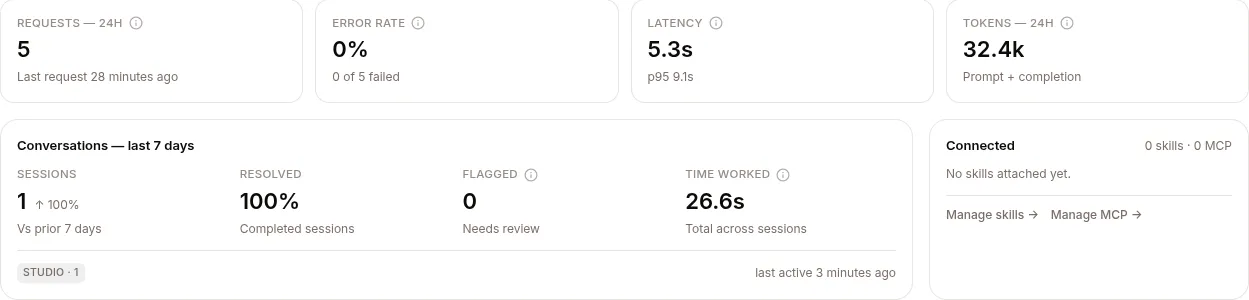
Start from the signal: the agent’s Metrics tab (Configure → Metrics) shows error rate, latency, and a Conversations — last 7 days card whose Flagged count (a policy denial, a crash, or a thumbs-down) is the fastest pointer to the sessions worth triaging.
Three levers, in increasing order of effort:
- Mark sessions — 👍 / 👎 the ones that matter
- Attach the right resources — skills, KBs, or MCP servers for the gaps you’re seeing
- Edit the persona — SOUL.md changes how the agent behaves in every conversation
1. Mark sessions
Section titled “1. Mark sessions”In the THREAD view of any session, hover an assistant turn and click 👍 or 👎.

| Mark | What it becomes |
|---|---|
| 👍 | Training-data candidate, regression-test reference, evaluation positive |
| 👎 | Triage queue, evaluation negative, excluded from fine-tuning datasets |
Worth doing even if you’re not training experts yet — it’s free annotation now, valuable signal later.
2. Attach the right resources
Section titled “2. Attach the right resources”Most “agent gave the wrong answer” problems are a missing skill or a missing fact in a KB.
- Wrong facts → add KB sources covering the gap. See Knowledge bases.
- Wrong procedure or format → write a skill. See Skills.
- Can’t reach an external system → add an MCP server with appropriate Vault credentials. See MCP servers.
3. Edit the persona (SOUL.md)
Section titled “3. Edit the persona (SOUL.md)”If the tone is off, the agent crosses boundaries it shouldn’t, or it makes claims it can’t back up — fix SOUL.md in the agent’s CONFIG tab.
# Acme Support Agent
You are the Acme Corp customer support assistant. Speak in the first personplural ("we") when referring to Acme. Never disclose internal ticket IDs.
Tone: warm, concise, technically literate. Avoid corporate boilerplate.
## Things you can do- Look up an account by email- Explain product features and pricing- Open a support ticket- Refund up to $100 without human approval (use the refund tool)
## Things you must not do- Disclose another customer's information- Make legally binding statements- Promise feature delivery dates
When in doubt, say "Let me get a human on this" and call the `escalate` skill.
Saved changes apply to new sessions only. In-progress sessions keep their old persona — policies are frozen at session start, by design.
Don’t put procedures in SOUL.md. “When asked X, do Y, Z, then W” is a skill, not an identity. Rule of thumb: SOUL.md is what the agent is; skills are how it does specific tasks.
When the agent is genuinely stuck
Section titled “When the agent is genuinely stuck”Three escalating options, only when something’s actually broken:
/clearin the composer — wipes the conversation context and destroys the sandbox. Session row stays; the agent starts fresh.- STOP → START at the agent level. STOP lets work already in progress finish and refuses new sessions and new messages; START lets them in again. It restarts nothing, since agents run on the shared runtime, so use STOP to take the agent offline while you fix it.
- DELETE → re-deploy — slug is preserved, everything else resets.
Verifying changes
Section titled “Verifying changes”To try a change on made-up customers before real ones see it, run them through Simulate: it reviews each run and can make the fix for you.
Start a new session, ask the same question that produced a 👎 in the past, compare. Don’t continue an old session — it’ll keep the old config.
For systematic regression checking, collect the 👎 sessions into a dataset and score a benchmark against it — see Regression testing.