

Coding agents (`/code`)
/code runs a real vendor coding agent — Claude Code or Codex — inside the session’s sandbox, working on the session workspace using your own subscription or API plan.
The platform never runs an OAuth flow for you and never calls the coding-agent providers itself. You connect a credential that the vendor CLI minted on your machine, and the agent runs the genuine vendor binary in your own per-session sandbox.
Sub-commands
Section titled “Sub-commands”/code show help/code status show which providers are connected/code login <claude|codex> how to connect your plan/code logout <claude|codex> disconnect (deletes the stored credential)/code claude "<task>" run Claude Code on the workspace/code codex "<task>" run Codex on the workspacelogin and logout accept either the agent name (claude / codex) or the provider name (anthropic / openai).
Flags go after the task on a run command:
| Flag | Values | Meaning |
|---|---|---|
--model <m> |
provider model id | Pick the model the coding agent uses |
--effort <level> |
low / medium / high / xhigh |
Reasoning/effort level |
--allow read-only |
— | Run without write access. The default is the agent’s normal (bypass) mode |
--repo <name> |
a configured repo name | Target a specific configured repository (see Repository runs) |
Example:
/code claude "add retry logic to the HTTP client" --model claude-sonnet-4-6 --effort highConnecting your plan
Section titled “Connecting your plan”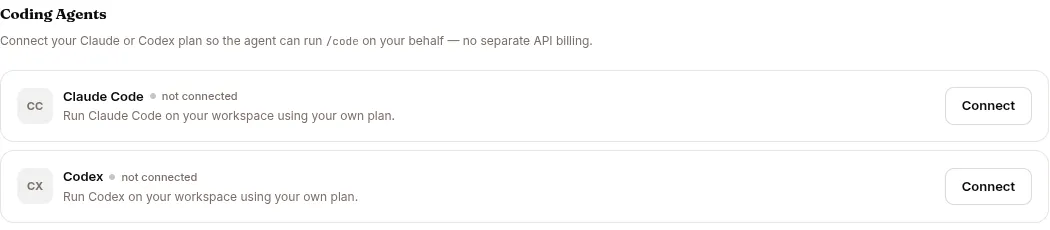
Connections are stored per user, encrypted in the credential vault, one entry per provider. There is deliberately no shared fallback — if you personally haven’t connected a plan, /code reads as “not connected” and never borrows anyone else’s.
Run /code login <claude|codex> for instructions, then paste the credential in Settings → Coding Agents:
| Provider | On your machine, run | Paste |
|---|---|---|
| Claude (subscription) | claude setup-token (needs a Claude Pro/Max plan) |
the sk-ant-oat… token |
| Claude (API) | — | an sk-ant-api… key |
| Codex (subscription) | codex login (needs a ChatGPT plan) |
the contents of ~/.codex/auth.json |
| Codex (API) | — | an sk-… OpenAI key |
The pasted secret travels only over the dedicated credential route, never through a chat message or the event log. /code status lists which providers are connected and in which mode. /code logout <provider> deletes the stored credential.
Operators can also connect agent-owned Claude Code / Codex plans (under the agent’s own service account) from the CONFIG → Coding tab — see Configure an agent. The Coding tab only appears when the /code capability is enabled in Capabilities.
How a run works
Section titled “How a run works”A run emits a start event, streamed progress, and a final result you see in the chat. The credential is injected only into the spawned CLI’s process environment inside your own sandbox, conflicting provider environment variables are scrubbed first, and the credential is removed after the run. Credentials never appear in any event payload or log. /code command text is also exempt from the prompt-injection screen, because it is a command to your own coding agent and never reaches the platform’s chat model.
Runs are bounded by the sandbox’s pod deadline (roughly one hour). Connecting a plan works on any deployment; running requires the sandbox image that bundles the claude / codex CLIs.
Workspace runs
Section titled “Workspace runs”By default /code operates on the session /workspace only. The coding agent reads and edits files there and reports back in chat. Add --allow read-only to prevent it from writing.
Repository runs
Section titled “Repository runs”If the agent has configured repositories (set on the CONFIG → Coding tab) and you pass --repo <name>, the run instead checks out that repository, makes its changes on a fresh branch, and opens a pull request.
Repository runs have a few extra requirements:
- A repo run must write, so
--allow read-onlyis rejected — re-run without it. - A GitHub token must be connected for the agent (on the Coding tab). Without one, the run asks you to connect it first.
- If
--reponames a repository that isn’t configured, the run reports the mismatch instead of guessing.
Related pages
Section titled “Related pages”- Slash commands — the full command reference.
- Configure an agent — the Capabilities toggle and the Coding tab (repositories, agent-owned plans, GitHub token).