

Skills & Experts
The Skills & Tools page (in Work mode’s nav) has two tabs — SKILLS and MCP SERVERS; this chapter is the builder’s deep dive into both. A skill is a markdown file (SKILL.md) the agent loads into its prompt. An expert is a skill whose type is expert — backed by a fine-tuned model that runs in a bounded mini-loop.
This chapter covers both. For the operator’s walk-through of writing a skill in the UI, see Work mode → Skills.
SKILL.md format
Section titled “SKILL.md format”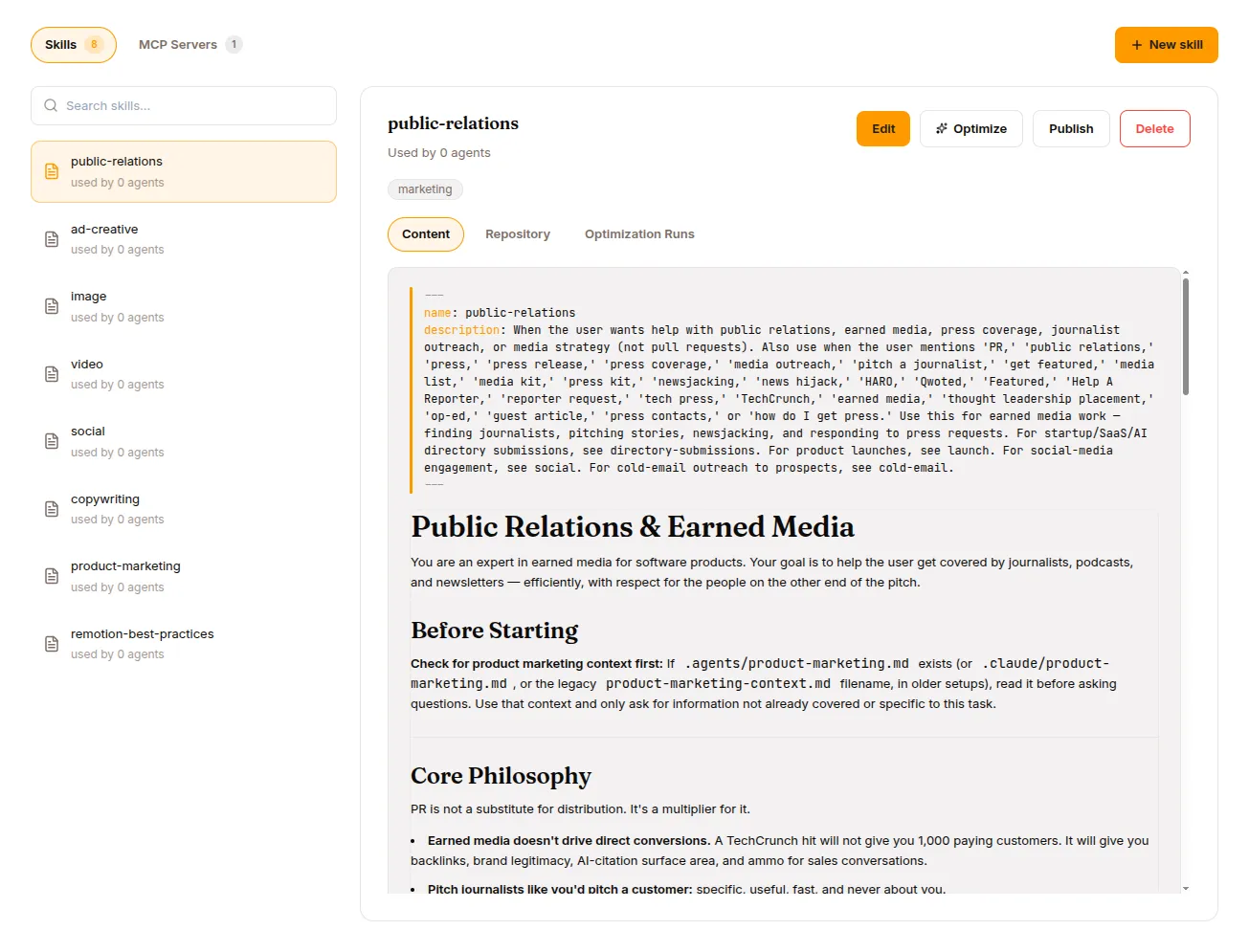
Markdown with YAML frontmatter:
---name: code_reviewerdescription: Reviews code for quality, security, and best practicestrigger: review code, code review, check this codetype: skill                    # default; use 'expert' for model-backedtags: [security, quality]requires_tools: [read_file]---
You are a code reviewer. When asked to review code:
1. Read the files specified by the user.2. Check for:   - Security vulnerabilities (OWASP top 10)   - Performance issues   - Code style and readability   - Missing error handling3. Provide specific, actionable feedback with line references.4. Suggest concrete fixes, not just descriptions of problems.
Frontmatter
Section titled “Frontmatter”| Field | Type | Required | Description |
|---|---|---|---|
name |
string | yes | Lowercase, alphanumeric + hyphens, 1-64 chars |
description |
string | yes | Shown to the LLM in skills_list |
trigger |
string | list | recommended | Keywords/phrases matched against the user message |
tools |
list | no | For type: expert, the tools the expert may call in its mini-loop. On a regular skill it is author metadata only; the runtime does not read it. Use requires_tools to gate on tool availability. |
type |
string | no | skill (default) or expert |
tags |
list | no | Metadata for categorisation |
requires_tools |
list | no | Hidden unless ALL listed tools are available |
fallback_for_tools |
list | no | Hidden when ALL listed tools are available |
enabled |
bool | no | Parsed but not enforced — a skill file loads whether or not it is set |
Body text after the frontmatter is the skill’s prompt content — inlined into the system prompt when the skill triggers, or returned by skill_view when explicitly invoked.
The 4-layer loading model
Section titled “The 4-layer loading model”Skills load from four layers in increasing precedence. Layer 1 has two halves, both served from the Hub:
Layer 1a: System bundle platform/system-skills repo, <name>/SKILL.md (lowest)Layer 1b: Per-agent bundle agent bundle repo, skills/<name>/SKILL.mdLayer 2: User files tenant assets, {org_id}/users/{user_id}/skills/Layer 3: Org (DB) skills table, org-wide (user_id IS NULL)Layer 4: User (DB) skills table, user-specific (highest)| Layer | Managed by | How |
|---|---|---|
| 1a System bundle | Platform operator | One Hub repo (platform/system-skills) shared by every agent in the cluster — the framework built-ins (brainstorming, executing-plans, …). The runtime reads its latest v* tag and caches that snapshot per process, re-fetching when the catalog is republished. |
| 1b Per-agent bundle | Org admin | Attaching a Hub-published skill to an agent copies its repo subtree under skills/<name>/ in that agent’s own bundle repo. |
| 2 User files | End user | Written by the agent’s skill_manage tool during a session. |
| 3 Org (DB) | — | Org-wide rows in the runtime’s skills table. |
| 4 User (DB) | — | Per-user rows in the same table. Both DB layers are read paths only: nothing currently writes them, so in practice a skill you author reaches an agent through 1b. |
Higher layers override by name, so a per-agent skill (1b) shadows a built-in of the same name for that agent — the system skill is not removed, just superseded. Org admins always win: an end user cannot override a skill the org admin has set. Disabling a DB skill row does not mask a lower layer — the row simply drops out of the merge and the lower layer’s version loads instead.
Conditional activation
Section titled “Conditional activation”Two fields:
requires_tools— skill included only if all listed tools are available in the agent’s allowlistfallback_for_tools— skill excluded when all listed tools are available; only appears when at least one is missing
Use fallback_for_tools for graceful degradation. Example:
---name: manual-web-searchdescription: Guides the user through manual web researchfallback_for_tools: [web_search]---Only loads when the agent’s web_search tool is denied.
Use requires_tools to gate skills that depend on specific tools:
---name: container-debugdescription: Diagnoses issues inside running containersrequires_tools: [bash, docker]---The loader evaluates conditional activation after merging all four layers.
agentskills.io / Hermes compatibility
Section titled “agentskills.io / Hermes compatibility”Skills authored in the agentskills.io format are loaded without modification. The loader reads conditional fields and tags from the metadata.hermes namespace:
---name: hermes-skilldescription: A skill using the Hermes frontmatter conventionmetadata: hermes: requires_tools: [bash] fallback_for_toolsets: [web_search] tags: [devops, ci]---Recognised hermes keys:
| Hermes key | Maps to |
|---|---|
requires_tools |
requires_tools |
requires_toolsets |
requires_tools |
fallback_for_tools |
fallback_for_tools |
fallback_for_toolsets |
fallback_for_tools |
tags |
tags |
Top-level keys win when both are set.
Dynamic skill commands
Section titled “Dynamic skill commands”Users invoke a skill explicitly via /<skill-name> [args...]:
/research vector databases/babysit-prsResolution order in the harness:
- Builtin commands —
/clear,/code,/compress,/deep-research,/goal,/loop,/mission,/auto-research - Dynamic skill resolution
- Plain user message if no match
Those eight names are reserved: the parser skips them, so a skill named code or deep-research is never reached by slash command.
For dynamic invocation, the harness calls skill_view server-side and inlines the body into the user message.
Skill REST API
Section titled “Skill REST API”| Method | Endpoint | Description |
|---|---|---|
GET |
/api/skills?is_expert=true&project_id= |
List (filter is_expert for experts only) |
POST |
/api/skills?project_id= |
Create. Body: {name, content, description, ...} |
GET |
/api/skills/{skill_id} |
Detail |
PATCH |
/api/skills/{skill_id} |
Update. Body: partial skill fields |
POST |
/api/skills/{skill_id}/publish |
Tag a version |
DELETE |
/api/skills/{skill_id} |
Delete (409 if in use) |
Skills are addressed by skill_id, not by name. An API-created skill gets its own Hub repo; attaching it to an agent copies it into that agent’s bundle (layer 1b). Agent-created skills (via the skill_manage tool) go to the tenant bucket (layer 2).
Validation rules
Section titled “Validation rules”| Rule | Constraint |
|---|---|
| Name | Lowercase, alphanumeric + hyphens, 1-64 chars |
| Name uniqueness | No duplicates within scope (user or org) |
| Frontmatter | Must include name and description |
| Content size | Body ≤ configured limit (default 100 KB) |
| File path | Must be within tenant’s skill directory |
Validation errors return 422 Unprocessable Entity.
Publishing — versioning
Section titled “Publishing — versioning”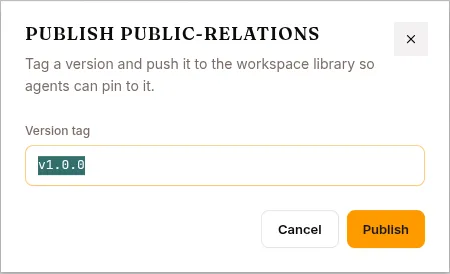
When you PUBLISH a skill, you tag a version in the skill’s Hub repo. Tags are immutable. Editing creates a new draft; the next PUBLISH creates v0.1.1, v0.2.0, etc.
Sessions record which version of each skill they used. You can:
- Roll back to a previous tag
- Pin an agent to a different skill version and re-run your regression set against it
- Audit “which skill version was active for session X”
Experts — model-backed skills
Section titled “Experts — model-backed skills”When you set type: expert on a skill, you turn it into something different. The body becomes the expert’s system prompt (not the agent’s), and you specify a model + endpoint.
Example
Section titled “Example”---name: sql_writerdescription: Writes PostgreSQL queries from natural language descriptionstype: expert
model: qwen2.5-coder-7bendpoint: http://expert-pool.your-cluster.svc:8000/v1trigger: SQL queries, database schemas, PostgreSQL, data analysis
tools: [terminal, read_file, search_files]max_iterations: 10expert_status: draft---
You are a PostgreSQL expert for this organisation. When given a naturallanguage description, write a correct, efficient query.
Rules:- Always use explicit column names (never SELECT *)- Use CTEs for complex queries- Include comments explaining non-obvious joins- Validate against the schema before returningFrontmatter for experts
Section titled “Frontmatter for experts”| Field | Required | Default | Description |
|---|---|---|---|
name |
yes | — | Expert name |
description |
yes | — | Shown to the base LLM |
type |
yes | skill |
Must be expert |
model |
yes | — | Model name passed to the inference endpoint |
endpoint |
no | — | OpenAI-compatible URL; normally resolved from the served model at activation rather than set by hand |
trigger |
yes for routing | — | Phrases describing when to select this expert |
adapter |
no | — | LoRA adapter path in tenant storage |
tools |
no | [] |
Tools the expert can use in its mini-loop |
max_iterations |
no | 10 |
Max tool-call rounds before budget exceeded |
expert_status |
no | draft |
draft / collecting / active / retired |
The expert lifecycle
Section titled “The expert lifecycle”1. Define SKILL.md with type: expert expert_status: draft2. Collect POST /api/experts/{name}/collect expert_status: collecting3. Train In-platform SFT/GRPO run over the dataset (or export the JSONL)4. Activate POST /api/skills/{skill_id}/activate expert_status: active5. Monitor expert.result / expert.failure session events (retire manually)6. Retrain Collect → train → activate (loop)Collect (and its dataset/trajectory inspection) lives on a separate experts router keyed by name (/api/experts/{name}/...); activation and retirement are on the skills router keyed by skill_id (/api/skills/{skill_id}/...).
1. Define
Section titled “1. Define”Create the SKILL.md with type: expert, expert_status: draft, via the Studio or POST /api/skills.
2. Collect training data
Section titled “2. Collect training data”curl -X POST http://localhost:8000/api/experts/sql_writer/collect \ -H "Authorization: Bearer $TOKEN" \ -H "Content-Type: application/json" \ -d '{"project_id": "<project>", "mode": "bootstrap"}'The platform walks the surogates session events and appends successful trajectories as fine-tuning JSONL to the expert’s dataset repo in the Hub, committing each run. Two modes:
- Bootstrap — walks the skill’s trajectories for this name. Use to train an expert from an existing prompt-based skill.
- Improve — walks the active expert’s delegation → tool-call → result chains. Use once the expert is active to train on fresh successful trajectories.
Each collect is a strict delta from the manifest’s last_collect_at cursor (pass since to re-collect from an earlier point), and tainted sessions are excluded by default (exclude_tainted: true).
Preview candidate counts before a full run with GET /api/experts/{name}/trajectories?project_id=&mode=bootstrap; inspect the accumulated dataset manifest (row counts, run history, cursor) with GET /api/experts/{name}/dataset?project_id=. Note: the improve-mode preview is not yet implemented — only bootstrap preview is wired.
3. Train (in-platform)
Section titled “3. Train (in-platform)”The collected dataset closes the loop inside the platform. Wrap the expert’s JSONL as a dataset and launch an in-platform SFT or GRPO training run over it — no external fine-tuning service required. See Training for the run wizard and Datasets for turning the collected export into a training dataset.
You can still export the JSONL and train elsewhere (OpenAI fine-tuning, Unsloth, Axolotl, or a custom transformers + peft script) if you prefer. Either way the output is a model with an OpenAI-compatible serving endpoint that the platform can serve and back the expert with.
4. Activate
Section titled “4. Activate”curl -X POST http://localhost:8000/api/skills/{skill_id}/activate \ -H "Authorization: Bearer $TOKEN" \ -H "Content-Type: application/json" \ -d '{"model_id": "<served-model-id>"}'Activation resolves the endpoint from the model’s serving service rather than taking a raw URL — so the expert’s model must already be serving a live endpoint, otherwise activation fails with a 400 (an active expert always has a live endpoint invariant). Activation also republishes every agent bundle that embeds the skill, so the refreshed SKILL.md reaches the runtime.
After activation, the base LLM sees the expert in its system prompt under # Available Experts. The harness routes hard tasks matching the expert’s triggers; the base LLM can also explicitly call consult_expert("sql_writer", task="...").
5. Monitor
Section titled “5. Monitor”An expert’s quality signal lives in the session event log, not on the skill row. Every consultation emits an expert.result or expert.failure event, and the feedback API adds expert.endorse / expert.override when a user or judge rates a result. Count those per expert to decide whether it is still earning its serving cost.
Nothing retires an expert automatically. A failing expert stays active — and stays in the base LLM’s # Available Experts block — until an operator calls /retire.
6. Retire / retrain
Section titled “6. Retire / retrain”curl -X POST http://localhost:8000/api/skills/{skill_id}/retire \ -H "Authorization: Bearer $TOKEN"Retirement flips expert_status to retired and, like activation, republishes the dependent agent bundles. To retrain: collect fresh data → train → activate against the newly served model.
The expert mini-loop
Section titled “The expert mini-loop”When consult_expert(name, task, context) is called:
1. Load the expert's SKILL.md2. Make an OpenAI-compatible request to the expert's endpoint with model = expert.model3. The expert can call tools from its restricted set (expert.tools)4. Iterate up to max_iterations5. Return the expert's final assistant message to the base LLM6. Base LLM reviews and either accepts, modifies, or rejectsBounded — can’t go forever, can’t escalate its tool surface, can’t keep the conversation going. Just answer the delegated question.
REST API for experts
Section titled “REST API for experts”Collection is keyed by expert name on the experts router; lifecycle is keyed by skill_id on the skills router:
| Method | Endpoint | Description |
|---|---|---|
GET |
/api/skills?is_expert=true |
List experts |
GET |
/api/experts/{name}/trajectories?project_id=&mode=bootstrap |
Preview candidate trajectories (bootstrap only) |
POST |
/api/experts/{name}/collect |
Collect trajectories → append JSONL to the Hub dataset |
GET |
/api/experts/{name}/dataset?project_id= |
Dataset manifest (row counts, run history, cursor) |
POST |
/api/skills/{skill_id}/activate |
Set status to active (requires a live serving endpoint) |
POST |
/api/skills/{skill_id}/retire |
Set status to retired |
What’s next
Section titled “What’s next”Knowledge Bases for the other half of “agent’s knowledge.” MCP & Vault for external tool integration. Datasets and Training for the training pipeline.