

Agents
The Agents page (Develop mode) is the densest screen in the platform. Every knob here changes how your agent behaves.
For the operator’s lighter walk-through, see Work mode → Run an agent.
The agent’s anatomy (recap)
Section titled “The agent’s anatomy (recap)”An agent bundles six things, configured through five tabs:
| Tab | What lives here |
|---|---|
| OVERVIEW | Four 24h stat cards (requests, error rate, latency incl. p95, tokens) + four hourly bar charts, a Conversations — last 7 days card, and the Connected skills/MCPs card. |
| KNOWLEDGE & TOOLS | Attach / detach Skills, Knowledge Bases, MCP Servers; per-row DETACH; ATTACH dropdown. |
| USERS | Per-agent end-user accounts. Add Web users, set passwords or SSO, manage display names. |
| CHANNELS | Web (always on), Slack (App + Bot tokens, threading, mention requirements), Telegram (Bot token, DM/group toggles), Website widget (publishable key, allowed origins, embed code, session message cap). |
| CONFIG | Persona (SOUL.md), Tool Access, Web & Browser Egress, EU AI Act Transparency, Saga, Session Reset, Environment Variables. |
Plus four action buttons:
- CHAT — open a new chat session
- STOP / START — drop replicas to 0, or bring them back
- SCALE — change min/max replicas (auto-scaling target = 40 active sessions per pod)
- DELETE — pre-flight reference check, then tombstone
Persona — SOUL.md
Section titled “Persona — SOUL.md”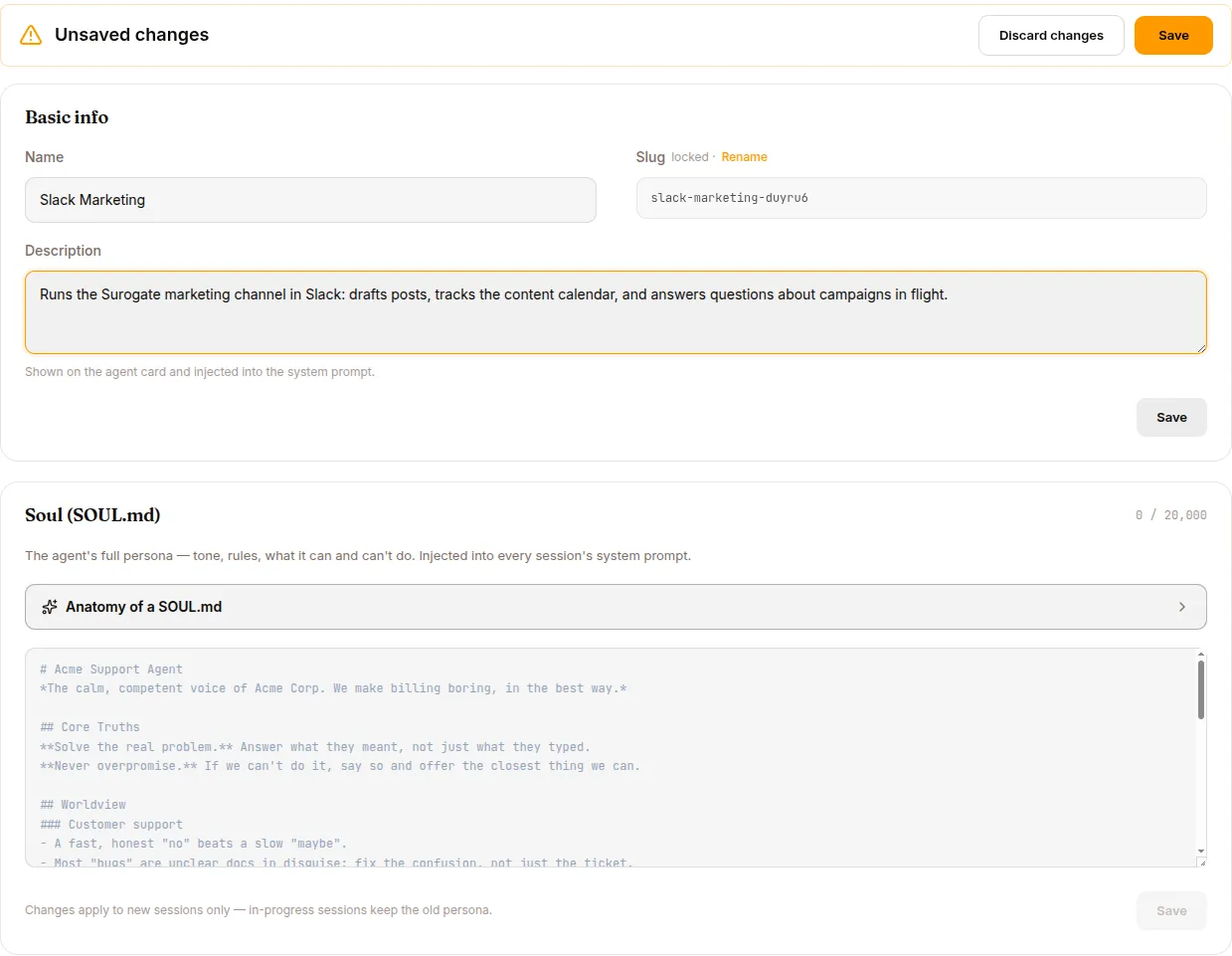
Up to 20,000 characters of markdown injected at the top of every system prompt for this agent.
# Acme Support Agent
You are the Acme Corp customer support assistant. You speak in thefirst person plural ("we") when referring to Acme. You never discloseinternal ticket IDs to users.
Tone: warm, concise, technically literate. Avoid corporate boilerplate.
## Things you can do- Look up an account by email- Explain product features and pricing- Open a support ticket- Refund up to $100 without human approval (use the refund tool)
## Things you must not do- Disclose another customer's information- Make legally binding statements- Promise feature delivery dates
When in doubt, say: "Let me get a human on this" and call the`escalate` skill.
What belongs in SOUL.md:
- Identity — who, what role
- Voice — tone, “we” vs “I”, formality
- Boundaries — what the agent does and doesn’t do
- Escalation — when to defer to humans
What DOES NOT belong in SOUL.md:
- Procedures (“when given X, do Y”) — those are skills
- Lists of facts — those are knowledge bases
- Tool instructions — those are skills or tool catalog
- Secrets — those go in the Vault
Safety: SOUL.md content passes through scan_context_content (12 prompt-injection patterns — jailbreak phrases, hidden-instruction markers, role-override attempts, invisible Unicode) before injection. Detected injections are stripped, not silently passed through.
Tool Access
Section titled “Tool Access”Two lists:
- Allowed Tools — only these tools are visible to the LLM
- Denied Tools — these are blocked, even if allowlisted
Deny beats allow. See the Tool catalog for the full 40+ list of built-in tools.
Recommended starting points by agent type are in Build phase.
Knowledge & Tools tab
Section titled “Knowledge & Tools tab”The same tab supports three categories. Click + ATTACH to add, X to remove.
| Category | What it is |
|---|---|
| Skills | Reusable prompt-based behaviours. See Skills & Experts. |
| Knowledge Bases | Curated document corpora. See Knowledge Bases. |
| MCP Servers | External system connectors. See MCP & Vault. |
Order matters for skills — attached in the listed order; the LLM sees them in skills_list results in that order.
Multiple skills with the same name resolve by precedence: user-specific overrides org-wide overrides platform-default.
CHANNELS tab — multi-channel deployment
Section titled “CHANNELS tab — multi-channel deployment”Four channel types. Web is always on; the others toggle.
Always on. Endpoint: https://<slug>.cloud.surogate.ai. End-user accounts are managed via the USERS tab — sign-in is required if you’ve added any users; anonymous otherwise.
Toggle ON, paste credentials:
- App Token —
xapp-...withconnections:writescope (Socket Mode) - Bot Token —
xoxb-...with at minimumchat:write,app_mentions:read,im:read,im:write,channels:history,groups:history,files:read,users:read
Behaviour settings:
- Require @mention (default ON) — bot only responds in channels when @mentioned
- Allow Bots —
None/DMs only/Channels only/All - Reply in Thread (default ON) — responses inside the thread
- Reply Broadcast (default OFF) — when on, thread replies also post to the channel
- Free Response Channels — comma-separated channel IDs where no @mention is needed (dedicated bot channels)
Telegram
Section titled “Telegram”Toggle ON, paste Bot Token (123456:ABC-DEF...). DM-only vs allow-in-groups. Forum topic support. Media handling (photos, voice notes via transcription, documents).
Website widget
Section titled “Website widget”Toggle ON. Reveals:
- Publishable Key (
pk_live_...) — masked. Click SHOW to reveal, COPY to clipboard (disabled until you SAVE), ROTATE to invalidate the current key. - Allowed Origins — exact-match URLs where the widget will be embedded. No wildcards.
- Session Message Cap —
0= no cap. Useful for cost control. - Embed code — JavaScript snippet to paste into your site’s HTML.
USERS tab
Section titled “USERS tab”Per-agent end-user accounts. Different from operator accounts.
| Field | Notes |
|---|---|
| The user’s login | |
| Display name | Optional, what shows in chat |
| Password | Optional, leave blank for SSO-only |
| AUTH | Database / Google SSO / GitHub SSO |
| CREATED | When the user was added |
Add via + ADD USER. Edit / Disable / Delete via the row menu.
For bulk operations (>20 users), use the REST API.
CONFIG tab — the deepest screen
Section titled “CONFIG tab — the deepest screen”
Sections:
Identity
Section titled “Identity”- NAME — display name, editable
- SLUG — locked. Click Rename to change.
- DESCRIPTION — multi-line markdown
Knowledge Bases / Skills / MCP Servers attachments
Section titled “Knowledge Bases / Skills / MCP Servers attachments”(Same as Knowledge & Tools tab.)
Channels (same as CHANNELS tab)
Section titled “Channels (same as CHANNELS tab)”Web & Browser Egress
Section titled “Web & Browser Egress”default_action: denyrules: - domain: api.openai.com ports: [443] action: allow - domain: api.github.com ports: [443] action: allow - domain: "*.amazonaws.com" ports: [443] action: allowRules evaluated top-to-bottom; first match wins. Domain matching is glob-based (*.acme.com covers subdomains); CIDR ranges are not supported. Scope: these rules govern only the URL arguments of web_extract and browser_navigate — not web_search, the terminal, coding agents, or MCP servers. The terminal has its own fixed sandbox allowlist, and MCP is governed by server attachment. default_action: deny therefore does not mean “no internet”; see Governance & AI disclosure for the three network planes.
EU AI Act Transparency
Section titled “EU AI Act Transparency”Per-agent AI disclosure, stored as policy.transparency = {enabled, level} with levels none | basic | enhanced | full. The public GET /v1/transparency endpoint serves the server-composed disclosure {enabled, level, text} for the resolved agent; the web app shows it as a blocking banner, and Slack / Telegram / WhatsApp post it as the first message of every new conversation. Evidence lands on the session log as disclosure.presented / disclosure.confirmed events.
Governance Policy Enforcement (on/off)
Section titled “Governance Policy Enforcement (on/off)”When ON, the governance gate evaluates every tool call against the composed policy (platform floor + this agent’s rules). When OFF, the agent’s own rules are dropped but the platform floor (workspace containment, path hygiene) still applies, and disclosure falls back to the deployment default. Production agents should keep it on.
Saga (multi-step rollback)
Section titled “Saga (multi-step rollback)”The Saga card is hidden unless the deployment sets saga_ui_enabled on the server — it is off on the hosted platform and opted into on-prem. The behaviour below applies wherever it is exposed.
enabled: truedefault_step_timeout: 300default_max_retries: 2retry_delay: 1.0When ON:
- Tool calls are forced sequential (no parallelism)
- Each state-changing call gets a filesystem checkpoint (built-in tools) or a declared undo (MCP tools)
- On failure, completed steps compensate in reverse order
- If a compensation itself fails, the saga enters
escalatedstate — operator must intervene
Use for agents that mutate external systems (write files, create tickets, send emails, run migrations). Skip for read-only or research agents.
Session Reset
Section titled “Session Reset”enabled: truemode: idle # daily | idle | both | noneidle_minutes: 1440 # 24 hoursat_hour: 4 # 0-23 (only for daily/both)flush_max_iterations: 8The background job detects idle sessions, runs a temporary LLM to extract important facts into MEMORY.md / USER.md, then tears down the sandbox pod.
Environment Variables
Section titled “Environment Variables”Per-agent env vars passed to the sandbox. Use cases:
SUROGATES_STORAGE_BUCKET— override the default workspace bucketOPENAI_BASE_URL— custom endpoint- Constants your skills explicitly read
Don’t put secrets here — they’re visible in the sandbox. Use the Vault.
SCALE dialog
Section titled “SCALE dialog”Replicas: 2 (current)Min: 1Max: 5CPU per replica: 500mMemory per replica: 1GiHPA target: 40 active sessions per replicaWhen traffic exceeds 40 active sessions per replica, new pods come up. When below 20 for 5 minutes, they drain.
DELETE confirmation
Section titled “DELETE confirmation”Standard pattern across the platform — title DELETE <NAME>, pre-flight check:
Checking for active references…No references found. Safe to delete.
[CANCEL]   [DELETE]
CANCEL is focused by default. If references exist, the modal lists them.
REST API for agents
Section titled “REST API for agents”| Method | Endpoint | Purpose |
|---|---|---|
GET |
/api/agents |
List agents |
GET |
/api/agents/{id_or_slug} |
Agent detail |
POST |
/api/agents |
Deploy new agent |
PATCH |
/api/agents/{id} |
Update config |
POST |
/api/agents/{id}/start |
Bring replicas to min |
POST |
/api/agents/{id}/stop |
Drop replicas to 0 |
POST |
/api/agents/{id}/scale |
{min_replicas, max_replicas} |
DELETE |
/api/agents/{id} |
Tombstone (409 if references) |
See Runtime architecture reference for full schemas.
What’s next
Section titled “What’s next”Sessions for the observation surface, or Skills & Experts for what you attach.