

Browser profiles
A browser profile is a saved, encrypted browser login that an agent can reuse, so it stays signed in to a site across sessions instead of logging in every time.
Profiles build on the Agent browser. A profile captures the cookies and storage a real login produced; attaching it to a session starts the agent’s browser already authenticated.
What a profile stores
Section titled “What a profile stores”Each profile is one row owned by exactly one principal — either a human user or a service account (never both).
| Field | Meaning |
|---|---|
name |
Human-readable label, unique per owner within an org. |
source |
How the state was captured (default manual_vnc — a human login). |
| storage state | The encrypted browser storage state: cookies plus local/session storage from the logged-in session. Stored encrypted at rest and never returned to the client. |
cookie_domains |
The domains the saved cookies belong to — a non-secret summary so the UI can show what a profile covers. |
created_at / last_used_at |
Creation time and the last time the profile was injected into a browser. |
The login state itself (storage_state) is encrypted before it is written and decrypted only when it is injected into a browser. Only the derived cookie_domains list and metadata are stored in the clear.
How a profile is created
Section titled “How a profile is created”
Creating a usable profile is a three-step, interactive flow — you log in by hand once, and the profile keeps that login:
- CREATE — an empty named profile is created for the caller’s principal.
- SETUP SESSION — a dedicated, interactive browser-setup session is started and its browser is handed to you in the live view with control already granted. You navigate to the site and sign in by hand (including MFA/CAPTCHA). This session is short-lived: it self-terminates after 15 minutes, and nothing is saved unless you explicitly capture it. On monetized agents, setup sessions are exempt from per-buyer browsing-time metering — capture never spends a buyer’s minutes.
- CAPTURE — while you still hold control, the post-login cookies and storage you just established are exported and saved (encrypted) onto the profile. The setup browser is then torn down.
Capture is deliberately narrow: it can only export from the dedicated setup session bound to that specific profile, and only for the person who holds control of it — it cannot export login state out of an ordinary agent session.
How a profile is attached
Section titled “How a profile is attached”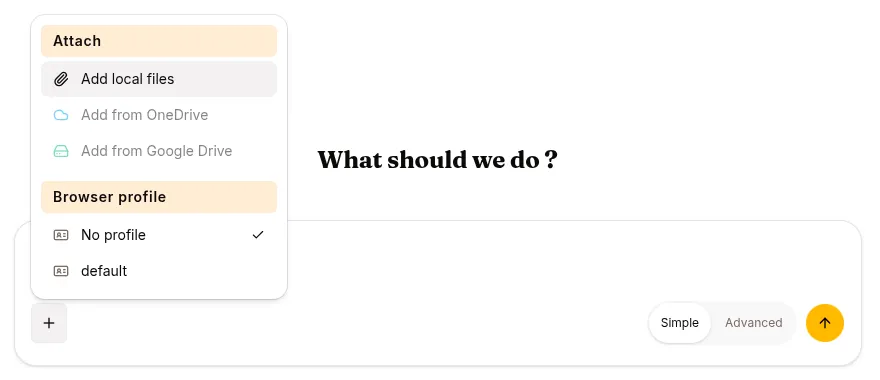
To use a profile, a session is bound to it (its profile_id travels in the session config). On the first browser_* tool call, the runtime looks up the profile for the session’s principal, decrypts its storage state, and injects it into the fresh browser so it starts logged in. The profile’s last_used_at is updated each time it is loaded.
If the profile can’t be loaded — no state saved yet, principal mismatch, or a decryption failure — the browser still starts, just unauthenticated (it “fails open” to a fresh browser rather than breaking the tool). To the agent this looks the same as no profile at all.
Security model
Section titled “Security model”- Encrypted at rest. The stored login state is encrypted; a database read alone does not reveal cookies or session tokens.
- Principal-scoped. Every profile operation filters on the exact owning principal, so one user’s or service account’s profile is unreadable by another principal even if its id is guessed. A database constraint enforces that a profile has exactly one owner.
- Capture is bounded. Login state can only be captured through the dedicated setup session for that profile, by the control holder — not siphoned from arbitrary sessions.
- Fail-safe. A profile that cannot be decrypted (for example after a key rotation) degrades to an unauthenticated browser instead of failing the session.