

Knowledge Bases
A KB is a curated corpus the agent can search and read at runtime via kb_search_pages, kb_list_pages and kb_read_page. Where a skill teaches the agent how to do something, a KB tells it what it knows.
For the operator’s view, see Work mode → Knowledge bases.
How a KB works (architecturally)
Section titled “How a KB works (architecturally)”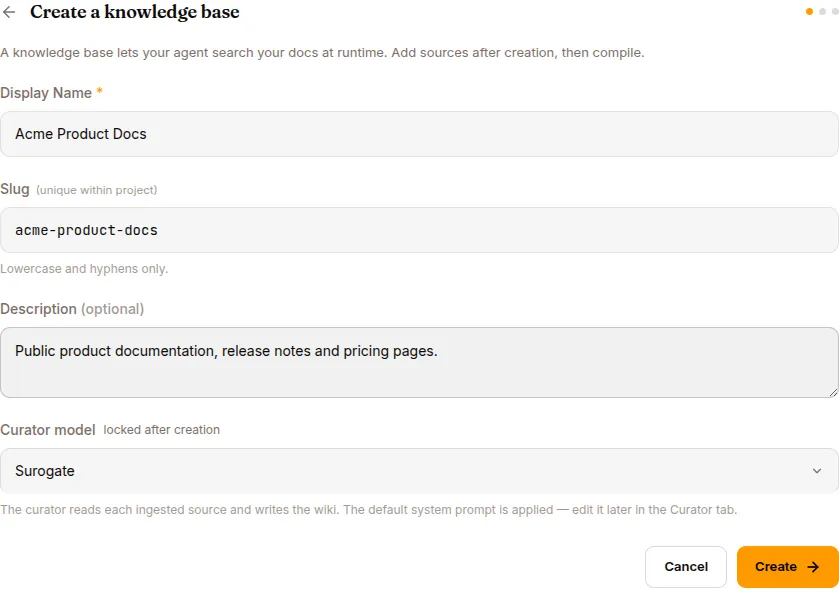
Source files (markdown, PDF, CSV) │ ▼ uploaded via POST /api/knowledge-bases/{id}/sources ┌─────────────────────────────┐ │ Curator (an LLM) │ │ Reads sources, extracts │ │ structured knowledge, │ │ deduplicates │ └─────────────┬───────────────┘ │ COMPILE (POST /api/knowledge-bases/{id}/compile) ▼ ┌─────────────────────────────┐ │ Wiki — searchable index │ │ (Hub-versioned) │ └─────────────┬───────────────┘ │ ▼ kb_list_pages / kb_read_page at runtime Agent's session context grows by relevant pagesThe curator distills and links the material into a wiki. Hybrid search covers passages from both original sources and generated pages. Agents can read exact source passages, expand to the parent document, or follow a PDF section tree to its page ranges.
What a KB carries
Section titled “What a KB carries”| Field | Notes |
|---|---|
| Name | Unique within your org |
| Description | Free-form |
| Curator model | Locked at creation — can’t be changed later. Default works for most cases; pick a smarter model (Claude Sonnet 4.6, GPT-5) at creation for highly technical content. |
| Sources | List of files / S3 prefixes / GitHub repos / Notion pages / URLs (only File works in current builds) |
| Status | error (no successful compile yet) → compiling → active |
| Counters | sources, wiki pages, attached agents |
Published artifacts are versioned in Hub. Search results and reads refer to the same published content. A failed compile preserves the previous publication; changing a Hub branch alone does not roll back the search registry.
Five source types
Section titled “Five source types”Five types are listed in ADD SOURCE. Only File is enabled in current builds — the rest are scaffolded but not yet wired.
| Type | Available | Notes |
|---|---|---|
| File | ✅ | Upload .md, .pdf, .txt, .docx, .csv |
| S3 | 🚧 | Recursive pull from a bucket/prefix |
| GitHub | 🚧 | Auto-pull from a repo’s docs folder with branch tracking |
| Notion | 🚧 | OAuth into a Notion workspace |
| URL | 🚧 | Crawl a domain or specific URLs |
When the other source types ship, they’ll have continuous sync (re-compile on detected changes).
Curator model
Section titled “Curator model”Locked at KB creation. Can’t be changed later. Common choices:
- Surogate default — fine for most cases
- Claude Sonnet 4.6 — better for highly technical content
- GPT-5 — alternative
The curator runs once per source on COMPILE. The cost is dominated by the size of the source corpus.
Compile
Section titled “Compile”curl -X POST http://localhost:8000/api/knowledge-bases/{id}/compile \ -H "Authorization: Bearer $TOKEN"What happens:
- For each source: read, parse, chunk
- For each chunk: curator extracts structured knowledge
- Per-source wiki page assembled
- Cross-source synthesis index built
- Wiki committed to the Hub
Compile time: 30s to several minutes per source.
When compile fails
Section titled “When compile fails”A failed source is marked error with its recorded message in the SOURCES list. Source, concept-generation, upload or publication failures leave the previous published knowledge available. Successfully prepared summaries are checkpointed for a retry; a PDF retry also recovers its extracted source and section tree.
- Retry the failing file — transient failures (curator LLM rate limits) are common, and files a dead compile left locked are requeued automatically on every finalize path, so retry never reports “no files to compile”
- Reduce source size — splitting large documents into chapters can shorten individual retries. Long PDFs use the section-tree indexer; oversized documents and sections are summarized in parts, then combined so the summary process covers the full text.
- Check format — corrupt PDFs and non-UTF-8 markdown choke the parser
- Read the per-file error — it names the actual reason
Document identity and ingestion diagnostics
Section titled “Document identity and ingestion diagnostics”Expand Document identity and ingestion under a source file to see extracted titles, identifiers, explicit editions and aliases with their source quotations. This works across document types and languages. Filename and content claims are kept separately; disagreements are flagged, and matching identifiers never automatically merge documents. Edition strings are preserved without inferring dates from codes.
Identity extraction uses a bounded sample from the beginning and end of the source and separate optional model calls for filename and content. Quotes are checked against extracted source text, but identity interpretation can still be incomplete or incorrect. Agents should read the source before selecting a document or edition.
Identity extraction uses the configured base model by default; bulk summaries
keep using the summary model. Operators can set kb_identity_llm_profile: summary
to use the summary model for both. The base profile can cost more per source.
An identifier that exactly equals the complete filename stem is also confirmed
in code, preserving punctuation and version suffixes.
The same disclosure shows the latest ingestion attempt’s warnings and failures, including pages with no extracted text, failed or limited image captioning, section-index fallback, rejected identity claims and missing embeddings at publication. Diagnostic counts include a few examples. A blank PDF page can be intentional, so inspect the original before treating it as missing content.
Published identity remains available when a later compile fails. The ingestion report records the latest attempt, not a full history or current health status; an embedding backfill may have repaired an earlier warning. Existing sources receive this metadata when compiled again; rebuild the KB to populate all files.
Wiki search
Section titled “Wiki search”After attaching a KB, agents use kb_search_pages for hybrid lexical/vector search across their permitted knowledge bases, then kb_read_page to read the matching pages. Validate retrieval by asking the attached agent representative questions and inspecting its search and read tool results.
For a known document, use kb_search_pages(query="DOC-003", mode="documents")
to look up an exact filename, title, identifier or explicit alias. Results make
ambiguity and filename/content conflicts explicit. Case and whitespace are
normalized; punctuation, accents and edition differences remain meaningful.
If identity lookup finds nothing, search content with mode="passages" (the
default). Both modes use the same permitted KB scope.
Search hits include a passage_id when an exact evidence passage is available. Pass it to kb_read_page with the returned KB ID and path. Omit it to expand the document; use pages for a PDF range. Reads report the published version and location.
For table headings or clauses continued around a passage, pass context="surrounding" together with passage_id. The reader keeps the passage and expands its PDF page and immediate neighbors within a budget. Markdown sources receive a window around the passage. The default is 8,000 source characters, with a maximum of 24,000; limit sets the budget. Each slice reports its original location and marks omitted text. Use a parent read or PDF pages range for further context; surrounding cannot be combined with pages or offset.
Deleting a source file retires its dependent searchable evidence. Existing KBs need a full rebuild to populate source passages and provenance.
The wiki browser’s “Search wiki” field filters page titles locally; it does not run the agent’s retrieval pipeline.
Attach to an agent
Section titled “Attach to an agent”curl -X POST http://localhost:8000/api/agents/{agent_id}/knowledge-bases \ -H "Authorization: Bearer $TOKEN" \ -d '{"kb_id": "..."}'The agent’s system prompt gains:
## Available Knowledge Bases
- acme-product-docs: Product documentation, runbooks, known-issues database.  Browse via kb_list_pages("acme-product-docs"), then kb_read_page(path).
Plus the agent’s tool catalogue grows by kb_search_pages, kb_list_pages and kb_read_page.
REST API
Section titled “REST API”| Method | Endpoint | Purpose |
|---|---|---|
GET |
/api/knowledge-bases |
List |
GET |
/api/knowledge-bases/{id} |
Detail |
POST |
/api/knowledge-bases |
Create. Body: {name, description, curator_model} |
DELETE |
/api/knowledge-bases/{id} |
Delete (pre-flight: warns if attached to agents) |
GET |
/api/knowledge-bases/{id}/sources |
List sources |
POST |
/api/knowledge-bases/{id}/sources |
Add source (multipart for File, JSON for others) |
DELETE |
/api/knowledge-bases/{id}/sources/{source_id} |
Remove source |
POST |
/api/knowledge-bases/{id}/compile |
Trigger compile |
GET |
/api/knowledge-bases/{id}/wiki |
Browse wiki |
What’s next
Section titled “What’s next”MCP & Vault for external system integration. Datasets for the other corpus type used in training.