

Landing page
A public marketing page for an agent, at /landing/<agent-slug>. It is what you send people to before they buy or chat: a headline, your photo, what the agent does, and a button that leads to your pricing page.
Build it in Publish → Landing page. Nothing is public until you turn on Live.
The link, and going live
Section titled “The link, and going live”The share card at the top of the tab holds everything about the page’s existence:
- Live / Off — the switch that publishes. While it is off,
/landing/<slug>returns “not found” to everyone, including you. Turning it on also saves whatever you have written. - Copy link and Open — the public URL. On a phone the URL itself is hidden (it is unreadable at that width) and the two buttons take its space.
- Look — one of six themes, shared with your buy page so an agent’s two public surfaces match.
Once the page is live, saving publishes immediately. There is no separate draft: if you want to rework a live page substantially, switch it off first.
Two tabs
Section titled “Two tabs”- Landing page — the blocks your page is made of.
- Layouts — five ready-made pages you can start from.
Blocks
Section titled “Blocks”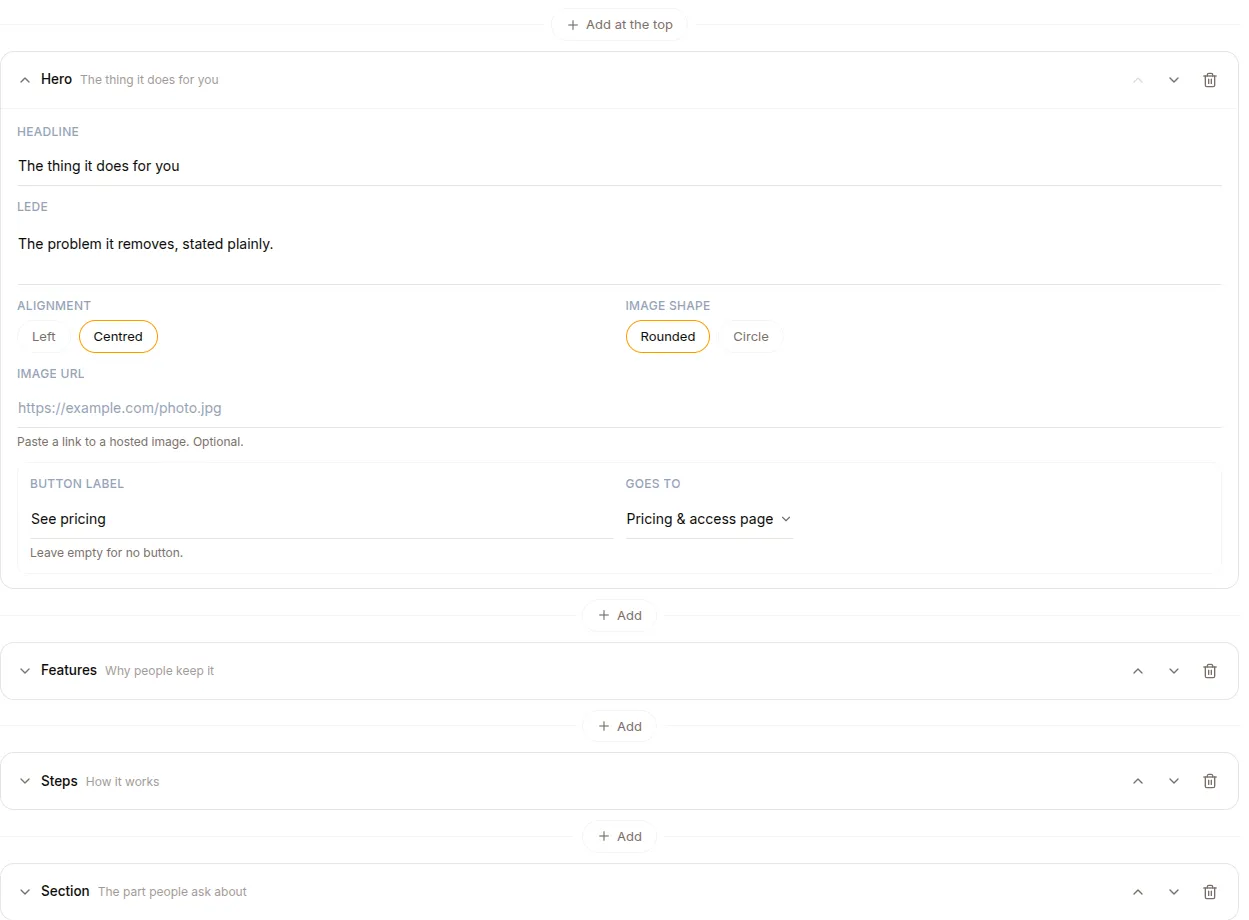
A page is an ordered list of blocks. Add one with the + between any two blocks — a page is written top-down, and the section you want next is rarely the last one. Each block collapses to a single row so a long page stays navigable, and can be moved with the arrows or deleted. Deleting a block you have written into asks first.
| Block | What it is |
|---|---|
| Hero | Headline, a sentence, a photo, and a button. Left or centred; the photo can be rounded or a circle |
| Portrait | A person: round photo, name, role, short bio |
| Section | A heading and Markdown prose, optionally beside an image on the left or right |
| Steps | A numbered sequence |
| Features | A short grid of reasons |
| Quote | A pull quote with attribution |
| Socials | Icon links to X, Instagram, LinkedIn, YouTube, Facebook, TikTok, GitHub, WhatsApp, Telegram, email or a website |
| Call to action | A closing line and a button |
A page can hold one hero; everything else repeats freely, so two calls to action (mid-page and at the foot) or several sections are normal.
Blocks are added blank and filled in over time. A half-written block is fine — anything empty is simply not rendered, and the page stays saveable throughout.
Images
Section titled “Images”Images are linked, not uploaded: paste a URL to a file you host. Only http:// and https:// links are accepted. An empty image slot renders nothing on the live page; in a layout preview it shows a labelled outline so you can see where it would go.
Buttons
Section titled “Buttons”Every hero and call-to-action button chooses where it goes:
- Pricing & access page — your buy page, where offers, sign-in and chat live.
- Chat with the agent — the agent’s own web app.
- A link I choose — any
http(s)URL.
The first two are resolved from the agent itself, so they cannot be mistyped and keep working if the agent is renamed. A button with no label is not rendered.
Section bodies are Markdown — bold, lists and links. HTML is not rendered, deliberately: this page shares an origin with surfaces that hold sign-in tokens, so author-supplied markup is never executed.
Layouts
Section titled “Layouts”Five starting points, each a whole page of six to eight blocks with the copy written as prompts you type over:
| Layout | For |
|---|---|
| The practitioner | A person behind the agent — portrait, method, what a session looks like, proof |
| One screen | Headline, a promise, three reasons, one button |
| The product | Lead with the offer, back it with reasons, how it works, and proof |
| The long read | Alternating sections that argue a case before asking for anything |
| The profile | A calling card: who you are, what you help with, where to find you |
Selecting one opens a preview first, rendered in your chosen look — a layout never changes your theme. Applying it replaces what is on the page, so it asks for confirmation when you have work to lose. Afterwards it is just blocks: every one stays editable, movable and deletable.
Preview
Section titled “Preview”Preview opens the page as a visitor sees it, with a Desktop / Phone toggle. It uses the same renderer as the public page, so what you see is what gets served. Links are inert inside the preview.
Sharing
Section titled “Sharing”The page carries OpenGraph tags, so a link posted to Slack, WhatsApp or LinkedIn unfurls with the agent’s name and your hero’s opening sentence rather than a generic card. Unpublished pages produce no preview.