

Datasets
A dataset is a versioned corpus you use for training and evaluation. Every dataset is backed by a repository in the Data Hub — the training files (train/dataset.parquet, plus a dataset_dict.json split manifest) live there, while the dataset’s metadata (name, format, status, stats, PII scan, pipeline) lives in the platform database. Creating, building, and deleting datasets all go through /api/datasets.
Four ways to bring a dataset
Section titled “Four ways to bring a dataset”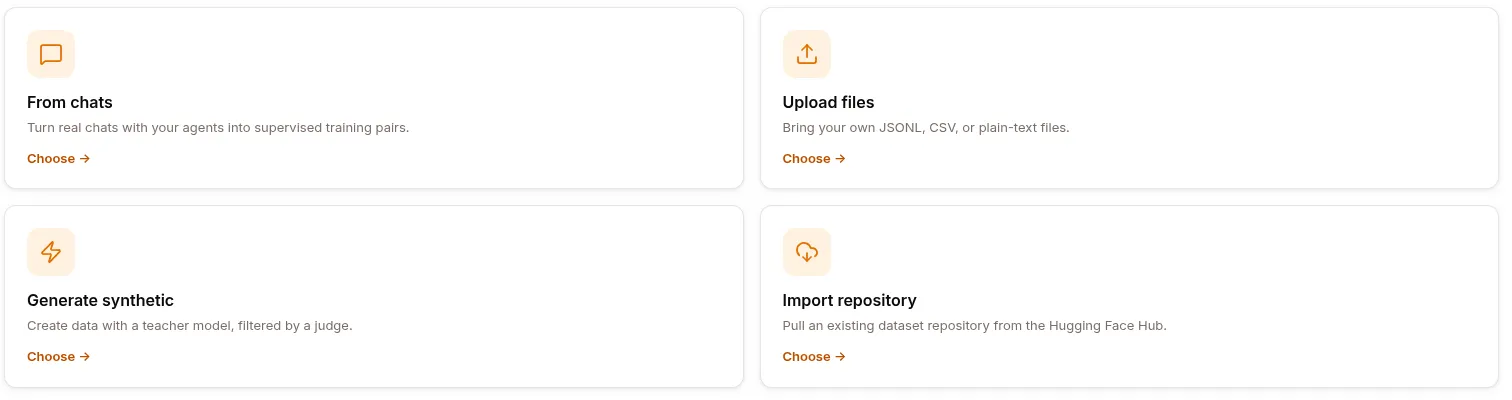
Click NEW DATASET (or, on an empty list, + New dataset) to open the source chooser at /studio/datasets/create. It’s a grid of cards, each routing to a dedicated builder page:
| Card | Builder page | What it does | Backend |
|---|---|---|---|
| From chats | /studio/datasets/from-chats |
Turn real agent conversations into supervised training pairs. | POST /api/datasets/from-conversations |
| Upload files | /studio/datasets/upload |
Bring your own JSONL / JSON / CSV / Parquet file. | POST /api/datasets/upload |
| Generate synthetic | /studio/datasets/synthetic |
Teacher model generates, judge model filters. | POST /api/datasets/synthetic → pipeline run |
| Import repository | /studio/datasets/import |
Pull a dataset repo from the Hugging Face Hub. | import_dataset compute job |
The datasets list also has an Import from chats button that jumps straight to the from-chats builder, and Source / Status filters (All sources · Chats · Expert traces · Synthetic · Upload; All statuses · Ready · Building · Error).
Every finished dataset lands in your list as building → ready, versioned in the Data Hub.
1. From Conversations
Section titled “1. From Conversations”The most common source: build a dataset from observed agent traffic. Two builder pages share this source — a simple form and a filter-rich advanced form — and both call the same endpoint.
From chats (simple) — /studio/datasets/from-chats
Section titled “From chats (simple) — /studio/datasets/from-chats”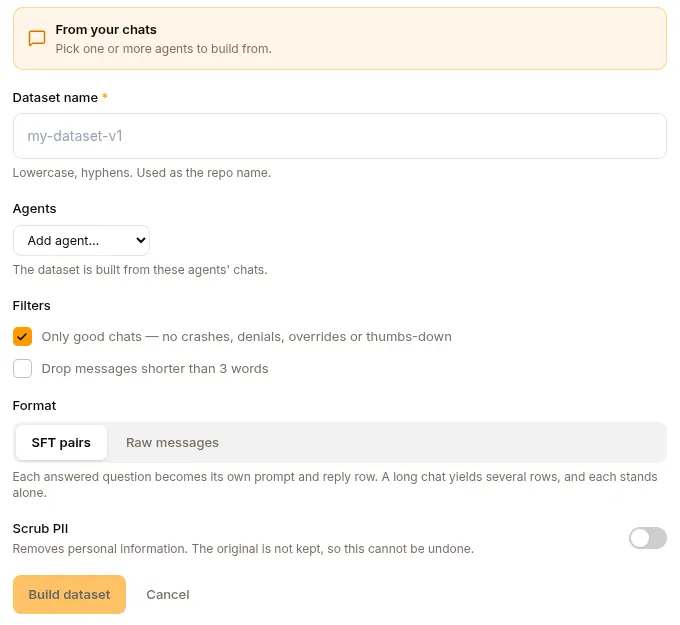
The form reached from the list’s Import from chats. When you arrive from a Sessions selection it’s pre-filled with those chats; otherwise it draws from the project’s recent chats and focuses on the agent with the most matching chats.
Fields:
- Dataset name (required, lowercase-hyphens — used as the repo name). Pre-filled as
<agent>-sft-v1. - Agents — chips for the agents to draw from. Pre-filled from the arriving selection; add or remove agents to widen or narrow the dataset.
- Filters — two checkboxes: Only good chats — no crashes, denials, overrides or thumbs-down (on by default) and Drop messages shorter than 3 words (off by default).
- Format — SFT pairs (user prompt → assistant reply). Raw messages is present but disabled, marked Coming soon.
- Scrub PII — off by default. See PII scrubbing below.
- Estimated output —
N rows · ~<tokens> tokens(tokens estimated at ~290 per row).
The page fetches at most the newest 500 chats per agent, and tells you when an agent’s list was truncated. A build may post at most 500 chats; above that the summary line asks you to remove an agent or tick Only good chats, and Build dataset stays disabled.
Click Build dataset to kick off the build. You can leave the page while it runs without stopping it, but a from-chats build can’t be cancelled once it’s started, and it isn’t resumable on screen — reloading during a build returns you to the datasets list while the build itself carries on.
From chats (advanced) — /studio/datasets/new
Section titled “From chats (advanced) — /studio/datasets/new”The filter-rich builder, seeded from the dashboard’s “Raw material” selection or a Sessions selection. It carries a seeded-chats banner and a list you can trim.
Fields:
- Dataset name (lowercase-hyphens, used as the repo name).
- Agents — chips pre-filled from the seeded chats; add more agents to widen the dataset.
- Time range — Last 24 hours / 7 days / 30 days / All time.
- Quality — pills: 👎 Negative · 👍 Positive · Flagged · All. These map to real session quality flags: Negative = a thumbs-down response; Positive = a thumbs-up response; Flagged = any policy denial, expert override, crash, or thumbs-down. Picking a quality also sets a recommended format.
- More filters — Channel and Skill selects, with options drawn from the matching sessions.
- A live N chats → ~N samples count (Preference halves the count into pairs), plus the seeded-chats list (each row removable).
- Format — Eval set · Preference · SFT · Conversation, with a “Recommended for 👍/👎 chats” badge (👍 → SFT; 👎 or flagged → eval set).
Click Build dataset.
What actually happens
Section titled “What actually happens”Both forms POST to /api/datasets/from-conversations. The request carries project_id, display_name, and exactly one source: either session_ids (the from-chats page sends the ids it is showing you) or agent_id + num_sessions (the dashboard builder). Two options ride along:
min_words— set by Drop messages shorter than 3 words. Turns below the threshold are dropped, and a session is discarded entirely unless a user → assistant pair survives, so an answer is never emitted without its question.scrub_pii— set by the Scrub PII toggle.
The server walks the selected sessions, converts each user.message + llm.response turn into an OpenAI-style messages list, writes them as a single parquet file in a fresh Hub repo, and persists the dataset as format=sft. Tool-call and tool-result turns are dropped: the sample schema is role + content today, so promoting tool turns needs a schema change first. This is synchronous — at typical session counts it finishes within the request.
The advanced form’s Quality / Channel / Skill / Time-range filters and its Format selector shape the on-screen estimate and choose which sessions are sent; the export itself always produces SFT messages for now.
2. Upload file — /studio/datasets/upload
Section titled “2. Upload file — /studio/datasets/upload”Bring your own file. Fields:
- Dataset name (required, lowercase-hyphens). Pre-filled from the file name.
- Files — a dropzone (or browse files) for a single file.
- Scrub PII — off by default. See PII scrubbing below.
Accepted formats
Section titled “Accepted formats”JSONL, JSON, CSV, or Parquet. The dropzone asks the server for this list (GET /api/datasets/upload-formats) rather than hardcoding it, so it always matches the validator — which in turn mirrors the Data Hub stats-worker’s converter, so the platform never accepts a format it can’t mirror to parquet.
A single upload is capped at 1 GiB, enforced before any database row or Hub write.
What the page detects
Section titled “What the page detects”Once a file is added, the page inspects it locally and shows a detection summary — the format, the inferred schema, and the row count:
| File | Schema shown | Row count |
|---|---|---|
| JSONL / JSON | prompt / completion, chat / messages, instruction / output, the first three keys, or records |
Non-empty lines |
| CSV | N columns |
Lines minus the header |
| Parquet | columnar |
Read from the file’s footer |
Parquet is read as binary — only the footer is fetched, not the whole file — so a large file previews its true row count without being parsed in the browser. A truncated or unusual footer shows no count rather than blocking the upload or inventing a number.
Validation
Section titled “Validation”The server rejects a file the trainer couldn’t consume, with a 422 and a specific reason. A row must carry one of three recognised shapes:
- messages — a
messages,conversation, orconversationscolumn. - pair — a query column plus a response column (
instruction/output,question/answer,prompt/completion, and the other aliases the trainer itself resolves). - text — a single text-ish column.
A dataset also needs at least 2 usable rows, since a valid training split can’t be carved from fewer. Validation samples the first 50 rows.
What happens on build
Section titled “What happens on build”Build dataset uploads the file (multipart POST /api/datasets/upload with project_id, display_name, scrub_pii, and the file as content). The server creates the dataset (kind=user, source=manual, format=sft), drops the file under train/<filename>, seeds a dataset_dict.json registering the train split, records the text column so token stats can be computed, commits, and flips the dataset to ready.
Uploaded columns are preserved. A file whose first row lacks a key that later rows carry keeps that column — the parquet schema is built from the union of every row’s keys, not inferred from row one.
An upload can be cancelled while it runs: Cancel build aborts the transfer, cancels the job on the server, and deletes the partial dataset.
3. Synthetic generation — /studio/datasets/synthetic
Section titled “3. Synthetic generation — /studio/datasets/synthetic”The teacher → judge flow, surfaced as three pipeline chips: Teacher generates → Judge scores → Keep above threshold.
Fields:
- Dataset name (required).
- What should the data teach? (required) — a brief the teacher model uses as its generation prompt (stored as the dataset description).
- Teacher model (required) — the strong model that writes the samples (from the project’s deployed models).
- Judge model (required) — scores each sample; low scores are dropped.
- Topics to cover (optional) — comma-separated. Each row is generated for a sampled topic, so outputs vary; leave it blank and samples may repeat at high counts.
- Samples to generate (default
5000). - Quality threshold (default
0.8, range 0–1). - Format — SFT pairs. Raw completions is present but disabled, marked Coming soon.
Clicking Build dataset does four things: it calls POST /api/datasets/synthetic to provision the dataset shell (kind=synthetic, status=building) and an empty Hub repo, composes a runnable starter pipeline from your answers, saves it, and starts the run. You land on the dataset’s PIPELINE tab with the run already in flight.
The starter pipeline it composes:
| Column | Type | Purpose |
|---|---|---|
topic |
Sample from distribution | Only when you list topics. A diversity seed — the generator conditions on it, and it’s dropped from the output rather than landing in the training data. |
instruction |
Generate with LLM (Text) | One realistic user request, written by the teacher at temperature 1.0. |
response |
Generate with LLM (Text) | The ideal assistant reply to that request, written by the teacher at temperature 0.7. |
quality |
Judge with LLM | The judge scores the pair against a rubric, 1–10. |
Your 0–1 quality threshold becomes the run’s minimum score on that quality column (0.8 → a cutoff of 8), and deduplication is on. Everything is an ordinary pipeline afterwards — open the Pipeline tab to edit the columns, re-run, or extend it.
4. Hugging Face import — /studio/datasets/import
Section titled “4. Hugging Face import — /studio/datasets/import”Fields:
- Repository (required) — a Hugging Face Hub search input; enter as
org/name(e.g.tatsu-lab/alpaca). - Subset (optional) — config / subset name, if the dataset has one.
- Access token (optional) —
hf_…, needed only for private or gated repos. - Destination branch — a branch combobox; created in the Data Hub if it doesn’t exist (defaults to
main). - Destination folder (optional) — leave empty to import at the repo root.
The page pre-flights the repository as you type it and blocks the import when it can’t succeed:
- Script-based datasets aren’t supported — a repo with a loading script is refused.
- Multi-config datasets need a Subset — if the repo declares configs, pick one before submitting.
Import dataset spawns an import_dataset compute job (params: hf_repo_id, hub_repo_id, hub_branch, and optional hub_path / hf_token / hf_dataset_subset). This is a compute job, not a /api/datasets call — track it in Compute → Workload Queue. The flow is gated on the Free plan (shows an Upgrade prompt).
PII scrubbing
Section titled “PII scrubbing”Scrub PII appears on the upload and from-chats builders. It is off by default, and it is destructive: matches are replaced with a placeholder tag in the stored data and no raw copy is kept, so a scrubbed dataset cannot be un-scrubbed.
Detection is regex only — deliberately no NER, so there’s no model dependency and no false positives on names that are legitimate training signal. Names are never detected or removed. What it covers:
| Detected | Replaced with |
|---|---|
| Email addresses | [EMAIL] |
| US phone numbers, international phone numbers | [PHONE] |
| US Social Security numbers | [SSN] |
| Romanian CNPs | [CNP] |
| IBANs | [IBAN] |
| Credit-card numbers | [CREDIT_CARD] |
| IPv4 addresses | [IP] |
Because a false positive is permanent corruption, precision is favoured over recall and every candidate must clear three independent checks: a semantic validator (a Luhn checksum for cards, mod-97 for IBANs, the control digit for CNPs, in-range octets for IPs), a context check on the text immediately before the match (so version 1.2.3.4 isn’t read as an IP), and a token check (so a match can’t be carved out of a longer identifier). The sharpest case is a bare digit run: an unpunctuated ten-digit number is indistinguishable from a timestamp or an order id, so a phone number needs either phone-shaped punctuation or a nearby phone / call / fax label before it’s touched.
Detection runs whether or not you scrub, and its result is stored with the dataset. That’s what the detail page’s PII tile reports:
| Tile | Meaning |
|---|---|
| Not scanned | No scan has run for this dataset — including anything created before scanning existed. |
| None found | Scanned, and clean. |
| N removed (“PII scrubbed”) | Scanned with the toggle on; N matches were replaced. |
| N found (“PII · not scrubbed”) | Scanned with the toggle off; N matches are still in the data. |
Scanning is advisory: if detection fails, the ingest still succeeds and the dataset reads Not scanned rather than failing the build.
Token stats
Section titled “Token stats”The Tokens and Avg length figures are measured from one rendered column per row — the formatted training example, as a chat-shaped string — rather than summed across columns. A pair row is rendered as the two-turn conversation it becomes at training time, so it’s measured the way the trainer will actually consume it.
These counts are an approximation, not a tokenizer’s output. The real chat template belongs to the model and is applied by the trainer at train time, so an ingest-time count can’t be model-exact and doesn’t try to be. Treat them as a sense of scale.
Token stats are computed for chat uploads, pair uploads, single-text uploads, from-chats builds, Hugging Face imports, and synthetic datasets. Coverage is forward-only: datasets created before a given path gained stats aren’t backfilled and keep showing an em dash.
Dataset detail page
Section titled “Dataset detail page”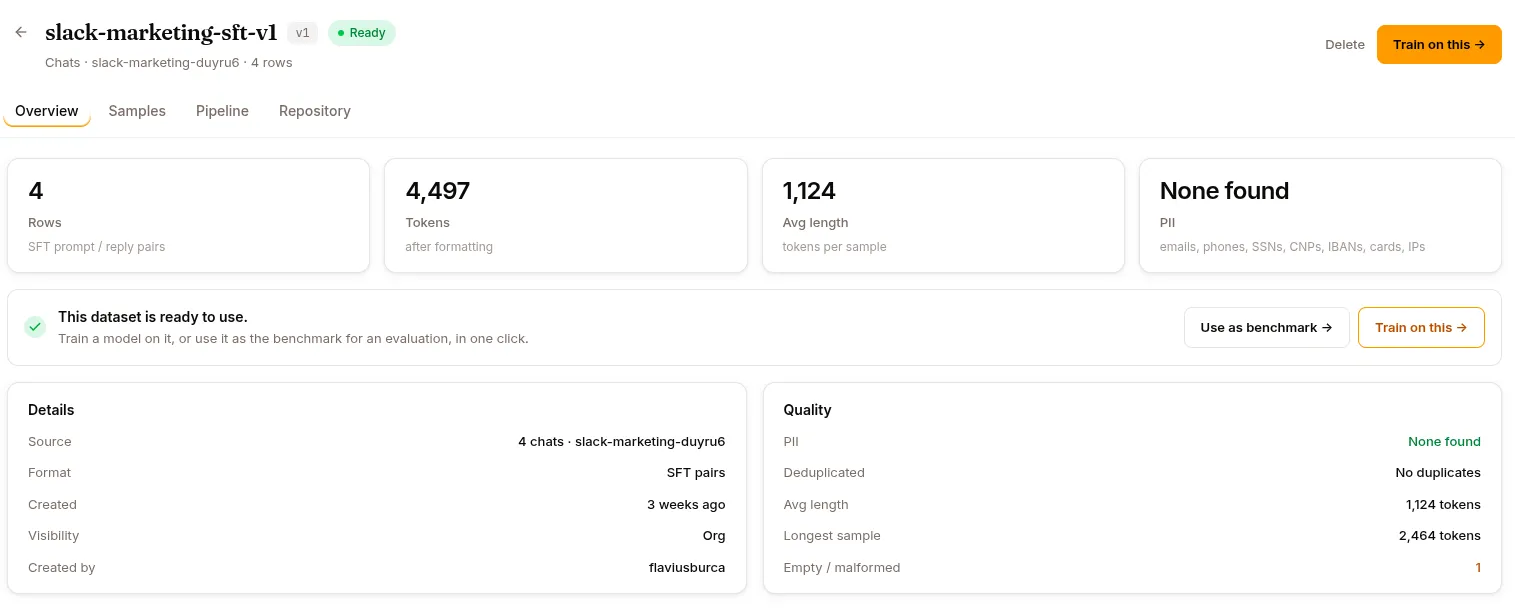
Open a dataset to see four tabs: Overview, Samples, Pipeline, and Repository.
Overview
Section titled “Overview”Four stat cards across the top:
- Rows — the measured row count, subtitled with the format.
- Tokens — the whole-dataset total, “after formatting”. See Token stats.
- Avg length — tokens per sample.
- PII — the scan result. See PII scrubbing.
A ready dataset then shows a This dataset is ready to train on banner with a Train on this → button, which opens the new-run wizard with this dataset already selected.
Below that, two cards:
Details — Source (for a from-chats dataset, N chats · <agent>), Format, Created, Visibility, Created by.
Quality —
| Row | What it shows |
|---|---|
| PII | The same scan result as the stat card. |
| Deduplicated | Yes · N removed, or No duplicates. |
| Avg length | Mean tokens per sample. |
| Longest sample | Max tokens in any sample. |
| Empty / malformed | Input rows that were empty or malformed and won’t become training examples. A data-quality warning, not subtracted from the row count. An em dash means the count wasn’t measured — it’s recorded going forward, not backfilled. |
Figures come from GET /api/datasets/{id}/stats, which the Data Hub’s stats worker computes on each commit to the underlying repo. Until the first commit is processed you’ll see “Stats haven’t been computed for this dataset yet.” The PII rows are the exception: they read the dataset’s own stored scan, not the stats bundle.
Samples
Section titled “Samples”Previews the first 20 rows via GET /api/datasets/{id}/samples?limit=20&split=<split>. A split selector switches between splits (default train, or the first available). Rows that fit the SFT/DPO chat convention render as instruction → response; other rows fall back to a generic key-value column view.
🚧 Known issue: the header counter sometimes shows N samples while the Samples tab shows 0 rows. Workaround: navigate away and back.
Pipeline
Section titled “Pipeline”A DataDesigner canvas for authoring a generation/transformation pipeline — this is where synthetic datasets are actually built. The header sets the target row count and default model; the column palette adds Seed column, Sample from distribution, Generate with LLM (Text / Structured / Code), Judge with LLM, Compute from expression, and Validate columns. Edits autosave (PUT /api/datasets/{id}/pipeline). Preview runs 1–200 rows without committing (POST .../pipeline/preview); Run generates the full target (POST .../pipeline/run, tagged run-<timestamp>) and commits it to the repo. Preview/run execute as managed compute jobs; their logs are at /api/datasets/pipeline-jobs/{jobId}/logs.
Repository
Section titled “Repository”The underlying Hub repo — files, commits, branches, tags. Same operations as any Data Hub repo.
SFT vs Preference vs Conversation formats
Section titled “SFT vs Preference vs Conversation formats”SFT format
Section titled “SFT format”{"messages": [ {"role": "system", "content": "You are..."}, {"role": "user", "content": "How do I..."}, {"role": "assistant", "content": "Here's how...", "tool_calls": [...]}, {"role": "tool", "tool_call_id": "tc_1", "content": "..."}, {"role": "assistant", "content": "..."}]}For supervised fine-tuning. Each line is a complete conversation.
Preference format
Section titled “Preference format”{ "prompt": "Explain transformers", "chosen": "Detailed accurate explanation...", "rejected": "Incorrect explanation..."}For preference learning (DPO, RLHF). Requires both good and bad examples for the same prompt.
Conversation format
Section titled “Conversation format”Raw transcripts for analysis. Not used directly in training.
Datasets for evaluation
Section titled “Datasets for evaluation”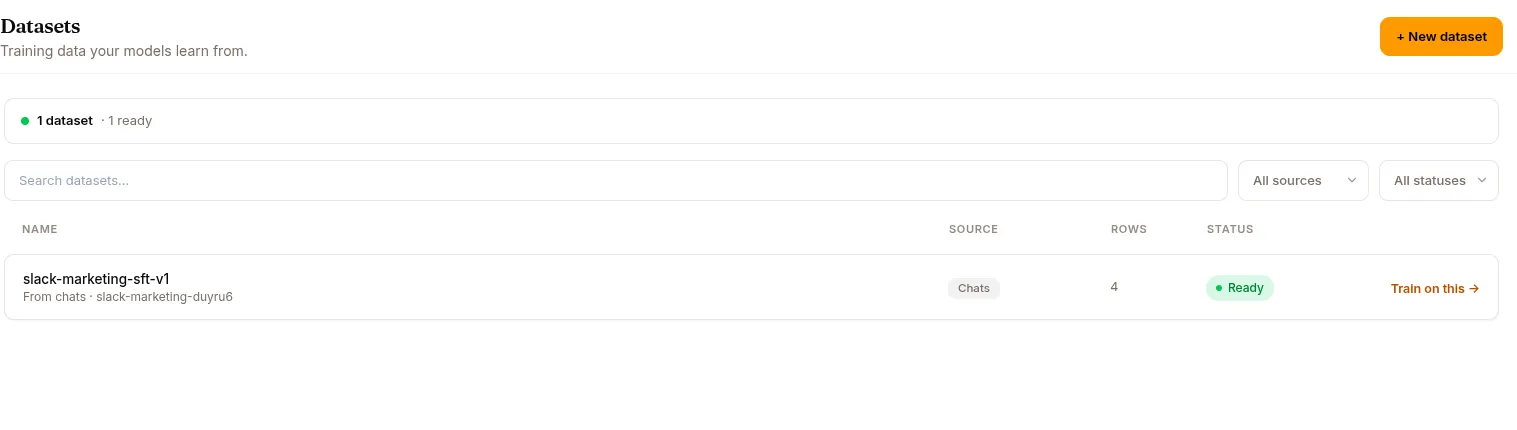
When you want a dataset specifically for evaluation rather than training, use:
- From Conversations filtered by 👎 — your worst cases become an eval / regression set.
- From Conversations filtered by 👍 — your best cases become regression checks.
- Upload file with hand-crafted edge cases.
Then reference this dataset in the Evaluation wizard.
Delete
Section titled “Delete”Deleting runs a pre-flight in-use check (GET /api/datasets/{id}/in-use). If the dataset is referenced by an active training or synthetic run, deletion is blocked with a conflict — stop the listed runs from their detail pages first.
Otherwise the platform cancels any running pipeline job and any in-flight upload, drops those job rows and their log archives, deletes the dataset, and drops the backing Hub repo.
REST API
Section titled “REST API”| Method | Endpoint | Purpose |
|---|---|---|
GET |
/api/datasets |
List (?project_id, ?kind, ?limit) |
GET |
/api/datasets/{id} |
Detail |
POST |
/api/datasets |
Create (generic) |
PATCH |
/api/datasets/{id} |
Update metadata |
DELETE |
/api/datasets/{id} |
Delete (with in-use check) |
GET |
/api/datasets/{id}/in-use |
List active + historical references |
GET |
/api/datasets/upload-formats |
File extensions the upload validator accepts |
POST |
/api/datasets/from-conversations |
Build from sessions (session_ids, or agent_id + num_sessions) |
POST |
/api/datasets/upload |
Upload a file (multipart) |
POST |
/api/datasets/synthetic |
Provision a synthetic dataset shell |
POST |
/api/datasets/expert-training |
Provision a collected-training-data dataset + run |
GET |
/api/datasets/{id}/stats |
Overview stats |
GET |
/api/datasets/{id}/samples |
Preview samples (?split, ?limit) |
GET / PUT |
/api/datasets/{id}/pipeline |
Read / save pipeline config |
POST |
/api/datasets/{id}/pipeline/preview |
Preview run (1–200 rows) |
POST |
/api/datasets/{id}/pipeline/run |
Full generation run |
GET |
/api/datasets/{id}/pipeline/active |
In-flight pipeline job, if any |
GET |
/api/datasets/{id}/pipeline/jobs/{jobId} |
Pipeline job state |
POST |
/api/datasets/{id}/pipeline/jobs/{jobId}/cancel |
Cancel a pipeline job |
GET |
/api/datasets/pipeline-jobs/{jobId}/logs |
Tail pipeline job logs |
Hugging Face imports run as an import_dataset job via the compute API, not a /api/datasets route.
What’s next
Section titled “What’s next”Training to fine-tune on a dataset. Evaluations to test with one.