

Website widget
The Website widget embeds the agent as a chat bubble on your own domain — marketing site, SaaS app, customer portal.
What you need
Section titled “What you need”Nothing external. The platform issues a publishable key (prefixed surg_wk_…) when you enable the channel.
Configuration
Section titled “Configuration”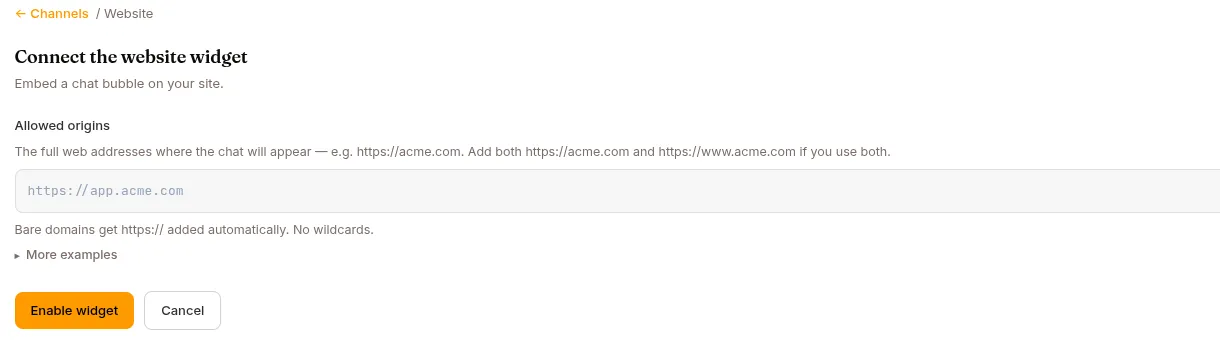
Open the agent → Publish in the left nav → the Channels tab → find the Website card → Connect. The connect screen asks for your Allowed origins, then you click Enable widget.
| Field | What it does |
|---|---|
| Allowed origins | Exact-match URLs where the widget will be embedded. Format: scheme://host[:port]. Add https://www.acme.com and https://acme.com if you serve both. Bare domains get https:// added automatically. No wildcards. |
Once enabled, the Manage screen shows:
- Embed code — the script snippet, with a Copy button.
- Allowed origins — the same editor; add/remove auto-saves.
- Messages per chat — max messages per visitor chat.
0= no limit. Useful for cost control on a public-facing widget. - Advanced → Publishable key — the generated key (shown read-only).
- Turn off — stops the bubble appearing on your site; your key and settings stay in place.
Changes on the Manage screen save automatically — there is no separate save button.
The embed code
Section titled “The embed code”Copy the snippet from the Manage screen and paste it before </body> on your site. It looks like this:
<script src="https://cdn.jsdelivr.net/npm/@invergent/website-widget@2/dist/surogates-widget.global.js"></script><script> SurogatesWidget.mount({ apiUrl: "https://acme-support-bot.cloud.surogate.ai", publishableKey: "surg_wk_...", });</script>apiUrl is the agent’s endpoint and publishableKey is the key from the Advanced section. Drop the snippet into any page on an allowed origin. A chat bubble appears in the bottom-right corner. Click → chat opens.
If you don’t manage the site yourself, send the snippet to whoever does.
Embedding with the key alone
Section titled “Embedding with the key alone”If you’d rather not hardcode the agent’s URL — so a rename or a move never breaks a live page — use the key-only form instead. The widget looks the agent up from the publishable key when the page loads:
<script src="https://cdn.jsdelivr.net/npm/@invergent/website-widget@2/dist/surogates-widget.global.js"></script><script> SurogatesWidget.mountWithPairing({ publishableKey: "surg_wk_...", });</script>Behaviour is otherwise identical, including the allowed-origins check. Passing apiUrl as well skips the lookup and is exactly the same as mount. The snippet Studio generates uses mount with an explicit apiUrl; both forms work.
Visitors are anonymous
Section titled “Visitors are anonymous”The widget doesn’t require your visitors to have Surogate accounts. Identity is the HttpOnly session cookie the server issues at bootstrap and nothing else — the widget stores nothing in localStorage, so a visitor who clears cookies or arrives in a private window is a new visitor.
Whether a returning visitor lands back in their previous conversation depends on the agent’s Multi session capability, on Configure → Capabilities:
| Multi session | What a page reload does |
|---|---|
| Off | The visitor returns to the same conversation, as long as their cookie is still valid and the origin and key are unchanged. |
| On (default) | Every load starts a fresh conversation. The cookie survives, the history does not — and an anonymous visitor has no chat list to navigate back with. |
If your widget is a support bubble people return to mid-task, turn Multi session off for that agent.
When the widget says “origin not allowed”
Section titled “When the widget says “origin not allowed””The page’s exact URL isn’t in your Allowed origins list. Add it on the Manage screen (it auto-saves) and reload the page.
No wildcards: https://*.acme.com doesn’t work. You need each subdomain individually.
Monetized agents and the widget
Section titled “Monetized agents and the widget”Selling happens on the agent’s hosted buy page, not in the widget itself — see Monetize your agents. Two things matter for the widget:
- Website is a sellable channel. A buyer’s package can include or exclude it; a visitor on an excluded plane is refused with “Your current plan doesn’t include this channel.” and the buy link, before any usage is spent.
- Your own widget is a free side door unless you gate it. If a monetized agent keeps its free operator widget enabled, visitors there chat without paying — the Monetize tab warns about exactly this. Either disable the Website channel and sell only through your buy link, or rely on trial/allowance limits.
Buyer-minted embed keys
Section titled “Buyer-minted embed keys”Buyers of a monetized agent can resell it on their own site. On the buy page, an Embed on your website panel lets a buyer with a funded purchase (active subscription or a positive pack balance) enter their own origins and mint a personal surg_wk_… key — “Put this agent on your own site so visitors’ chats come out of your purchased usage.”
How it behaves:
- Their visitors are anonymous, and every chat draws from the buyer’s purchased allowance. When it runs out, visitors see a paywall pointing back to your buy page.
- Origins are comma-separated exact matches (no wildcards, no paths); the panel emits the standard
SurogatesWidget.mountsnippet with a Copy button, and the button flips to Update embed code on refresh. - The buyer’s widget inherits your Messages per chat cap.
- Preconditions: you must have the Website channel enabled (else website channel not enabled), and the buyer needs a funded purchase (a free trial doesn’t qualify — else purchase required). A first-time mint also requires your project to be on Pro+; refreshing an existing embed survives a downgrade.
- Turning your Website channel off deactivates buyer embeds too (without deleting them — a later refresh reactivates).
What’s next
Section titled “What’s next”If you need end-user accounts, see Users.