

Usage
The Usage tab shows what your project has consumed this billing period, how much of each wallet is left, and a breakdown per agent and model. It’s the real-time meter behind your plan — no end-of-month surprises. Balances refresh silently every minute while the tab is visible.
Wallet balances
Section titled “Wallet balances”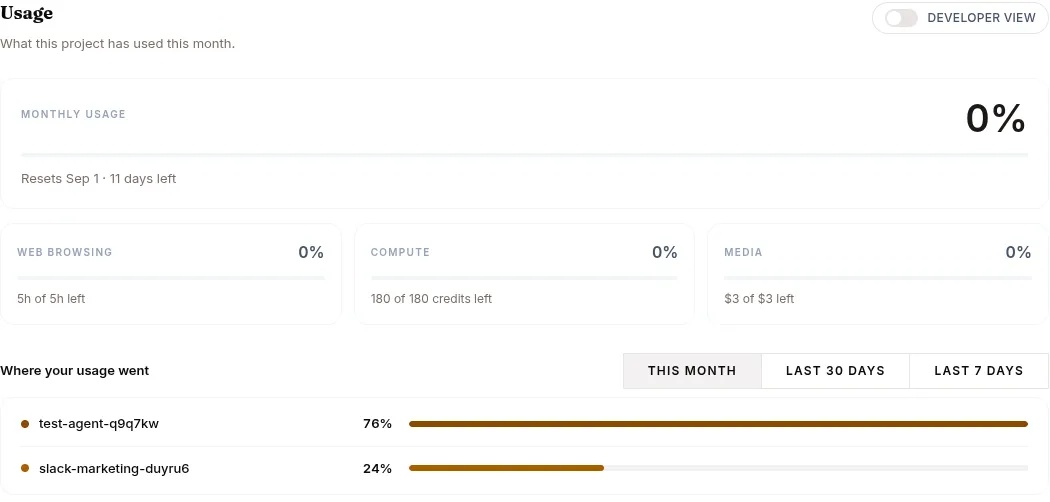
Each consumable resource is a prepaid wallet (your plan grants a monthly balance; top-ups add more; usage drains it in real time). Each card shows the remaining balance with a progress bar against your plan’s grant and a detail line — of <grant> monthly · renews <date>, plus · N from top-ups when a rolled-over top-up balance exists:
| Wallet | What it meters |
|---|---|
| Tokens | LLM tokens (prompt + completion), across every agent |
| Web-browsing minutes | Agent browser time (shown in hours), wall-clock while a browser is open, summed per session |
| Compute credits | GPU time for training runs, datasets, and evaluations |
| Media | Image & video generation, in dollars of provider spend — a flat few cents per image, a video at its real provider cost |
Grants come from the live plan catalog, so the cards can’t drift from what’s enforced. Unlimited (internal/enterprise) allowances render as “Unlimited” with no bar. On BYO LLM, the tokens card keeps showing the balance but drops the grant framing and the progress bar — the monthly token grant is deliberately zero because you pay your own provider.
Note for monetized agents: your buyers’ browsing and media usage drains both their purchased balances and these project wallets — see Monetize.
Usage breakdown
Section titled “Usage breakdown”A table breaks consumption down for the selected range — presets This month / Last 30 days / Last 7 days / Custom (with From/To dates) — with a totals strip and a daily token chart above it. Group it by:
- Agent × Model — one row per (agent, model) pair
- Model — totals per model
- Agent — totals per agent
Each row shows token columns Prompt, Completion, and Total, so you can see exactly which agent and which model is spending your allowance. An Include non-agent usage switch adds platform calls made outside agent sessions. Traffic from agents on a non-Surogate model is excluded from this view.
Hub storage
Section titled “Hub storage”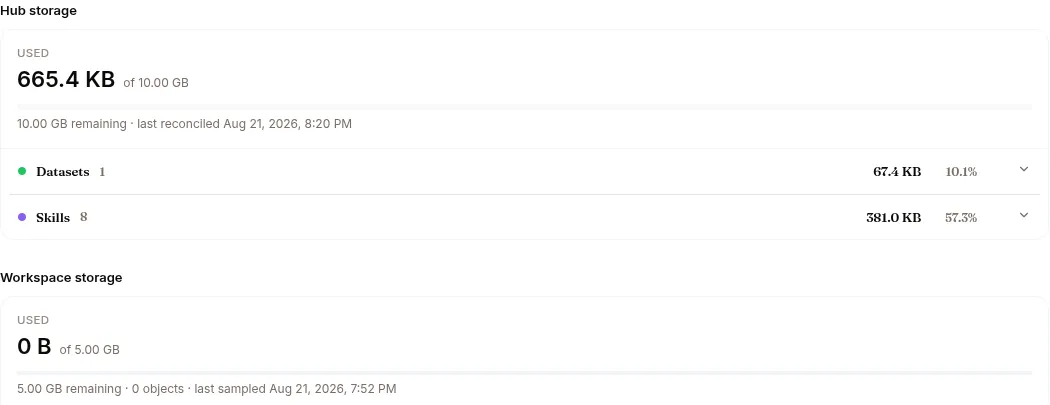
A separate section reports your project’s Hub storage: used vs quota, remaining, when it was last reconciled, a per-type share bar, and per-repo rows (models, datasets, skills, knowledge bases, and other). An estimate badge means the Hub hasn’t reconciled the project yet — the figure is a fast estimate that may lag the authoritative count. See Data Hub for what lives in each repo.
When you hit a limit
Section titled “When you hit a limit”When a wallet reaches zero, new requests that would draw on it are refused with 402 insufficient_credits until the next cycle. Running agents stay up — they just refuse new traffic on the exhausted resource, and each resource fails independently: an empty media wallet doesn’t stop chat, an empty browsing wallet just means no new browser opens.
What people see:
- You / your team: the agent reports the exhausted resource with guidance (e.g.
media_budget_exhausted— top up or wait for the monthly reset). - Your end users, when the token wallet is dry: “This assistant is temporarily unavailable. Its owner has run out of credit.” — your wallet is the hard ceiling on every end-user turn, checked before their own per-user allowance.
To keep going, upgrade the plan, add a recurring add-on, or drop in a wallet top-up — all from Billing.