

Playground
The Playground is an interactive chat where you send prompts to a model that is currently serving and watch it stream a reply live. Use it to sanity-check a model or a fine-tune before you wire it into an agent.
Open it from the Develop sidebar, or land directly on a model with /studio/playground?modelId=<model> (the Models page deep-links here).
Only serving models appear
Section titled “Only serving models appear”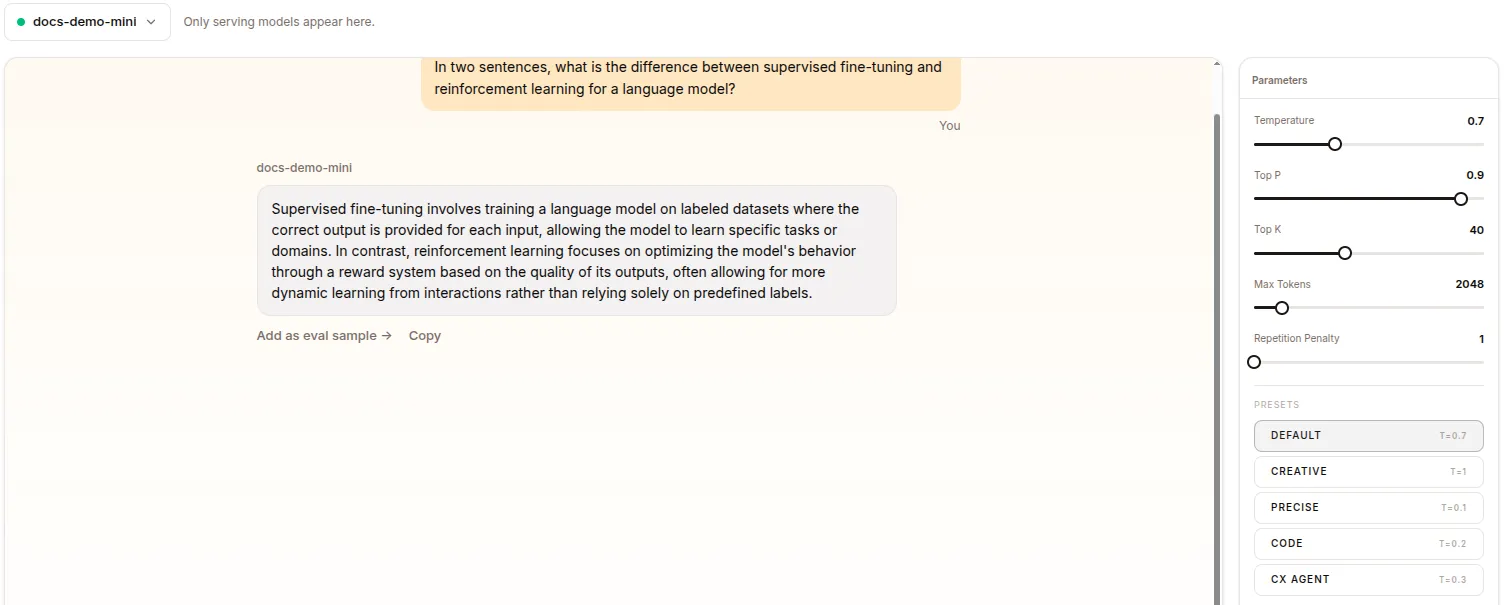
The model picker lists only models that are serving — models whose status is running, plus proxy (BYO-LLM) models. Anything not currently served is hidden.
If nothing is serving, the page shows an empty state (“Start a model to use the playground.”) with an OPEN MODELS → button that takes you to /studio/models. Start a model there first, then come back.
Picking a model
Section titled “Picking a model”At the top of the workspace a dropdown shows the selected model (with a green “serving” dot). Open it to switch to any other serving model.
- If you arrived via
?modelId=, that model is pre-selected when it is serving. - When the Playground is embedded elsewhere with a locked model, the picker is read-only and shows just the model name.
- Switching models starts a fresh chat rather than reloading the previous model’s conversation.
Chatting
Section titled “Chatting”The center pane is a chat thread. Type a prompt and the model streams its response token by token. Conversations are held per model, so each model you pick has its own thread history.
Parameters panel
Section titled “Parameters panel”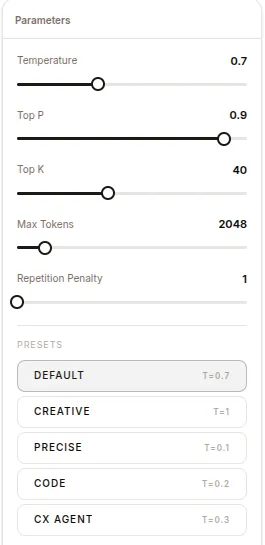
The right-hand Parameters panel controls sampling. Each is a slider:
| Parameter | Range | Step |
|---|---|---|
| Temperature | 0 – 2 | 0.05 |
| Top P | 0 – 1 | 0.05 |
| Top K | 1 – 100 | 1 |
| Max Tokens | 64 – 16384 | 64 |
| Repetition Penalty | 1.0 – 2.0 | 0.05 |
Presets
Section titled “Presets”Below the sliders is a row of Presets. Clicking one applies a bundle of sampling settings (and a matching system prompt) in one go. The active preset is highlighted, and each button shows its temperature (t=…).
| Preset | Temp | Style |
|---|---|---|
| Default | 0.7 | General helpful assistant |
| Creative | 1.0 | Imaginative, vivid writing |
| Precise | 0.1 | Factual, concise, verified-only |
| Code | 0.2 | Clean, documented code with step-by-step reasoning |
| CX Agent | 0.3 | Empathetic customer-support persona |
How it relates to deployed models
Section titled “How it relates to deployed models”The Playground talks to the same served endpoint your agents would use — it does not deploy or change anything. It is a scratchpad for trying prompts and tuning sampling parameters against a live model. To make a model available here, deploy/serve it from Models.