

Sessions
Every conversation is a session, fully recorded and inspectable. This chapter is about reading and using session data deliberately — what to look at, what to filter on, what to extract for training and evaluation.
For the operator’s lighter walk-through, see Work mode → Review what your agent did.
The six detail tabs
Section titled “The six detail tabs”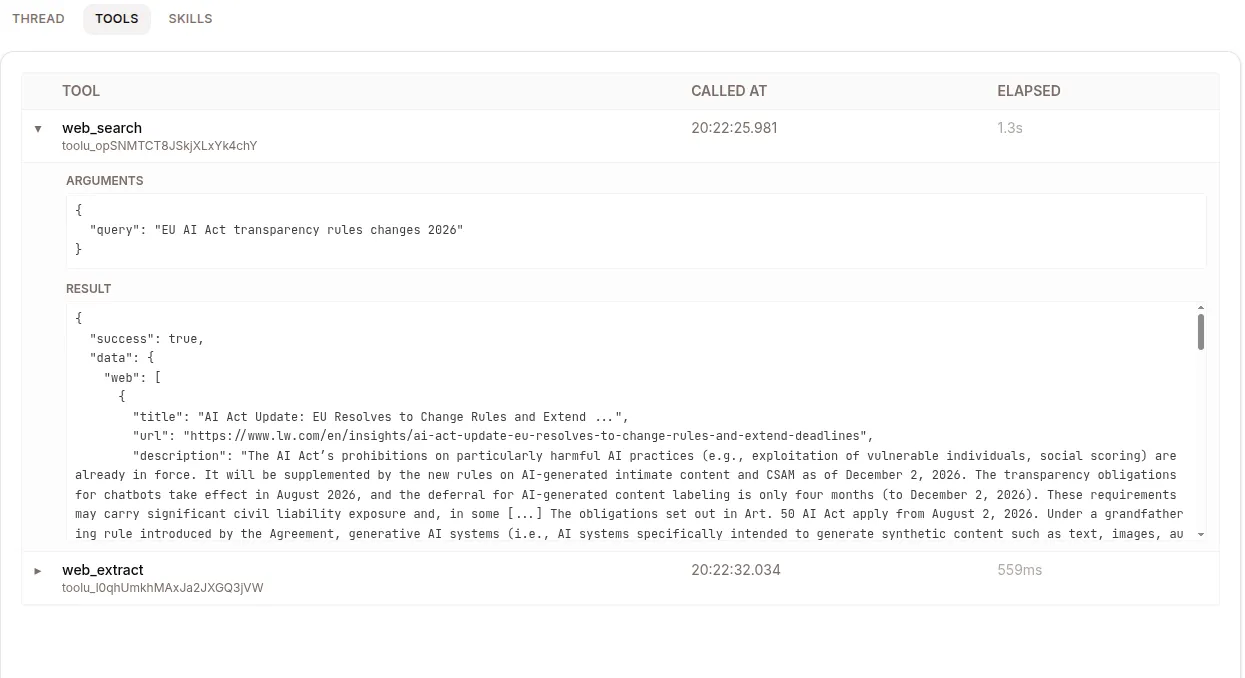
| Tab | Use it for |
|---|---|
| THREAD | The conversation as the user saw it. Markdown renders; artifacts display inline; files are downloadable. |
| EVENTS | Full ordered log of every event — user messages, LLM responses, tool calls, governance decisions. Your primary debugging surface. |
| TOOLS | Filtered to tool.call + tool.result. Fastest way to answer “what did the agent actually do?” |
| SKILLS | Which skills loaded into context, which the LLM invoked. Drift between the two is a signal: the skill loaded but didn’t fire = trigger keywords don’t match, or description is wrong. |
| POLICIES | Governance denials (policy.denied), plus allowed calls when the deployment enables governance.log_allowed. AI-disclosure events (disclosure.presented / disclosure.confirmed) appear in EVENTS. |
| METADATA | Counters (turns, tokens, cost, duration), the 7 quality flags, the agent’s frozen config snapshot at session start. |
All six are Develop-mode tabs. Work mode’s Sessions page shows only THREAD, TOOLS and SKILLS — open a session from Dev → Sessions when you need the audit three.
The Sessions list page has filters for: agent, status (Active / Completed / Failed / Archived), and chips for each quality flag (Denied, Overridden, Crashed, 👍, 👎). Filters compose into URL params, so you can bookmark a filtered view.
The 7 quality flags
Section titled “The 7 quality flags”These flip when corresponding events fire during the session:
| Flag | Set by |
|---|---|
| 👍 / 👎 | User feedback in the THREAD view |
policy.denied |
Governance gate blocked a tool call |
harness.crash |
The agent’s runtime crashed mid-session (rare) |
saga.compensated |
A multi-step rollback fired |
expert.override |
Base LLM rejected an expert’s answer |
expert.endorse |
Base LLM accepted an expert’s answer |
Use them to slice traffic. Combine on the Sessions list — “sessions in the last 7 days where saga compensated AND the user thumb-downed.”
Reading the EVENTS log
Section titled “Reading the EVENTS log”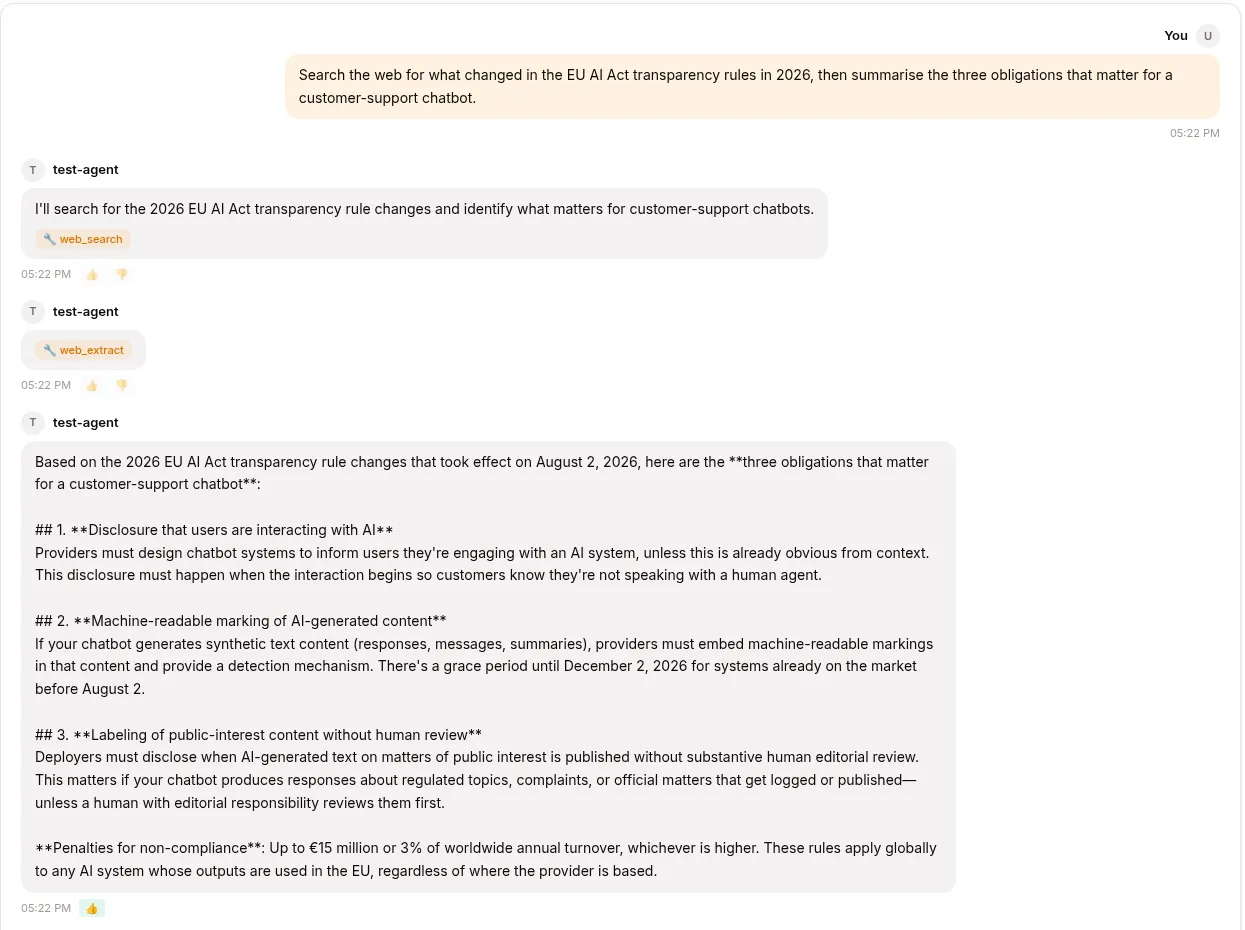
Each row is a typed event with a JSON payload. For the canonical list of event types and what their payloads contain, see Event types.
Failure-mode triage:
- Agent didn’t search the KB → SKILLS tab confirms the relevant skill loaded; if it did, check whether the
triggerkeywords match the user’s phrasing. - Agent searched but got bad results → TOOLS tab, expand
tool.resultforkb_read_page. Often the KB content is the problem, not the agent. - Agent looped → check iteration count in METADATA; the last few
llm.responseevents usually reveal the repetition pattern. - Tool was blocked → POLICIES tab; the denial reason is recorded.
- Saga rolled back → look at
saga.step_failed(the trigger) and thesaga.compensateevents that followed.
Export
Section titled “Export”| Destination | Where |
|---|---|
| Copy session URL | Shareable within your tenant |
| Export events JSON | Full event log as a .json file. Used for audits or offline analysis. |
| Add to dataset | Captures the session into a versioned dataset. Used to build training corpora — see Datasets. |
Per-channel sessions
Section titled “Per-channel sessions”Channel determines who can see / interact with the session:
| Channel | Session boundary |
|---|---|
| Web | Each “New chat” click. End user owns it. |
| Slack DM | One DM thread = one session. |
| Slack channel | Each @mention starts a thread-scoped session. |
| Telegram | DM thread or forum topic. |
| Website widget | One per visitor browser session (resumed via localStorage). Capped by Session Message Cap if set. |
| API channel | Each POST /v1/api/prompts = one session. Service-account owned; no inbox. |
API channel sessions are different
Section titled “API channel sessions are different”They have channel="api", no interactive user (service-account ownership) and no inbox surface. The service-account token fixes the agent — the request body carries no agent selector. Poll for the terminal status, then read the log:
import json, requests, time
BASE = "https://ops.surogate.ai/v1/api"H = {"Authorization": f"Bearer {sa_token}"}
# Recognised body fields: prompt, idempotency_key, metadata.resp = requests.post(f"{BASE}/prompts", headers=H, json={"prompt": "Analyse Q1.csv"})session_id = resp.json()["session_id"]
while True:    status = requests.get(f"{BASE}/sessions/{session_id}", headers=H).json()["status"]    if status in ("completed", "failed"):        break    time.sleep(5)
# Events are served as SSE — there is no JSON-list endpoint under /v1/api/.answer, etype = None, Nonewith requests.get(f"{BASE}/sessions/{session_id}/events", headers=H, stream=True) as r:    for line in r.iter_lines(decode_unicode=True):        if line.startswith("event:"):            etype = line.split(":", 1)[1].strip()            if etype in ("session.done", "stream.timeout"):                break        elif line.startswith("data:") and etype == "llm.response":            data = json.loads(line.split(":", 1)[1])            answer = data["message"].get("content") or answerprint(answer)
Three traps in that flow:
| Trap | What is actually true |
|---|---|
| Unknown body keys | agent_slug, context and friends are accepted and silently ignored — the session still runs against the token’s agent. |
| The final answer | An llm.response event, text at data.message.content. There is no assistant.final type. A turn emits several llm.response events (the intermediate ones narrate before a tool call), so take the last one. |
| Stream termination | session.done is emitted for completed / archived only. A failed session never terminates the stream — it idles until the 300s cap and closes with stream.timeout. A run longer than the cap needs a reconnect with ?after=<last event id>. |
Service-account tokens are honoured only under the /v1/api/ prefix — every other /v1/ path rejects them with a 403, and a user JWT is rejected on /v1/api/ in turn.
See Use cases → API channel for batch jobs for an end-to-end recipe.
Defining a goal programmatically
Section titled “Defining a goal programmatically”An API client sets a goal by posting a user.define_outcome event — not by sending /goal … as a prompt:
POST /v1/api/sessions/{session_id}/events{ "events": [ { "type": "user.define_outcome", "description": "Fix every failing test in tests/", "rubric": { "type": "text", "content": "The final response includes the passing pytest command" }, "max_iterations": 5 } ]}The endpoint is deliberately narrow: user.define_outcome is the only accepted type (anything else is a 422), and rubric is mandatory in exactly the {"type": "text", "content": "…"} shape. max_iterations defaults to 20 and is clamped to 1–20.
Do not send a user message as well. The handler persists the outcome on sessions.config['outcome'], appends the kickoff message itself, reactivates the session if it had already finished, and enqueues it — an extra message double-starts the work. See Goals for the evaluator’s verdicts and the iteration budget.
Sub-agent observability
Section titled “Sub-agent observability”A session can have children (via spawn_worker / delegate_task / spawn_task). The session detail shows:
- The Running panel in the sidebar — live sub-agent tree, auto-refreshes every 4s while children are active
- Per-child links — click to drill into the child’s own session
- The parent’s
delegation.*events showing what each child did
GET /v1/sessions/{id}/tree returns the full descendant graph (up to 200 nodes). It has no /v1/api/ alias, so it is JWT-only. Use it to build your own dashboards over sub-agent fan-out.
Retention
Section titled “Retention”Sessions are kept indefinitely by default — they’re the source of truth for compliance and training-data extraction. To delete a specific one: METADATA tab → Delete (soft delete; the row stays for audit but disappears from default views).