

Training
The Training page launches fine-tuning runs. Four methods can be created and started — SFT, DPO, GRPO and DISTILL — and the method picker offers exactly those four. Each is documented in depth below.
Studio vs. the engine. Pretraining (PT) and full-parameter fine-tuning are handled directly by the
surogateengine CLI (surogate sft/surogate grpoand friends) and are not exposed in the Studio training pipeline.PPOexists in the API schema but is rejected at run-create time with “PPO not yet supported”.
DPO and DISTILL both ride the SFT path rather than having a pipeline of their own: DPO is an SFT config plus a loss: {type: dpo} block over {prompt, chosen, rejected} rows, and DISTILL is an SFT config plus a distillation: block naming a teacher model. Run-create rejects either one if that block is missing.
The methods
Section titled “The methods”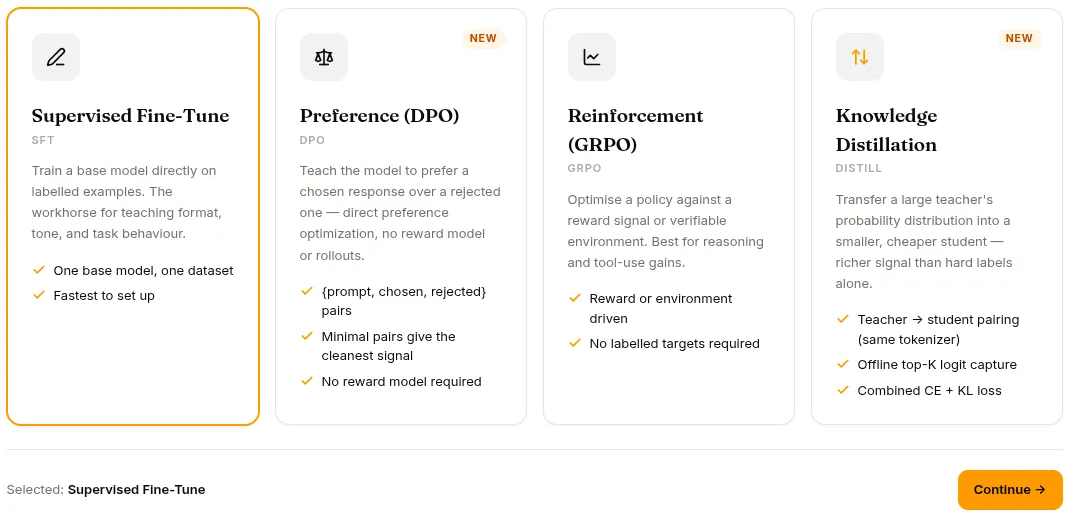
SFT — Supervised Fine-Tuning
Section titled “SFT — Supervised Fine-Tuning”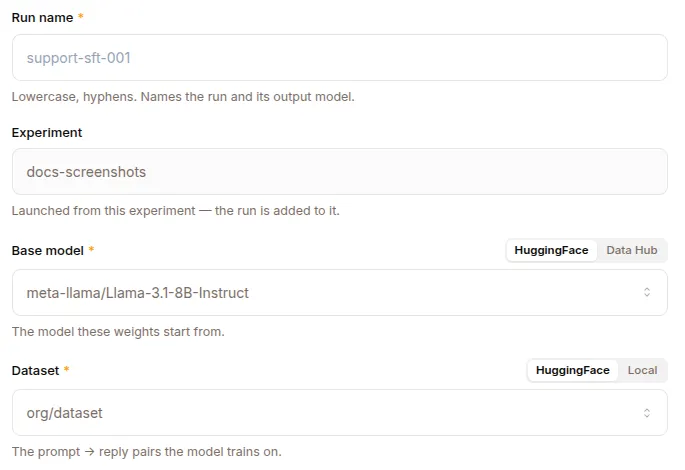
Standard supervised fine-tuning from labeled trajectories. Most common path.
Configuration:
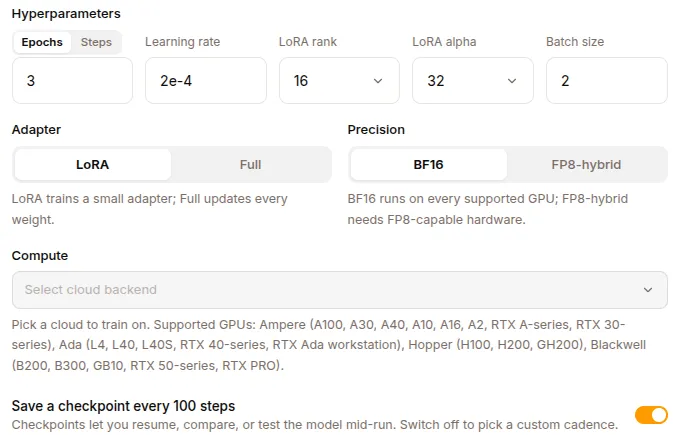
Method: SFTBase model: qwen2.5-coder-7b (a HF model id, or a Data Hub repo@ref)Dataset: my-conversations-2026q1 (a local Dataset, or an HF dataset id)Training parameters (carried in the run's config): - Epochs / max steps - Learning rate - Batch size - Precision: BF16 | FP8 | NVFP4 - Adapter: lora / qlora (set lora + lora_rank in config), or fullCompute: - Backend: dstack (kubernetes / cloud) or Modal - Accelerators: e.g. GPU:1, H100:8 - Spot instances + region (optional)The adapter choice (LoRA / QLoRA rank, or full) is not a dedicated form field — it’s carried in the run’s free-form config dict alongside the rest of the trainer settings, so the launcher can pass it straight through to the trainer.
Use when:
- You have a dataset of (input → expected output) pairs
- You want a model that mimics the patterns in your data
- The base model gets the right structure but wrong details
DPO — Direct Preference Optimisation
Section titled “DPO — Direct Preference Optimisation”Trains on preferences rather than on a single target answer. Each row gives the model a prompt with two completions — one preferred, one not — and the objective pushes probability toward the preferred one relative to a frozen copy of the base model.
DPO rides the SFT path: it is an SFT config plus a loss block, dispatched to its own trainer entrypoint (surogate dpo).
Configuration:
Method: DPOBase model: ...Dataset: rows of {prompt, chosen, rejected}Preference loss (config.loss): - type: dpo (required — run-create rejects a DPO run without it) - dpo_beta How hard to pull away from the reference model (> 0) - reference_free Score without a frozen reference copy - target_margin Required gap between chosen and rejected (needs reference_free) - length_norm Normalise by completion length - span_mask Score only the spans that differFour constraints are enforced before a run can start, and each mirrors the trainer:
- LoRA is required. Each pair is scored against the frozen base, so there has to be a base to freeze. A full fine-tune has no reference to compare against — use SFT for that.
per_device_train_batch_sizemust be even. A chosen/rejected pair is two rows, so an odd batch would split a pair across steps.target_marginrequiresreference_free: true. The margin is defined against a reference-free score.- Dataset entries are
type: preference, or carry no type at all. Any other value parses and then fails inside the container.
Use when:
- You have pairs of better/worse answers rather than single correct ones
- The quality you want is comparative — tone, helpfulness, style
- SFT gets the shape right but you want to push it away from a specific failure mode
GRPO — Group Relative Policy Optimisation
Section titled “GRPO — Group Relative Policy Optimisation”Reinforcement learning from rewards. Newer, more complex.
Configuration:
Method: GRPOBase model: ...RL Mode: Environment | RULEREnvironment: (Environment mode) — a registered environment with deterministic rewardsRULER judge: (RULER mode) — a dataset of prompts + a system prompt, scored by an LLM judgeGPU blocks: inference_blocks (vLLM) + trainer_blocks (+ judge_blocks for a colocated judge)Other RL hyperparametersUse when:
- You have a clear reward signal (math correctness, code compiles, …)
- The desired behaviour can be measured, not just imitated
- You want exploration beyond your training data
RL Modes
Section titled “RL Modes”The backend resolves exactly two GRPO reward paths:
- Environment — the run points at a registered verifiers environment (
config.environment_id) that computes deterministic rewards. Example: math problems where correctness is verifiable. - RULER — an LLM judge scores each rollout. The dialog supplies a dataset of prompts plus a system prompt (
config.ruler_task_args), which the platform wires into a built-inruler_taskenvironment. The judge can be external (your own OpenAI-compatible endpoint + API key) or colocated (a vLLM judge that runs on the training fleet and consumes its own GPU blocks). Good for subjective rewards (helpfulness, tone).
DISTILL — Knowledge Distillation
Section titled “DISTILL — Knowledge Distillation”Compresses a large teacher model into a smaller student by training the student to reproduce the teacher’s output distribution, not just the dataset’s answers. The teacher’s “nearly right” alternatives carry information a hard label throws away.
DISTILL rides the SFT path: it is an SFT config plus a distillation: block naming the teacher. Run-create rejects a DISTILL run without one.
The capture pass
Section titled “The capture pass”A distillation run has two phases, and the first is usually the longer one:
1. Capture The teacher is loaded and run once over the whole dataset. For every token it records its top-K next-token logprobs into a .kd sidecar file, stored alongside the tokenised shards.2. Train The student trains on those sidecars. The teacher is gone by now; it is not held in memory during training.Capture happens once, not per epoch, and its cost scales with the teacher’s size and the dataset, not with your epoch count. On a reference run a 1.7B teacher over ~295k tokens took about 100 seconds on one L4, against 70 seconds for the training that followed.
Two consequences worth planning around:
- The teacher must fit on one card. Capture loads the whole teacher onto a single device and does not shard it, so adding GPUs does not make a larger teacher fit. The run form warns when the teacher looks too large for the selected GPU.
- Sidecars are large. Roughly
6 × top_kbytes per token. At the defaulttop_k: 64that is ~384 bytes per token, which is far bigger than the token shards themselves — a 295k-token dataset produces about 113 MB. The storage table on the run form estimates this before you start.
Configuration:
Method: DISTILLBase model: the student — the model you are trainingDataset: any SFT-shaped datasetDistillation (config.distillation): - teacher_model Required. Must share the student's tokenizer. - top_k Logprobs stored per token, 1..1024 (default 64) - temperature Softens the teacher's distribution, > 0 - kd_weight Weight of the KD (KL) term, >= 0 - ce_weight Weight of the plain cross-entropy term. Defaults to 1 - kd_weight.The objective, and the two loss curves
Section titled “The objective, and the two loss curves”A distillation run minimises ce_weight × loss + kd_weight × kd_loss, and the run’s Overview shows both halves:
- KD Loss — how close the student is to the teacher’s distribution. This is the half distillation is for.
- Training Loss (CE) — plain cross-entropy against the dataset’s own answers, exactly as in SFT.
At the default 0.50/0.50 weights cross-entropy is only half the objective, and the Pure distillation preset (ce_weight: 0) takes it out entirely. So a climbing CE curve on a distillation run is not necessarily a failing one — check KD Loss, which is the half that matters.
Use when:
- You want a small model that behaves like a much larger one
- You have the larger model available and the budget to run it once over your data
- Plain SFT on the same data plateaus below the quality you need
Training run lifecycle
Section titled “Training run lifecycle”Creating a run and launching it are two separate steps: POST /api/training-runs records a queued run (and validates the request), then POST /api/training-runs/{id}/start submits it to compute. This lets you create a run, tweak its config, and only then launch.
1. Create Click NEW RUN, fill the form → a queued run is recorded2. Start Click START → pre-start validation runs, then GPUs are provisioned3. Run Training executes (5min to days depending on dataset + model size)4. Monitor Logs, metrics, rollouts, checkpoints via the run detail page5. Complete Final model lands in Models page as a new entry6. Optional Activate as an expert via the expert lifecycleTwo guardrails run at these boundaries:
- Plan-tier gating (402). If the project’s plan doesn’t include training, both create and start return
402with an “upgrade in Settings → Billing” message. - Pre-start validation (422). START runs the same validator that drives the frontend’s Start button; if the config has errors (missing GPU blocks, unset dataset, etc.) it returns
422and the run stays queued.
Experiments and the Data Hub
Section titled “Experiments and the Data Hub”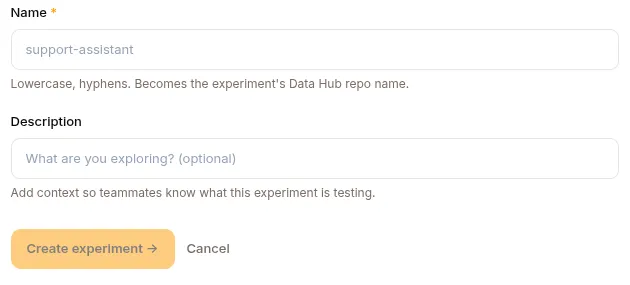
Every run belongs to an experiment, and each experiment maps to a repo in the Data Hub. Individual runs are branches in that repo — the platform creates the experiment repo on first use and a per-run branch at create time, then commits the run’s artifacts (checkpoints, metrics) to that branch as training progresses.
Run detail page
Section titled “Run detail page”The tab set depends on the method.
| Tab | What it shows | Methods |
|---|---|---|
| Overview | Status and progress, the loss charts, throughput, and the training log. A DISTILL run also charts KD Loss here | All |
| Configuration | Base model, hyperparameters, adapter and precision, compute. The method’s own card lives here too: Preference Loss for DPO, Distillation for DISTILL | All |
| Datasets | What it trains on | SFT, DPO, DISTILL |
| Checkpoints | Saved steps you can resume or merge from | SFT, DPO, DISTILL |
| Lineage | Where the weights and the data came from | SFT, DPO, DISTILL |
| Environment | The registered environment the run scores against | GRPO, Environment mode |
| Rollouts | Periodically sampled rollouts with prompt, completion, reward and advantage — from GET /api/training-runs/{id}/rollouts |
GRPO |
| Repository | Files and commits in the run’s Data Hub branch | All |
Stopping a run
Section titled “Stopping a run”STOP button on the run detail page (POST /api/training-runs/{id}/stop). This aborts the upstream dstack or Modal job and marks the run cancelled. Partial training is lost; checkpoints already committed are preserved. A failed or cancelled run can be started again from its detail page — the restart wipes prior metrics/logs/rollouts so the retry’s series don’t collide with the previous attempt.
RL Environments
Section titled “RL Environments”For GRPO Environment mode, you need a registered environment. The Hub has an Environments repo type for these.
An environment is a verifiers package, not a class implementing a gym-style step loop. It is a Python package whose __init__.py exposes a load_environment(...) function:
def load_environment(**kwargs): ... # returns a verifiers environmentThe platform stages that package into the training container before training starts, so a missing or unloadable environment stops the run early rather than part-way through.
There are two ways to get one:
- Fork a catalogue entry. The platform ships curated environments — grade-school maths, multiple choice, science questions, and calculator tool use. Picking one copies its implementation into your project as a new Hub repo, with its arguments in an editable
CONFIGdict beside it. From that point it is an ordinary environment of yours, and you can change it. - Bring your own. Push a verifiers package to an
Environmentsrepo in the Hub.
Constraints:
- An environment may import only what the trainer image already ships. There is no installer for an environment’s own dependencies, so a package needing something outside that set will not run.
REST API
Section titled “REST API”Runs live under /api/training-runs; experiments under /api/experiments. Create and start are separate calls, and there is no /cancel — use /stop.
| Method | Endpoint | Purpose |
|---|---|---|
GET |
/api/training-runs |
List runs |
GET |
/api/training-runs/{id} |
Run detail |
POST |
/api/training-runs |
Create (queued) — 402 if the plan lacks training |
POST |
/api/training-runs/{id}/start |
Launch — 422 if the config fails validation |
POST |
/api/training-runs/{id}/stop |
Stop / abort |
GET |
/api/training-runs/{id}/metrics |
Metrics series |
GET |
/api/training-runs/{id}/rollouts |
GRPO rollouts (prompt / completion / reward) |
GET |
/api/experiments |
List experiments |
POST |
/api/experiments |
Create an experiment (provisions its Hub repo) |
What’s next
Section titled “What’s next”Evaluations for testing what you trained.