

Telegram channel
Simpler than Slack — one bot token and you’re up.
What you need
Section titled “What you need”- Open Telegram, talk to
@BotFather. /newbot→ give it a name + username.- BotFather returns a token like
123456:ABC-DEF.... Save it.
Configuration in Surogate
Section titled “Configuration in Surogate”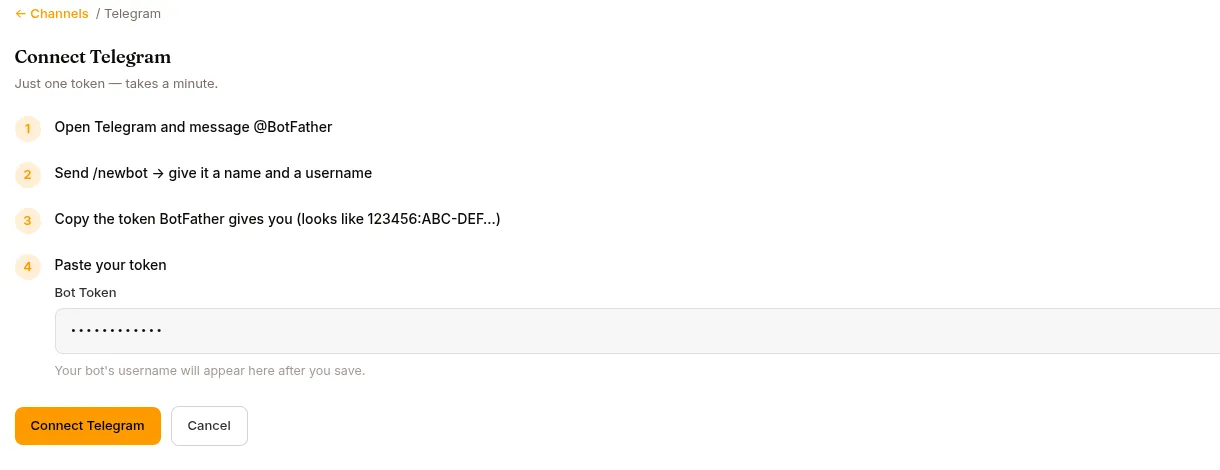
Open the agent → Publish in the left nav → the Channels tab → find the Telegram card → Connect. A short walkthrough (BotFather → /newbot → copy token) ends in a single Bot Token field. Paste the token and click Connect Telegram. Once connected, the bot’s @username is shown.
There is no separate save button — connecting and every later option change save automatically.
Options (the Telegram “Manage” screen)
Section titled “Options (the Telegram “Manage” screen)”Once connected, the Telegram card shows Manage. The options there auto-save as you change them:
| Option | What it does |
|---|---|
| Require @mention (default OFF) | Only replies in groups when @mentioned. Off = replies to every message in groups it’s added to. |
| Mode | Team member — members talk to a shared agent identity. Personal assistant — each user links their own Surogate account; unlinked users are prompted to link. |
| Reply Threading | First chunk only, All chunks, or Off — controls whether replies are threaded to the user’s message. |
| Message Reactions | Show processing status via emoji reactions. |
| Per-User Group Chats | Each user in a group gets their own chat. |
Photos, documents, audio and video are ingested automatically as attachments (up to 10 files / 20 MB per message), and a caption becomes the message’s text. Documents under 2 MB — PDF, Word, Excel, PowerPoint and text formats like CSV or Markdown — are read as text. Note: voice notes arrive as audio files; there’s no speech-to-text on this channel. Long replies are split at natural boundaries to fit Telegram’s 4,096-character message limit.
What users see
Section titled “What users see”If the agent’s AI disclosure is on (Configure → Governance), the disclosure text arrives as the first message of every new conversation — see Governance & AI disclosure.
Users find your bot in Telegram by its @username. They start a DM and just type. If the bot is in a group:
- It responds when @mentioned (if Require @mention is on)
- Or to every message, if you leave Require @mention off and add it to the group
Identity linking
Section titled “Identity linking”Same model as Slack — a (platform=telegram, platform_user_id=12345) row in the channel-identity table links Telegram users to Surogate users. In Personal assistant mode, unknown senders get an 8-character pairing code and a link to the agent app’s /link page (see Users); the linked identity shares the user’s per-user usage allowance across channels.
When the agent asks a question (ask_user_question), the user can answer via the widget or just type a reply — text matching a choice label selects it, anything else is recorded as “Other”. Questions expire after 30 minutes. On monetized agents, Telegram is a sellable channel: a buyer whose package excludes it gets a short notice with their buy link.
When the Telegram bot stops responding
Section titled “When the Telegram bot stops responding”The most common cause: another instance is consuming Telegram updates. Telegram only delivers each update once. If you have a dev environment also running with the same bot token, only one of them gets the messages. Stop the other.
Reconnecting and disconnecting
Section titled “Reconnecting and disconnecting”- Reconnect reopens the walkthrough so you can paste a new bot token.
- Disconnect stops the bot from replying on Telegram. Your bot token stays in place — reconnect anytime.
What’s next
Section titled “What’s next”For embedding chat on your website: Website widget.