

Data Hub
The Data Hub is Git for data. Every artifact your project produces — a skill, a dataset, a model, a knowledge base, a training experiment — is stored as its own versioned repository with branches, commits, and tags. The Hub is backed by surogate-hub, an open-source versioned object store, so a repo behaves like a git repo whose objects happen to be data files instead of source code.
Open it from Develop → Data Hub (/studio/hub). The page lists every repository in your active project; clicking one opens a browser for its files, history, branches, and versions.
A repository is identified as {namespace}/{name}, where the namespace is a stable, opaque per-project prefix (p- followed by the first eight characters of the project id — see core/hub/naming.py::project_hub_namespace). Everything you see in the Hub is scoped to the projects you’re a member of: GET /api/hub/repositories lists only repos under your projects’ namespaces.
What’s stored in the Hub
Section titled “What’s stored in the Hub”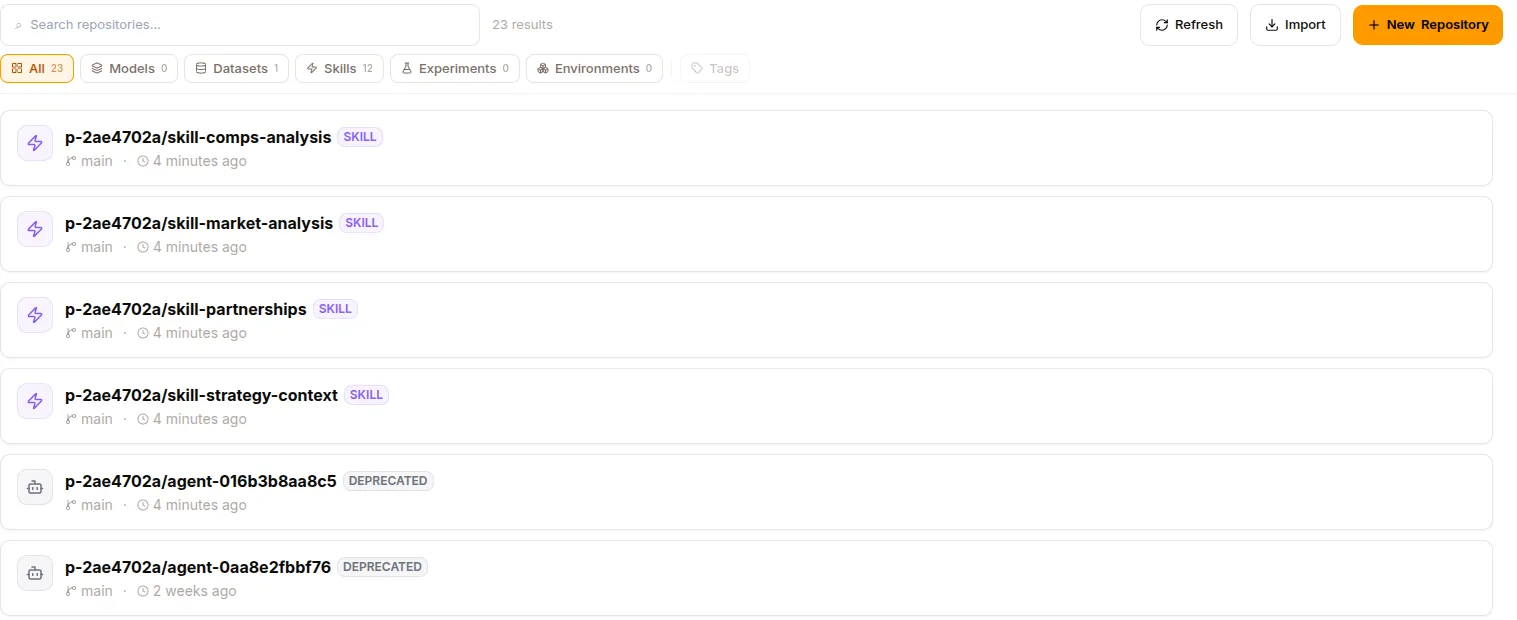
Every repo carries a metadata.type tag so the Hub UI and the rest of the platform can tell repos apart. The types are defined in core/hub/surogate_hub.py:
metadata.type |
Repo name pattern | Contents |
|---|---|---|
skill |
{ns}/skill-{name} |
Agent skills (and experts) |
dataset |
{ns}/ds-{uuid} (or import name) |
Versioned training corpora |
model |
{ns}/{import-name} |
Model weights + config |
knowledge_base |
{ns}/kb-{slug}-{id8} |
Compiled wiki + raw sources |
experiment |
{ns}/{slug}-{id8} |
Training runs (one branch each) |
environment |
{ns}/env-{id} |
RL / eval environment definitions |
agent |
{ns}/agent-{id12} |
Per-agent runtime bundle (internal; shown as Deprecated in the UI) |
The naming helpers all live in core/hub/naming.py. What each type actually stores, grounded in code:
Skills
Section titled “Skills”A skill repo holds a single SKILL.md at its root — YAML frontmatter (name, description, trigger, tags, allowed tools) plus the instruction body — alongside any supporting files the skill bundles. Serialization and the Hub write both go through core/hub/skill_md.py (SKILL_FILE_PATH = "SKILL.md"), so the copilot and the REST routes land identical files. When a shared-runtime agent is published, core/hub/agent_bundles.py copies each attached skill’s SKILL.md + supporting files into the agent’s bundle repo.
Experts
Section titled “Experts”An expert is a skill whose SKILL.md frontmatter carries type: expert (see render_skill_md in skill_md.py, which sets frontmatter["type"] = "expert" and adds base_model, model, endpoint, and generation config). It lives in a skill-typed repo — experts are not a separate repo type.
Datasets
Section titled “Datasets”A dataset repo stores its rows as Parquet: train/dataset.parquet with a co-located manifest.json, plus a train/data.parquet mirror that readers query (core/hub/datasets.py, constants DATASET_PATH, MANIFEST_PATH, MIRROR_TRAIN_SPLIT_PATH). Datasets created in-app get a ds-{uuid} repo; synthetic /collect runs append new examples and commit. Datasets imported from Hugging Face keep the import-chosen name.
Models
Section titled “Models”A model repo holds the model’s files — weights plus config.json / generation_config.json (read back by core/hub/model_info.py::parse_hub_ref + config reader). Models are created by importing from Hugging Face (Import) or produced by training. The repo name comes from the import (hub_repo_id), not a fixed pattern; the import task tags it type: model (core/compute/managed_tasks.py).
Knowledge bases
Section titled “Knowledge bases”Each knowledge base is a repo (kb-{slug}-{id8}, metadata.type = knowledge_base). Raw uploads land under raw/{source_id}/{filename}; the compiled wiki lives under wiki/ with index.md (table of contents), summaries/ (one page per source), and concepts/ (cross-document synthesis with [[wikilinks]]). Compiles run on a transient compile-<job_id> branch and merge into main on success, so main always reflects the live wiki agents query (core/hub/knowledge.py). Manage these from the Knowledge Bases page rather than editing files directly.
Training experiments
Section titled “Training experiments”An experiment is a repo (metadata.type = experiment); each training run is a branch (run-{slug}-{id8}). While a run executes it writes artifacts to its own branch; on a terminal transition the monitor commits the branch and tags it with the run name — that tag is the permanent, immutable handle to that run’s artifact set. The repo README.md accumulates a bullet per completed run under a ## Training Runs heading (core/hub/training.py).
Environments
Section titled “Environments”An environment repo (env-{id}, metadata.type = environment) stores the definition of an RL / evaluation environment (core/hub/environments.py).
Anatomy of a repository
Section titled “Anatomy of a repository”Every repo — regardless of type — exposes the same git-like structure:
- Objects (files) — the artifact contents, addressed by path.
- Commits — the version history on a branch.
- Branches — parallel lines of work.
mainis the default; experiments fork per run, KB compiles fork per job. - Tags — immutable named versions (
v0.1.0, a training run name, an agent bundlev1/v2). - Refs — a branch or tag id; a
refis what you pass to fetch objects/commits at a specific version.
Artifacts are referenced elsewhere in the platform with a hub_ref string of the form namespace/repo@branch[:sub], where :sub optionally points at a folder or a single file (core/hub/hub_ref.py). A model attached to a serving deployment, a skill attached to an agent, or a dataset attached to a training run is stored as one of these refs — pinning both the repo and the exact branch/tag.
The repo detail page
Section titled “The repo detail page”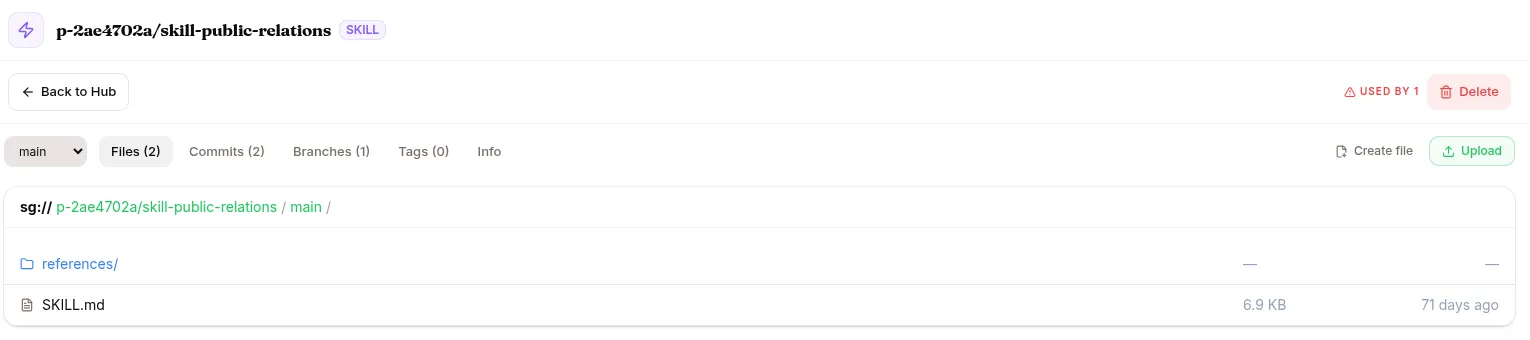
Click any repo on the Hub to open its explorer. Across the top:
- a URI breadcrumb for navigating up the object tree, and
- a ref combobox grouping Branches and Tags — switch it to view the repo at any version.
Below that, tabs:
- Files — the object listing for the current ref and directory (name, size, count). Click a file to view it inline: Markdown renders, code highlights, images preview, and structured data displays as a table.
- Commits — history for the current ref, with author, message, and relative time.
- Branches — the branch list; selecting one switches the view.
- Tags — the versioned tags.
- Info — repo metadata (id, type, default branch, tags).
When you select a tag (an immutable, read-only ref), the branch and tag tabs collapse to a single Commits view, since there’s nothing to fork from a tag.
Model repos additionally show a lineage sidebar and a Train button that opens a fine-tune dialog pre-filled with {repo}@main as the base model.
Why versioned data matters
Section titled “Why versioned data matters”Versioning is what makes agent improvement durable and auditable:
- Reproducibility — a session records which version of each skill, KB, and model it used (skill bundles are tagged
v1,v2, … on every publish, and the runtime fetches by version — seeagent_bundles.py). If a problem shows up, you can re-run against the exact same versions. - Rollback — every version is preserved as a commit or tag. Roll a skill or model back to a known-good version without losing the newer one.
- Bisect a regression — because a
hub_refpinsrepo@branch-or-tag, you can point an agent back at a specific historical version and re-ask the failing question to see whether a change caused it. - Audit — the commit log and tags are an immutable record of what changed, when, and by whom — for training runs, the run name tag is the permanent handle to that run’s outputs.
Operations
Section titled “Operations”Create a repository
Section titled “Create a repository”Hub → New Repository → pick a type (Skill / Dataset / Model / Experiment / Environment) → name + optional description → create. The repo is initialised with a main branch. On the Free plan only Skill repos can be created; models, datasets, experiments, and environments require a plan with the dev toolkit (the create route returns 402 otherwise).
Import from Hugging Face
Section titled “Import from Hugging Face”Hub → Import → paste a HF repo id, choose model or dataset, set the destination path and branch → import. The import runs as a background job (track it in Compute → Workload Queue); files are pulled and committed to the target branch, and the repo is tagged type: model or type: dataset.
Branch
Section titled “Branch”Branches let you iterate without touching production. Create a feature branch off main, edit, test, then merge.
curl -X POST "http://localhost:8888/api/hub/repositories/{namespace}/{repo}/branches?branch=feature/refactor-prompt&source=main"Tag a commit
Section titled “Tag a commit”Publishing a skill or completing a training run tags the relevant commit automatically. You can also tag by hand:
curl -X POST "http://localhost:8888/api/hub/repositories/{namespace}/{repo}/tags?tag=v0.2.0&commit=<commit-id>"Delete a repo
Section titled “Delete a repo”Hub → repo → Delete. A pre-flight in-use check runs first: if a dataset or skill owns the repo, or a deployed model sources from it, the delete is refused and you’re pointed at the owning page (server/routes/hub.py, core/hub/repo_in_use.py).
REST API
Section titled “REST API”Mounted at /api/hub (server/app.py). Repo path params are {namespace}/{repository}; a legacy single-segment form is also accepted.
| Method | Endpoint | Purpose |
|---|---|---|
GET |
/repositories |
List repos across your projects |
POST |
/repositories?project_id= |
Create a repo |
GET |
/repositories/{ns}/{repo} |
Repo detail |
DELETE |
/repositories/{ns}/{repo} |
Delete (in-use pre-flight) |
GET |
/repositories/{ns}/{repo}/in-use |
List rows bound to this repo |
GET POST |
/repositories/{ns}/{repo}/branches |
List / create branches |
GET DELETE |
/repositories/{ns}/{repo}/branches/{branch} |
Get / delete a branch |
GET POST |
/repositories/{ns}/{repo}/tags |
List / create tags |
GET DELETE |
/repositories/{ns}/{repo}/tags/{tag} |
Get / delete a tag |
GET |
/repositories/{ns}/{repo}/refs/{ref}/commits |
Commit history on a ref |
GET |
/repositories/{ns}/{repo}/commits/{commitId} |
Single commit |
GET |
/repositories/{ns}/{repo}/refs/{ref}/objects/ls?prefix= |
Directory listing |
GET |
/repositories/{ns}/{repo}/refs/{ref}/objects?path= |
Object stat |
GET |
/repositories/{ns}/{repo}/refs/{ref}/objects/content?path= |
Object content (text or image) |
POST DELETE |
/repositories/{ns}/{repo}/branches/{branch}/objects?path= |
Upload / delete an object |
POST |
/repositories/{ns}/{repo}/branches/{branch}/commits?message= |
Commit staged writes |
POST |
/repositories/{ns}/{repo}/branches/{branch}/reset-staging |
Discard uncommitted writes |
GET |
/repositories/{ns}/{repo}/branches/{branch}/diff |
Staged/uncommitted paths |
GET |
/projects/{project_id}/storage |
Per-project Hub storage usage |
What’s next
Section titled “What’s next”Datasets and Models for the two most common Hub repo types, Training for what produces experiment repos, and Knowledge bases for the compiled-wiki repos.