

Sessions
Every conversation is a session — fully recorded and inspectable. Open the Sessions page to review what your agent did: when something looks wrong, or to find good examples for improving your agent.
Find a session
Section titled “Find a session”Two paths:
- Per-agent: open an agent → click into past sessions on the left sidebar.
- Global: the Sessions nav item shows every session in your tenant.
In the global view:
Left rail: pick an agent (or "All agents")Top filters: Status combobox (All / Active / Completed / Failed / Archived) Filter chips: Denied · Overridden · Crashed · 👎 · 👍Search box: title, ID, modelThe filter chips are your shortcut to finding specific kinds of sessions:

- 👎 — sessions a user thumbed-down (problems)
- 👍 — sessions a user thumbed-up (good examples)
- Denied — sessions where the governance gate blocked a tool call
- Crashed — sessions where the agent’s runtime crashed
- Overridden — sessions where a rater thumbed-down an expert’s answer
The session detail page
Section titled “The session detail page”
Click a session → the detail view, with its tabs across the top. Work mode shows three:
| Tab | What it shows |
|---|---|
| THREAD | The conversation as the user saw it. Markdown renders, artifacts display, files are downloadable. |
| TOOLS | Only the tool calls and their results. |
| SKILLS | Which skills loaded into the session, and which the agent actually used. |
The three audit tabs — EVENTS, POLICIES and METADATA — are deliberately Develop-mode-only. Open the same session from Dev → Sessions to get them, along with multi-select and Add to dataset. They’re documented in Sessions (Develop mode).
THREAD — what the user saw
Section titled “THREAD — what the user saw”The cleanest view. If you want to share a session with a teammate, copy the link from this tab.
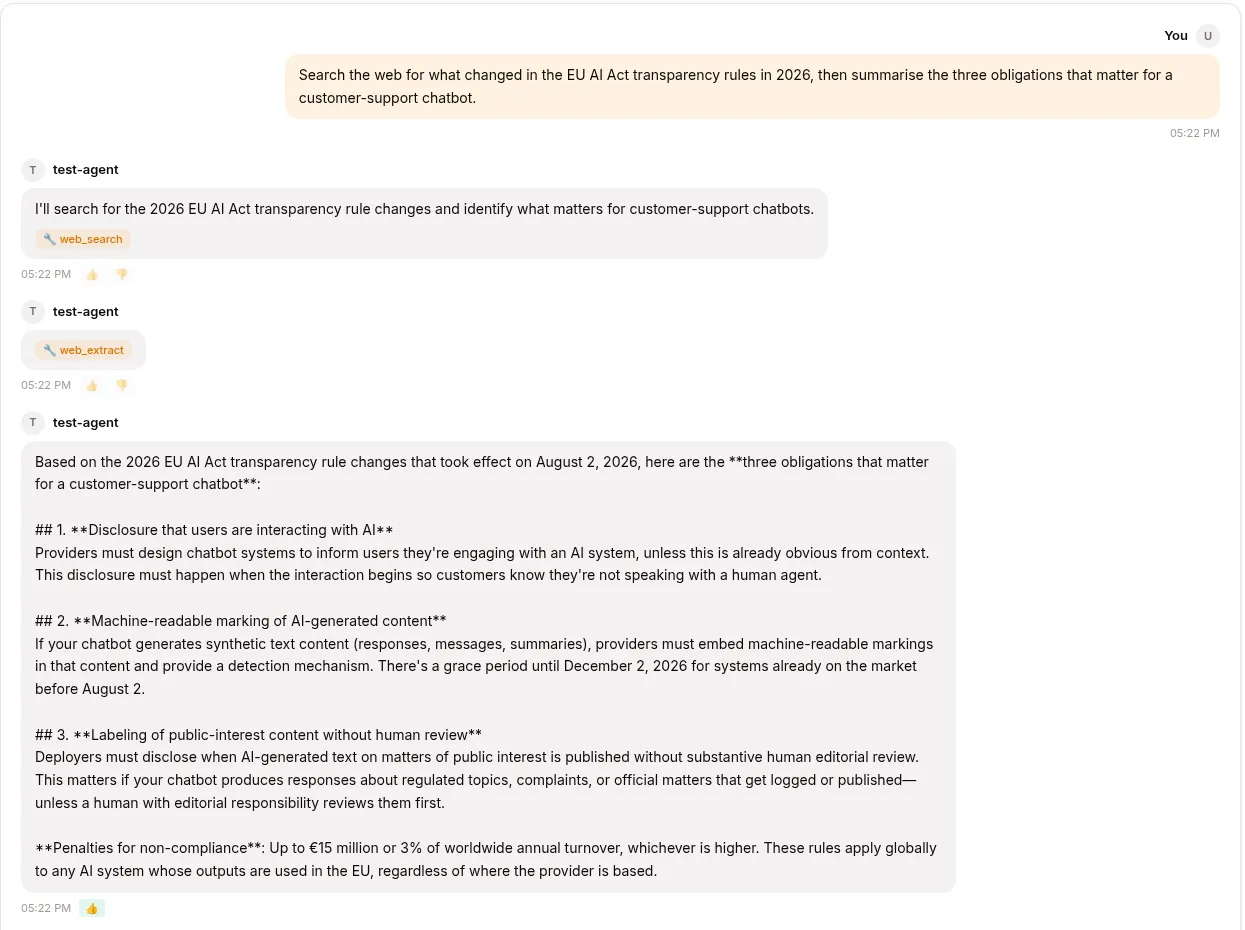
You can also click 👍 / 👎 on any assistant turn. The mark becomes a quality flag on the session and feeds into training-data extraction later.
EVENTS — the full story
Section titled “EVENTS — the full story”When the THREAD doesn’t tell you why something happened, switch to EVENTS:
12:43:01 user.message "What's the refund policy?"12:43:02 llm.request model=surogate-default, tokens_in=124712:43:04 llm.response "Let me check that..." tokens_out=1812:43:04 tool.call kb_read_page("billing/refund-policy") tool_call_id=tc_112:43:05 tool.result "Refunds within 30 days..." tc_112:43:06 llm.request tokens_in=142912:43:08 llm.response "Our refund policy is..." tokens_out=14612:43:09 session.completeThe user-visible answer is the last llm.response — the earlier ones narrate before a tool call.
You’ll spot whether the LLM understood the question, whether it searched the right KB, whether tool calls succeeded.
TOOLS — just the calls
Section titled “TOOLS — just the calls”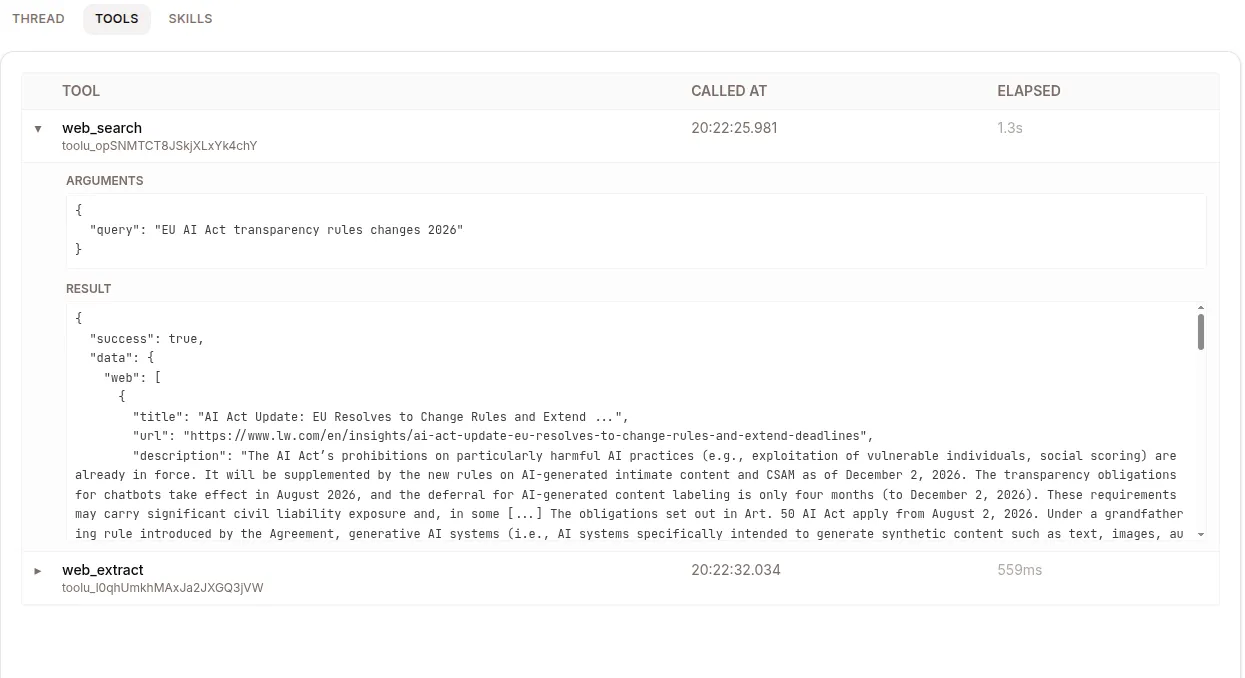
When you specifically care about what the agent did (not what it said), this tab filters out everything except tool calls and results.
Each row shows tool name, arguments (the JSON the LLM sent), result, duration, and status (success / error / denied by governance / saga-compensated).
SKILLS — what loaded vs what fired
Section titled “SKILLS — what loaded vs what fired”A subtle but useful distinction:
- Loaded — the skill appeared in the agent’s context (its description was visible to the LLM)
- Invoked — the LLM actually triggered it
If a skill loaded but never fired, the LLM didn’t think it was relevant. Possibly the description is too vague or the trigger keywords don’t match how users actually phrase requests. You can fix those in the Skills library — see Skills.
POLICIES — governance decisions
Section titled “POLICIES — governance decisions”Every policy.denied event — a tool call the governance gate blocked — is listed here with the tool, reason, and timestamp. Not every one is a hard block: a call held for human approval is denied first and shows a matching policy.allowed once someone approves it. Allowed calls are logged too (as policy.allowed) when the deployment enables governance.log_allowed. Useful for compliance audits (“which agents tried to do destructive things, and were any of them allowed through?”).
The AI-disclosure evidence trail (disclosure.presented when a messaging channel posts the notice, disclosure.confirmed when a web user accepts the banner) lives in the session’s EVENTS tab — see Governance & AI disclosure.
METADATA — counters and quality flags
Section titled “METADATA — counters and quality flags”Counters Turns: 6 User messages: 3 Assistant messages: 3 Tool calls: 7 Tokens in: 12,841 Tokens out: 1,203 Cost: $0.024 Duration: 2m 14s
Quality flags ✓ thumbs_up ✗ thumbs_down ✗ policy.denied ✗ harness.crash ✗ saga.compensated ✗ expert.override ✗ expert.endorseThe seven quality flags drive everything downstream:
- 👍 / 👎 — user feedback you set
policy.denied— governance blocked somethingharness.crash— the runtime died mid-sessionsaga.compensated— a multi-step rollback firedexpert.override— an expert’s answer was thumbed-down, by a person in the UI or by an automated judgeexpert.endorse— an expert’s answer was thumbed-up, by either of the same two
Filter the Sessions list by any combination of these to slice your traffic.
Export
Section titled “Export”Copy session URL from the THREAD tab to share a session with a teammate — only people in your tenant can open it.
The rest lives in Develop mode. Dev → Sessions adds a checkbox per row and an Add to dataset action that captures the selected transcripts into a dataset; the full event log is on that view’s METADATA tab. See Datasets for what to do with them.
Sessions across channels
Section titled “Sessions across channels”A session can have messages from multiple channels — a user starts on Web, continues on Slack. The session detail shows them in order with a small channel badge per message.
Sessions retention
Section titled “Sessions retention”By default sessions are kept forever (compliance, training-data extraction). Mostly that’s free — the storage is dominated by event log rows.
If you need to delete a session (GDPR right-to-be-forgotten, customer data lifecycle), use the trash icon beside it in the agent’s session list, or the METADATA tab in Develop mode. Soft-deletes the row. For bulk deletes by date, ask your admin.
What’s next
Section titled “What’s next”You’ve reviewed a session and have opinions about it. Now improve the agent: Improve your agent.