

Knowledge Bases
A knowledge base (KB) is the agent’s searchable library. Where a skill teaches the agent how to do something, a KB tells it what it knows.
When to use a KB
Section titled “When to use a KB”✅ Good fits:
- Product documentation, user guides, FAQ articles
- Internal wikis (Notion, Confluence, GitHub markdown)
- Past customer-support tickets and their resolutions
- Policy documents, SOPs, contracts
- Domain reference material (legal, medical, regulatory)
❌ Bad fits:
- Real-time data — use a tool or MCP server instead (current weather, current stock price)
- Per-user history — that’s what session memory is for, not the KB
- Behaviour rules — that’s a skill
- The agent’s identity — that’s SOUL.md
How a KB works
Section titled “How a KB works”You add SOURCES (files, URLs, etc.) ↓ ┌─────────────────────────────┐ │ Curator (an LLM) │ │ reads every doc, │ │ extracts structured │ │ knowledge, deduplicates │ └─────────────┬───────────────┘ │ COMPILE ↓ ┌─────────────────────────────┐ │ WIKI — searchable index │ │ per-source pages + a │ │ cross-source synthesis │ └─────────────┬───────────────┘ │ ↓ Agent calls kb_list_pages / kb_read_page at runtimeThe curator is an LLM that reads your raw documents and produces a structured wiki. At runtime the agent doesn’t read the raw documents — it searches the curated wiki. Much cleaner than naive chunk-retrieval RAG.
Creating a KB
Section titled “Creating a KB”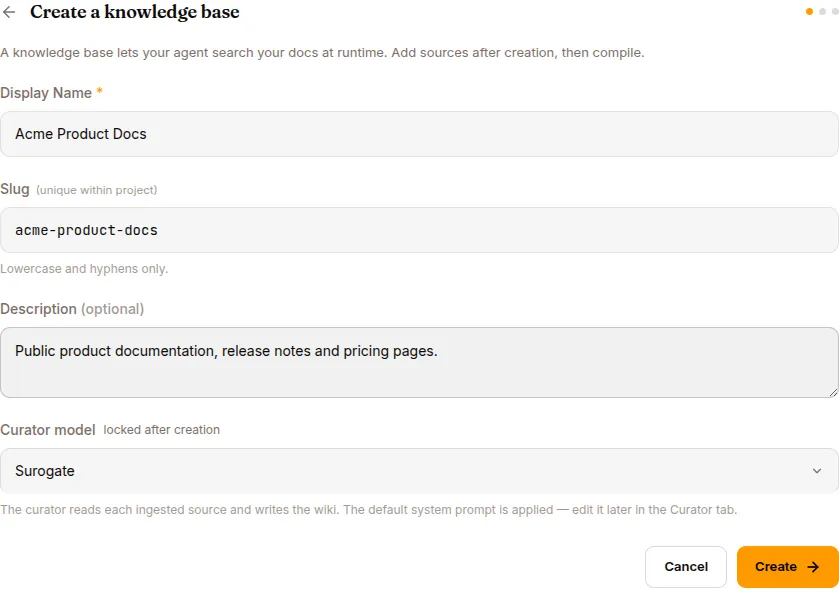
Library → Knowledge Bases → NEW KNOWLEDGE BASE
Fields:
- Name —
acme-product-docs - Description — what’s in here, who should use it
- Curator model — locked at creation, can’t be changed later. The default is fine for most uses. Pick a smarter model (e.g. Claude Sonnet) for highly technical content.
Click CREATE. The KB starts in error status — that’s normal until you add sources and compile.
Adding sources
Section titled “Adding sources”Open the KB → SOURCES tab → ADD SOURCE.
Five source types are listed in the picker. Only File works in the current build — the others (S3, GitHub, Notion, URL crawling) are coming soon.
So: drop your most important .md, .pdf, .txt, .docx, or .csv files in one at a time. Each one becomes a row in the SOURCES table with its own status.
Compiling
Section titled “Compiling”Click COMPILE NOW (or the COMPILE button at the top of the KB detail).
What happens:
- The curator job starts.
- Each source is read, parsed, and analysed.
- The curator extracts structured knowledge — facts, definitions, procedures.
- Duplicates are merged.
- A per-source wiki page is generated, plus a cross-source synthesis index.
- KB status:
error→compiling→active.
Compile takes 30 seconds to a few minutes per source.
When compile fails
Section titled “When compile fails”A single bad file no longer takes the whole compile down: healthy sources continue through the pipeline and a wiki is still produced from them, while each failing file shows its own error message inline in the SOURCES list with a per-file retry.
Read the status carefully, though — the KB still reports error when any file failed. That now means “at least one source failed”, not “nothing was built”: check the WIKI tab, it’s often already usable.
If a file shows an error:
- Retry it — many failures are transient, and files a dead compile left locked are requeued automatically, so retry never dead-ends.
- Reduce source size — split big documents.
- Check format — corrupt PDFs and non-UTF-8 markdown sometimes choke the parser.
- Read the inline error — it names the actual reason per file.
If failures persist, switch to Develop mode for the deeper troubleshooting steps.
Browsing the wiki
Section titled “Browsing the wiki”After a successful compile, the Wiki pages stat card on the KB detail becomes clickable (whole card, amber hover) and opens the wiki. The WIKI tab shows:
- Synthesis pages — cross-source (“Pricing across all products”, “All known issues by severity”)
- Per-source pages — organised by content, not by original file boundaries
- A search box — same one the agent uses
The page list highlights the selected page in amber, and the reader renders pages as a full-width selectable document. Preview what the agent will see before attaching the KB. Search for what a real user might ask. If the right page surfaces, the agent will too.
On monetized agents, KBs are also a sellable package dimension — a buyer whose package excludes a KB can’t see or search it. See Monetize.
Attach a KB to an agent
Section titled “Attach a KB to an agent”Open the agent → Configure in the left nav → the Knowledge Bases tab → + ATTACH KNOWLEDGE BASE → pick the KB.
The agent’s system prompt grows by:
## Available Knowledge Bases
- acme-product-docs: Product documentation, runbooks, known-issues database.  Browse via kb_list_pages("acme-product-docs"), then kb_read_page(path).
Plus the agent gains kb_list_pages and kb_read_page as available tools. The LLM uses them automatically — you don’t need to write a skill to invoke them.
Updating a KB
Section titled “Updating a KB”Two patterns:
Append a new source: SOURCES → ADD SOURCE → upload → COMPILE.
Replace existing content: delete the old source (row action → Delete), add the new file, COMPILE.
Sources don’t auto-sync from their origin. For frequently-changing content, wait for the S3 / GitHub / Notion / URL source types to ship — they’ll have continuous-sync.
Detach and delete
Section titled “Detach and delete”- Detach from an agent — agent’s Configure → Knowledge Bases tab → DETACH. The agent loses KB-tool access for this KB on the next session.
- Delete the KB entirely — KB detail → DELETE. A pre-flight check warns you if any agent has it attached.
A worked example
Section titled “A worked example”You have a product, acme-shop, and you want a customer-support agent to know your product cold.
- Create a KB
acme-product. - Add sources:
getting-started.md,pricing.md,faq.md,known-issues.csv. - COMPILE. Wait. Status:
active. - Browse the WIKI → confirm relevant content surfaces for typical questions.
- Deploy a new agent (Templates page → Start from scratch → fill in the dialog) or pick an existing one.
- Open the agent → Configure → Knowledge Bases tab → attach
acme-product. - Open a chat → ask: “What’s included in the Pro plan?”
- Watch the EVENTS tab — you’ll see a
tool.callforkb_read_page, then a grounded answer.
For the full multi-step recipe with screenshots, see Use cases → Product-support agent with a KB.
What’s next
Section titled “What’s next”If you have an MCP-protocol external system to connect to, read MCP servers. Otherwise jump to Use cases for end-to-end recipes.