An open process
An instance’s page shows where a BPMN process is, the tasks that are yours to work, who holds the others, what it waits for, its diagram, its data and its history, and a chat with the process agent. When the project uses the Surogate document system, it also lists the instance’s DMS documents. For supervisors it also shows what needs them and offers Retry and Cancel. It keeps itself current as the instance changes. Open an instance from the Processes page, the Work page, a case it started or waits on, or a link a colleague sends.
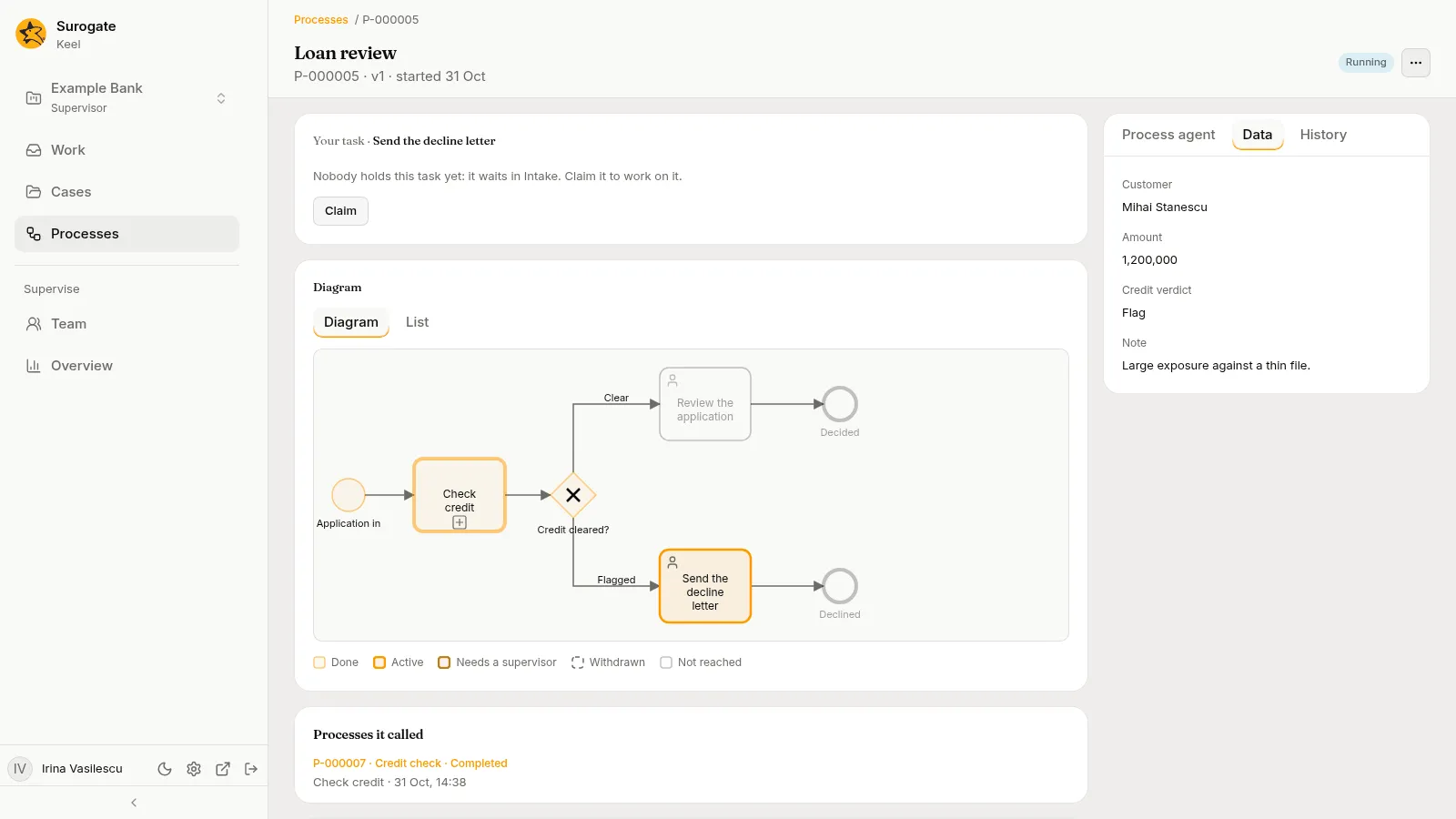
Keel records each time someone opens an instance.
The header
Section titled “The header”- A breadcrumb: Processes / the instance number.
- The process’s name, and under it the number, the version and the start day, such as
P-000001 · v1 · started 20 Oct. - The status: Running, Completed, Ended, Failed or Cancelled. A failed instance says which error ended it and where: “Ended in error code at place.”
- For supervisors, on a running instance, More actions with Move to version 3…, when the process has a newer version than the one the instance runs, and Cancel the process…. See Move to the current version and Cancel a process.
A case that started the instance shows Started by, with the case, over the rest. A process that called it shows Called by, with the calling instance, such as P-000001 · Loan decision.
With nothing to work or wait for, the page says “Nothing waits on people now.” on a running instance and “This process has ended.” on an ended one. A link to an instance that does not exist, or that is not this project’s, says This process does not exist, or it is not this project’s with Back to processes; when Keel cannot read it, This process could not be loaded with Try again.
Needs a supervisor
Section titled “Needs a supervisor”Supervisors see this card first when a task or a timer needs them. Nobody else sees it. A member of the staff who is no supervisor reads the same incidents on the task’s Now card and in Waiting for, without a button.
Each row names the task or the timer and says what happened:
| What happened | The row says | What a supervisor can do |
|---|---|---|
| An agent task whose agent failed for good | “Agent could not finish it.” | Retry |
| A call to a system that failed for good | “Its call to system failed.” and each attempt of the call: Attempt 1, its time and how it went (The system did not answer in time, The system was unavailable, Refused by the system or The system could not complete this) | Retry |
| A call that may have reached its system before it failed | The same, and “Its call may have reached system before it failed: check system before you retry.” | Retry, which asks first |
| A timer that could not fire | “It could not fire. Cancel the process to end it.” | Cancel the process |
Retry a task
Section titled “Retry a task”Retry starts the task again: a call is made again as a new call, and an agent task starts its agent in a fresh run. Keel says “Retried task.” and the page reads the instance again.
A call that may have reached its system asks first, since a retry calls the system again: Retry task? says “Its call may have reached system before it failed. A retry calls system again.” Check the system, then press Retry, or Cancel.
When another supervisor retried the task already, Keel says “Nothing to retry: the task has no incident now.” and the page reads the instance again. Any other refusal shows in the same toast.
Your task, and Now
Section titled “Your task, and Now”Each open task that is yours shows as a card, Your task, with its form, as a case’s step does: Submit completes it, Return to queue gives it back, and Claim takes a task that waits in one of your queues. Every other open task shows as a Now card with who holds it. Tasks that agents work or draft show what the agent does and what you may do about it. See Working a process’s tasks.
A task that runs for each item has one card for each instance that is open, headed by its number and how many there are: Your task · Approve · 2 of 3 when it is yours, Now · Approve · 2 of 3 when it is another’s. Under the name the card shows the instance’s item, such as “Member: ann”: the label of the variable that holds it, then its value (a choice by its label). A task with no item variable shows none. Each card is worked as any task is, with its own form, its own goal and deadline and its own holder; you can hold several. When the task says each person completes one instance at most, and you completed one, another of yours is refused with “Someone else must finish this step.” When a completion would start more than 100 instances, it is refused with “This would run a step more than 100 times. Ask your supervisor.” A task that runs one after another shows one instance at a time: the next opens when the one before it completes.
Waiting for
Section titled “Waiting for”Waiting for lists the timers, the messages, the signals, the cases, the processes it called, the calls and the tasks that run for each item that the instance waits on, such as “Cool off · due 20 Oct, 10:00”, “Documents · waits for the message Documents” or “Check the bureau · calling Bureau”. A message wait addressed by a key says it: “Documents in · waits for the message Documents arrived for Claim number CL-2041”, and, while the key’s variable holds no value yet, “Documents in · waits for the message Documents arrived sent to this instance (it holds no Claim number yet)”; an event subprocess’s message says it the same way, such as “Withdraw · starts when the message Withdrawn for Claim number CL-1 arrives, stopping the rest”. A signal wait, on a catch event, a branch of an event-based gateway or a boundary event, reads “Rates · waits for the signal Rates changed”; an event subprocess’s signal reads “Freeze · starts when the signal Rates changed arrives, stopping the rest” when it stops the rest and “Freeze · starts each time the signal Rates changed arrives” when it runs beside it. A call that failed for good reads “Check the bureau · its call to Bureau failed: a supervisor retries it or cancels the process”; a timer that could not fire reads “Pause · could not fire”. An event subprocess that waits to start reads when: “Escalate · starts 20 Oct, 10:00, stopping the rest” for a timer that stops the rest of the process or subprocess, “Escalate · starts 20 Oct, 10:00” for one that runs beside it, “Escalate · starts when the message Documents arrives, stopping the rest” for a message that stops the rest and “Escalate · starts each time the message Documents arrives” for one that runs beside it; a timer that could not fire reads “Escalate · could not fire”. An event subprocess that starts on an error waits for nothing anyone can see, so it is not listed. A task that runs for each item reads how far it is, such as “Approve · 1 of 3 done”; a call, a case or a process one of its instances waits on is named with the instance, such as “Check the bureau · 2 of 3 · calling Bureau”. A case it waits on shows the case, linked to its page. A call activity shows the process it called, linked to its instance, such as Check credit · P-000002 · Credit check · Running, or “waits for its process to start” until Keel starts it. Under it, “It could not start: …” says why Keel could not start the process, and “Keel could not take its end: …” why the instance, which still waits, could not take how the process ended.
Cases it started
Section titled “Cases it started”An instance whose tasks started cases lists them under Cases it started, oldest first: each case by its number, its case type’s name and how it stands, such as CL-000001 · Claim · Open, linked to the case, with the task that started it and when. A start that started nothing reads, for example, Claim · Not started, with why. The list reads again on each change. An instance that started no case shows no Cases it started.
Processes it called
Section titled “Processes it called”An instance whose call activities called processes lists them under Processes it called, oldest first: each by its number, its process’s name and how it stands, such as P-000002 · Credit check · Completed, linked to its instance, with the call activity that called it and when. A call that started nothing reads, for example, Credit check · Not started, with why. The list reads again on each change. An instance that called no process shows no Processes it called.
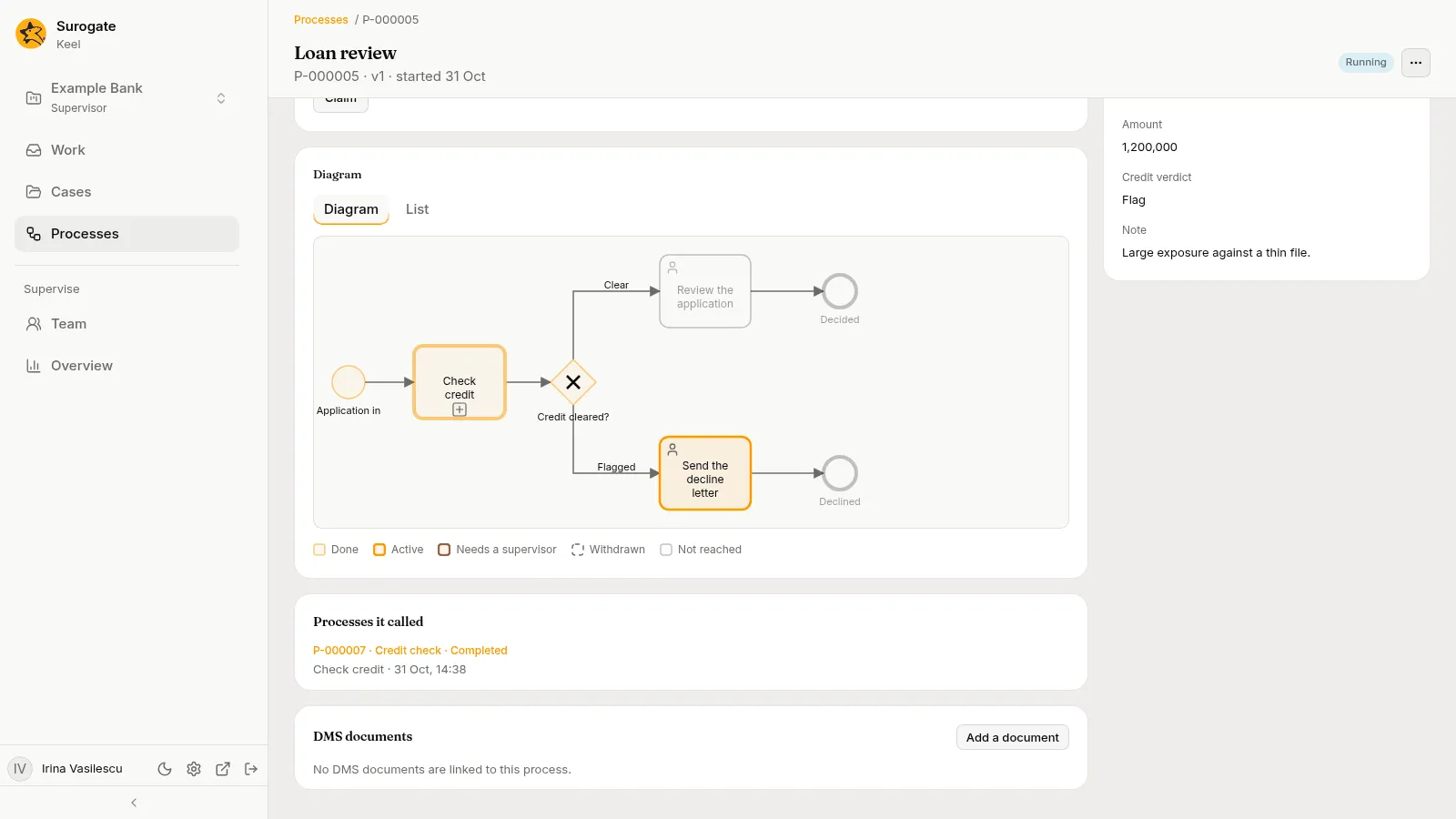
DMS documents
Section titled “DMS documents”When the project uses the Surogate document system (the DMS), the page has a card DMS documents. In a project that does not use it, the card is not there.
The card lists the DMS documents linked to the instance, newest first, as you may read them in the DMS: Keel asks the DMS with your own sign-in, so the list holds only the documents the DMS lets you open. Each row shows the document’s title and, under it, its type when it has one, its state in the DMS (Draft, Validated, Approved, Published or Archived), its current version with its file name, and when it was added, such as Contract · Approved · v2 loan-agreement.pdf · Added 31 Oct. Press the title to open the document in the DMS, in a new tab. Under the list, a line counts the linked documents you cannot open, such as “2 documents you cannot open.” Show more loads the next documents when there are more than 50. The card reads the list again each time the instance changes.
With no document linked, the card says “No DMS documents are linked to this process.”
Add or remove a document
Section titled “Add or remove a document”Add a document, and Remove under each document, show only while the instance is running, and only to a supervisor or to a person with a task of this instance: a task they hold, or one that waits in one of their queues. Everyone else sees the list without them.
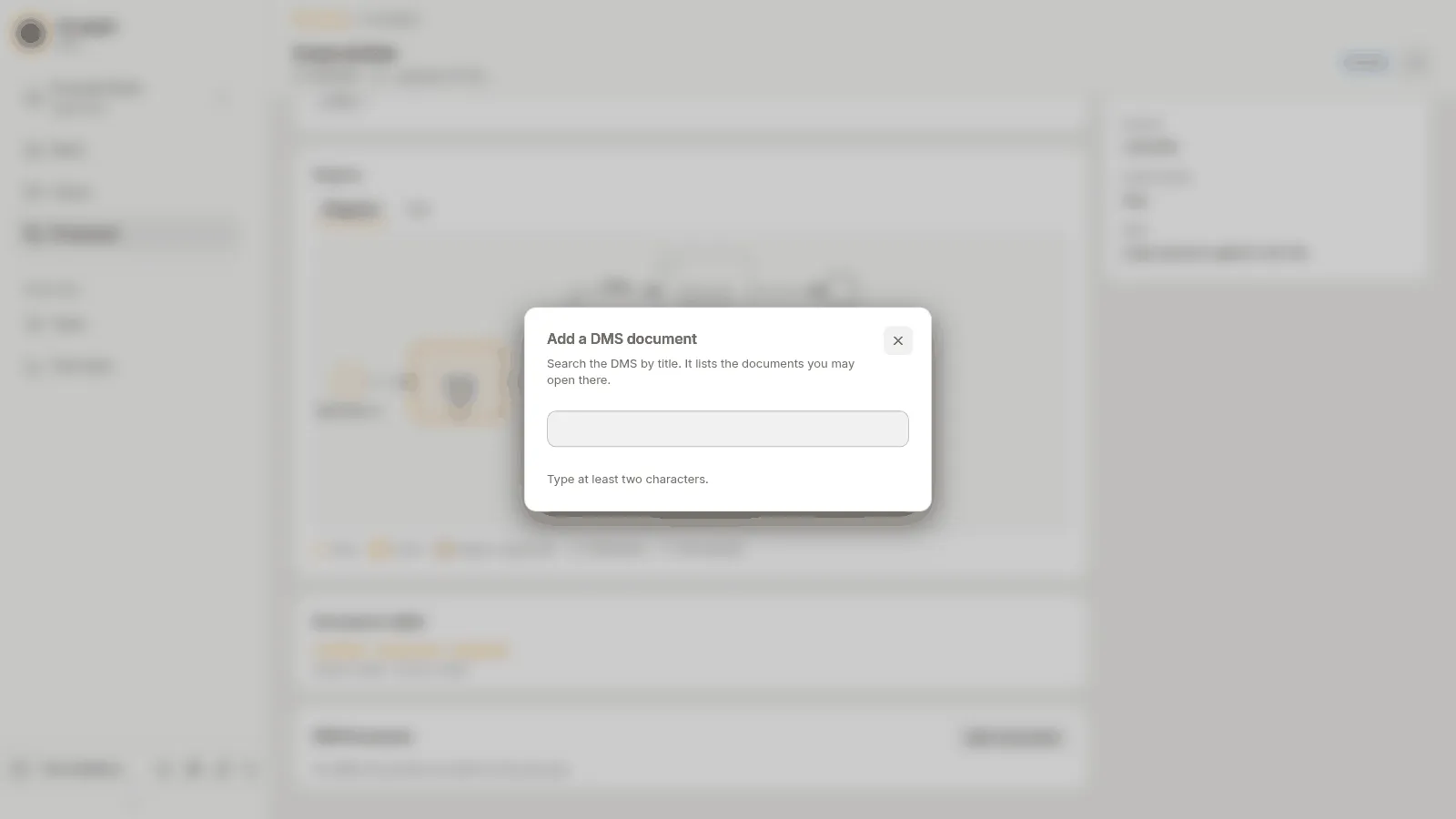
- Press Add a document. The dialog Add a DMS document says “Search the DMS by title. It lists the documents you may open there.”
- Type at least two characters of the title. Until you do, the dialog says “Type at least two characters.” The search runs when you pause typing.
- Each document found shows its title, its folder, its state and its current version. More results loads the next ones. With no match, the dialog says “No document matches.”
- Press Add beside the document. Keel says “Added.”, or “It was already in this process.” when it was linked already, closes the dialog and lists the document.
The document is linked in your name, with your DMS sign-in.
To remove a document, press Remove under it. Keel asks Remove title from this process? and says “The document stays in the DMS.” Press Remove to confirm. The DMS has its own rules for its documents: when it refuses a change, Keel shows its words, such as “The DMS does not let you do this with this document.”
When the DMS refuses or does not answer
Section titled “When the DMS refuses or does not answer”The card then shows the reason in place of the list:
| The card says | What to do |
|---|---|
| “You are not a member of the DMS’s organisation, so it lists no documents for you. Ask an administrator.” | Ask an administrator to add you to the DMS. The card offers no Try again. |
| “The DMS did not accept your sign-in.” | Press Try again. |
| “The DMS did not answer. Try again shortly.” | Wait a moment, then press Try again. |
In the dialog, a search the DMS cannot read says “The DMS cannot read this search. Use plain words, and close any quote or bracket.”
The diagram
Section titled “The diagram”The Diagram card draws the process as its file lays it out, with how far the instance got. It has two tabs, Diagram and List; on a phone, List comes first.
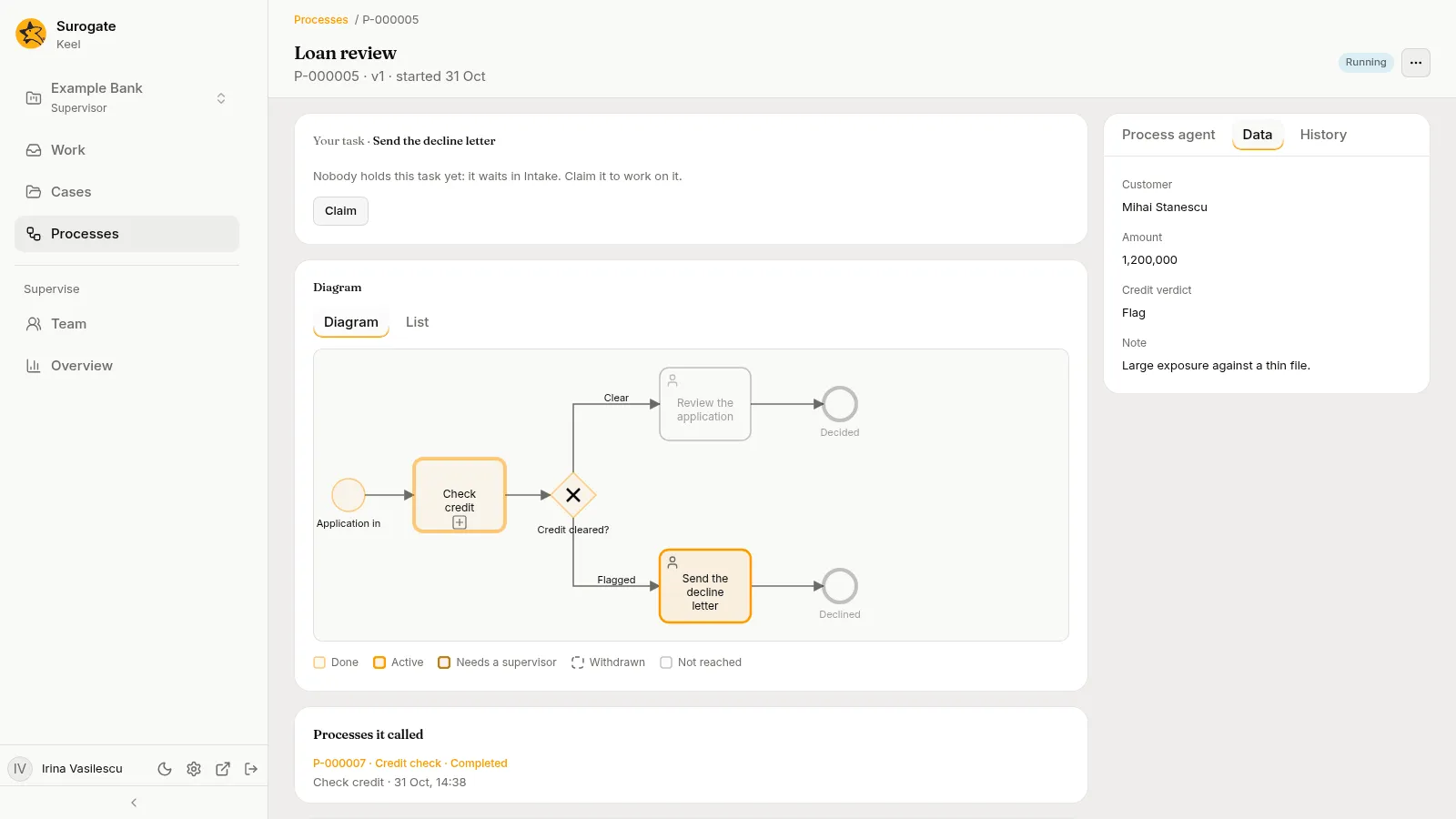
Diagram draws each element where the file puts it, scaled as the file scales it, in a box that scrolls. Pools and lanes show with their names. A mark shows what each element is: a person for a user task, a hand for a manual task, a robot for an agent task, a cog for a call to a system, a folder for a task that starts a case, a box with a thick border and a plus for a call activity, a table for a business rule, an envelope for a message, a clock for a timer, a triangle for a signal, a bolt for an error. An event subprocess is drawn as a subprocess with a dotted border; its start event carries the mark of what starts it, a clock, an envelope, a triangle or a bolt, and a dashed ring when it runs beside the rest instead of stopping it. A collapsed event subprocess carries that mark at its top left. Gateways show as diamonds marked with a cross, a plus, a bold circle or a ring. An element’s colour says how far the instance got:
| Colour | State |
|---|---|
| Amber, light | Done |
| Amber, strong | Active: the instance is at it now |
| Red | Needs a supervisor: the task holds an incident |
| Dashed grey | Withdrawn: something took it away, such as a timer that interrupted the task |
| Dotted amber outline, no fill | Waiting to start: an event subprocess that has not started and still can |
| Dimmed | Not reached |
The legend under the drawing names the states, and Waiting to start only when the drawing holds an event subprocess. A timer on a task that does not interrupt it draws with a dashed ring, whatever its state. A signal’s triangle is outlined where the event waits for the signal, and filled where it sends it: on a throw event, and on an end event that sends a signal. Pausing on an element shows its name and its state, such as “Review the loan · Active”. A call activity is Active while the process it called runs, and Done once it ended. A task that runs for each item is drawn with BPMN’s marker, three bars at the bottom of the task: vertical bars when its instances run all at once, horizontal bars when one after another (a call activity keeps its plus beside them). It is Active while any of its instances is open, Needs a supervisor while one holds an incident, and Done once it completed, an empty list included, or once one of its instances did. It is Withdrawn when something took it away before any instance completed, such as a timer that interrupted it, an error caught on it, a terminate end event or a cancel: one withdrawn after an instance completed reads Done, as an element a loop completed once does. An element a loop reaches again is Active, not Done. An event subprocess is Waiting to start while its trigger waits and no run of it is open, and that outranks Done and Withdrawn, since it can start again; Active while a run of it is open, and while any task inside one is; Done once a run of it completed; and Withdrawn when a run of it was taken away before any completed. Active and Needs a supervisor outrank Waiting to start. One that never started and cannot now, because the process or subprocess around it ended or another event subprocess stopped it, reads Not reached. A gateway where paths meet is Active while it waits for the paths still running, and a path a gateway did not take stays Not reached. The lines carry no colour: Keel does not record which line a run took.
List says the same in words. It groups the elements, leaving out pools, lanes, groups and notes, under Needs a supervisor, Active, Waiting to start, Done, Withdrawn and Not reached, in the file’s order, each as “name · kind”:
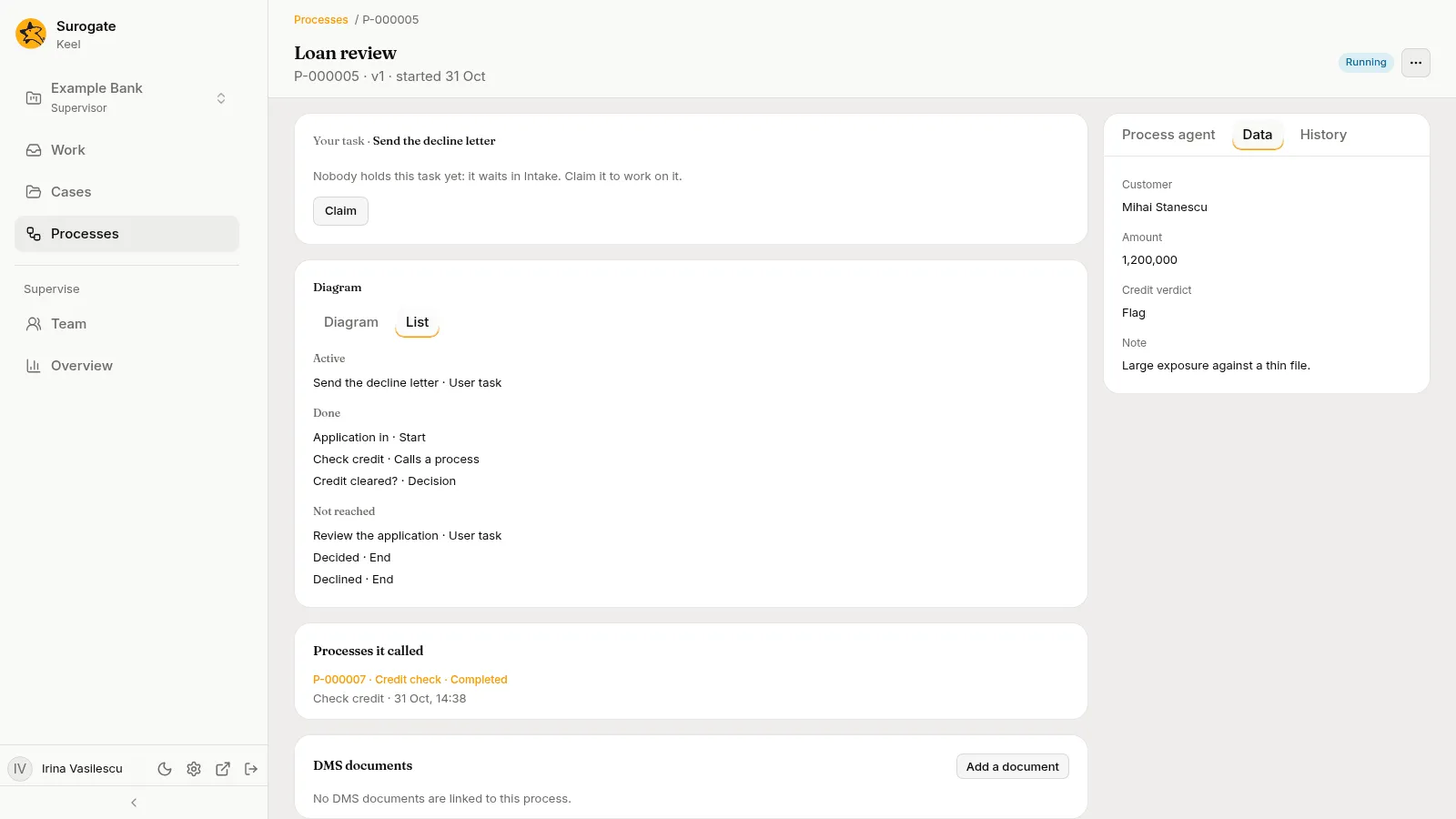
| Kind | Reads |
|---|---|
| A start event | Start |
| An end event | End, End that stops every branch, End with an error or End that sends a signal |
| A throw event | Sends a signal |
| A timer, a message or a signal an instance waits for | Timer, Waits for a message, Waits for a signal |
| A timer, a message, a signal or an error on a task | Timer on a task, Message on a task, Signal on a task, Error on a task |
| A subprocess | Subprocess |
| An event subprocess | Starts on a timer, stopping the rest, Starts on a timer, alongside the rest, Starts on a message, stopping the rest, Starts on a message, alongside the rest, Starts on a signal, stopping the rest, Starts on a signal, alongside the rest or Starts on an error, stopping the rest |
| The start event of an event subprocess | Start on a timer, Start on a message, Start on a signal or Start on an error |
| A user or a manual task | User task, Manual task |
| An agent task, or a call to a system | Agent task, System call |
| A task that starts a case | Starts a case |
| A call activity | Calls a process |
| A business rule | Business rule |
| A receive task | Waits for a message |
| A gateway | Decision, Parallel paths, One or more paths or Waits for the first event |
A task that runs for each item adds how it runs after its kind: Several at once or Several, one after another, such as “Approve · User task · Several at once”.
A process whose file draws nothing says “This process’s file has no diagram layout.” When Keel cannot read the diagram, the card says why with Try again.
The diagram shows names and places only: never a condition, a check, a connection, or an agent’s tools or knowledge.
Process details: Data and History
Section titled “Process details: Data and History”The side panel, beside the tasks on a wide screen and under them on a phone, has three tabs: Process agent, Data and History. The instance opens on Data; the address keeps the tab, so a link can open the History or the Process agent.
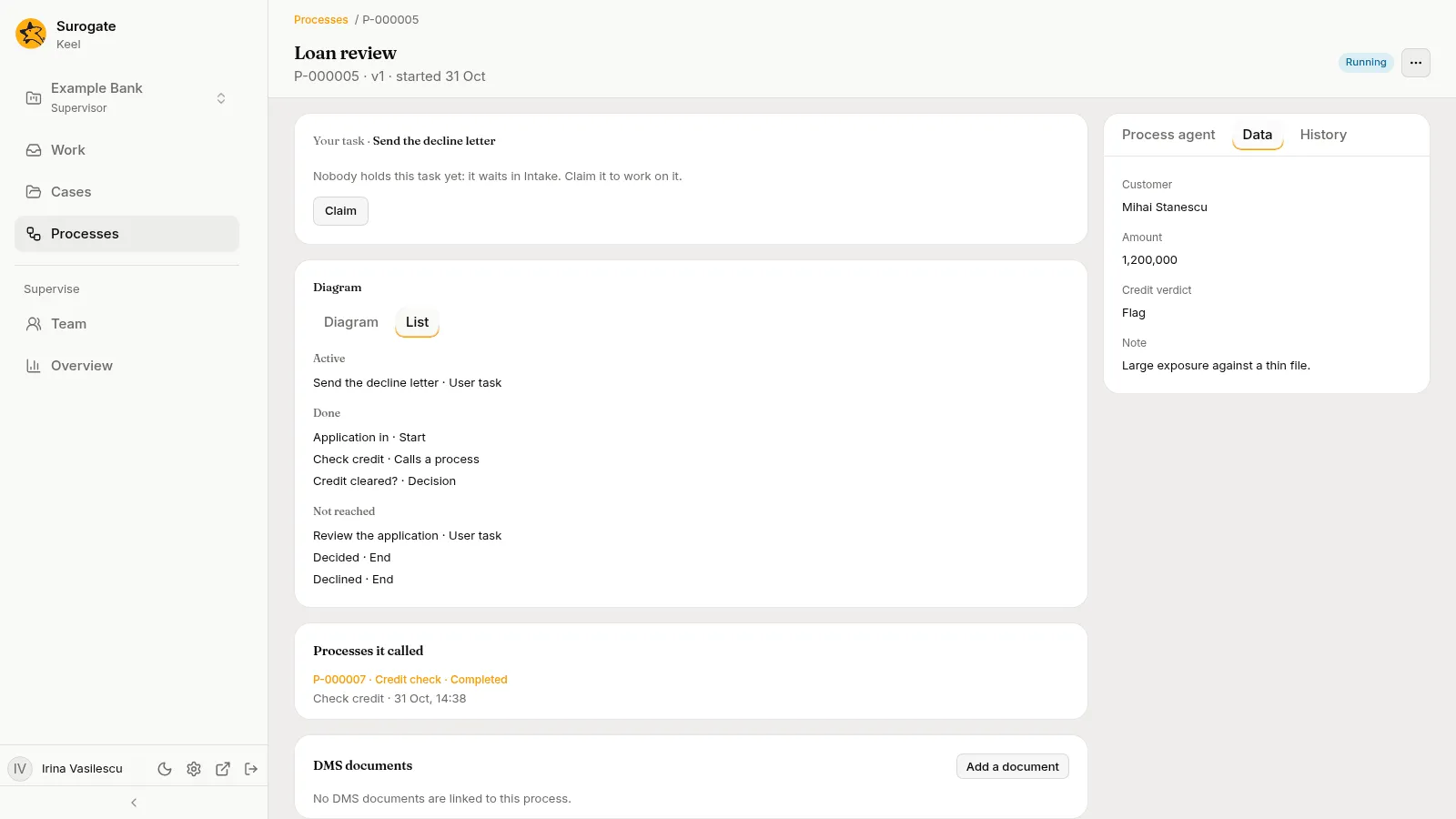
- Process agent: your chat about the instance. See The Process agent tab.
- Data: each variable by its label and value, or “No value” when it holds none. With no data, “No data yet”.
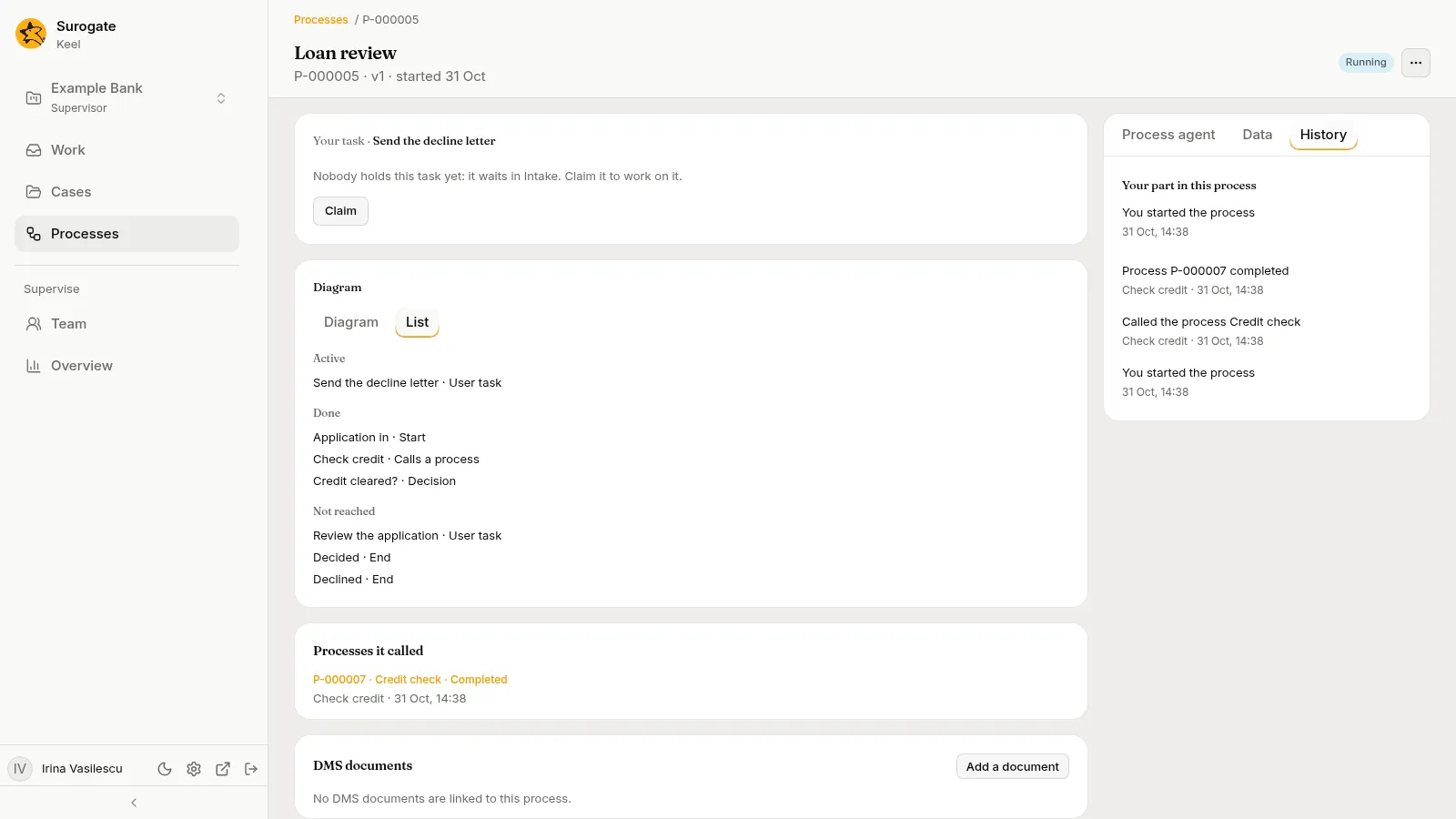
- History:
- Your part in this process first: what you did, latest first, or “You have not worked on this process yet”.
- Then everything that happened, latest first, each as a sentence with where and when, such as “Mihai Ionescu finished Review the loan” under
Approve the loan · 20 Oct, 10:00. A task a person finished with values an agent drafted adds “Agent drafted fields” under it. People who have left the staff are still named.
| History says | When |
|---|---|
| “Who started the process” | The instance started. |
| “Who finished task”, at the outcome | A person or an agent completed a task. |
| “Agent drafted task”, at the outcome | An agent drafted a task for its person. |
| “Who asked for a revision: note” | A person asked a drafting agent to revise. |
| “Who wrote to the agent: text” | Someone messaged an agent at work. |
| “Agent raised a hand: question”, and “Who answered: answer” | An agent asked, and was answered. |
| “Agent could not finish its draft” | A drafting agent failed. The person works alone. |
| “Agent was off: people work task” | A task started while its agent was switched off. |
| “Task failed: a supervisor retries it or cancels the process” | A task holds an incident. The reason stays out of the sentence. |
| “Who retried task” | A supervisor retried it. |
| “Timer fired”, “The message Name arrived” or “Who sent the message Name” | A timer fired, or a message came. |
| “Element sent the signal Name” | A throw event or a signal end event sent a signal. |
| “Who sent the signal Name”, “The signal Name arrived from P-000003” or “The signal Name arrived” | A signal came: one a person or a system sent to the project, one another instance sent, or one with no sender to name. |
| “Boundary caught the error code” | An error boundary caught an error. |
| “Event subprocess started, stopping the rest of the process”, “Event subprocess started, stopping the rest of subprocess” or “Event subprocess started” | An event subprocess started: one that stops the rest of the process, one that stops the rest of the subprocess it is in, or one that runs beside the rest. It follows “Timer fired”, the sentence of the message or the signal that came, “Element sent the signal Name” when the instance sent the signal itself, or “Start event caught the error code”. |
| “Task applied rule vn” | A business rule task applied a rule. |
| “Requested a case of case type”, then “Case number closed”, “Case number failed” or “The case could not start” | A task started a case, and how it ended. A closed case names its resolution. |
| “Called the process process”, then “Process number completed”, “Process number ended”, “Process number ended in error code”, “Process number was cancelled” or “The called process could not start” | A call activity called a process, and how it ended. |
| “The process completed”, “The process ended at element” or “The process ended in error code at element” | The instance ended. |
| “Started 3 instances of task”, or “Task had nothing to run” | A task that runs for each item was reached, with its items, or with an empty list. |
| “All 3 instances of task completed”, “The instance of task completed”, “Task completed” or “Task ended early: 2 of 3 instances completed” | The task ended: every instance completed, its only instance, none to run, or its completion condition held and the instances still open were withdrawn. |
| “Who moved the process to version 3”, or “The process moved to version 3” | A supervisor moved the instance to the current version, or a builder’s move of the running instances did. |
| “Who cancelled the process: reason” | A supervisor cancelled it. |
Every line about an instance of a task that runs for each item names the instance, such as “Ann finished Approve · 2 of 3”. An element that was only entered or passed, a gateway taken, a missed goal and the like are not told. The values written are in Data, and the history never shows an incident’s reason. With nothing to tell, the tab says Nothing yet. When Keel cannot read the history, the tab says why.
The Process agent tab
Section titled “The Process agent tab”The Process agent tab is your own chat with the project’s case agent about this instance. The project’s staff see it. It is the first tab of the side panel; an instance still opens on Data.
The tab says: “Ask about this process. The process agent answers from its data, tasks, waits and history, and drafts into your form when you ask. Nothing is sent until you submit.” Once your chat has a session, the line names the agent by its own name, such as “Case agent”, in place of The process agent.
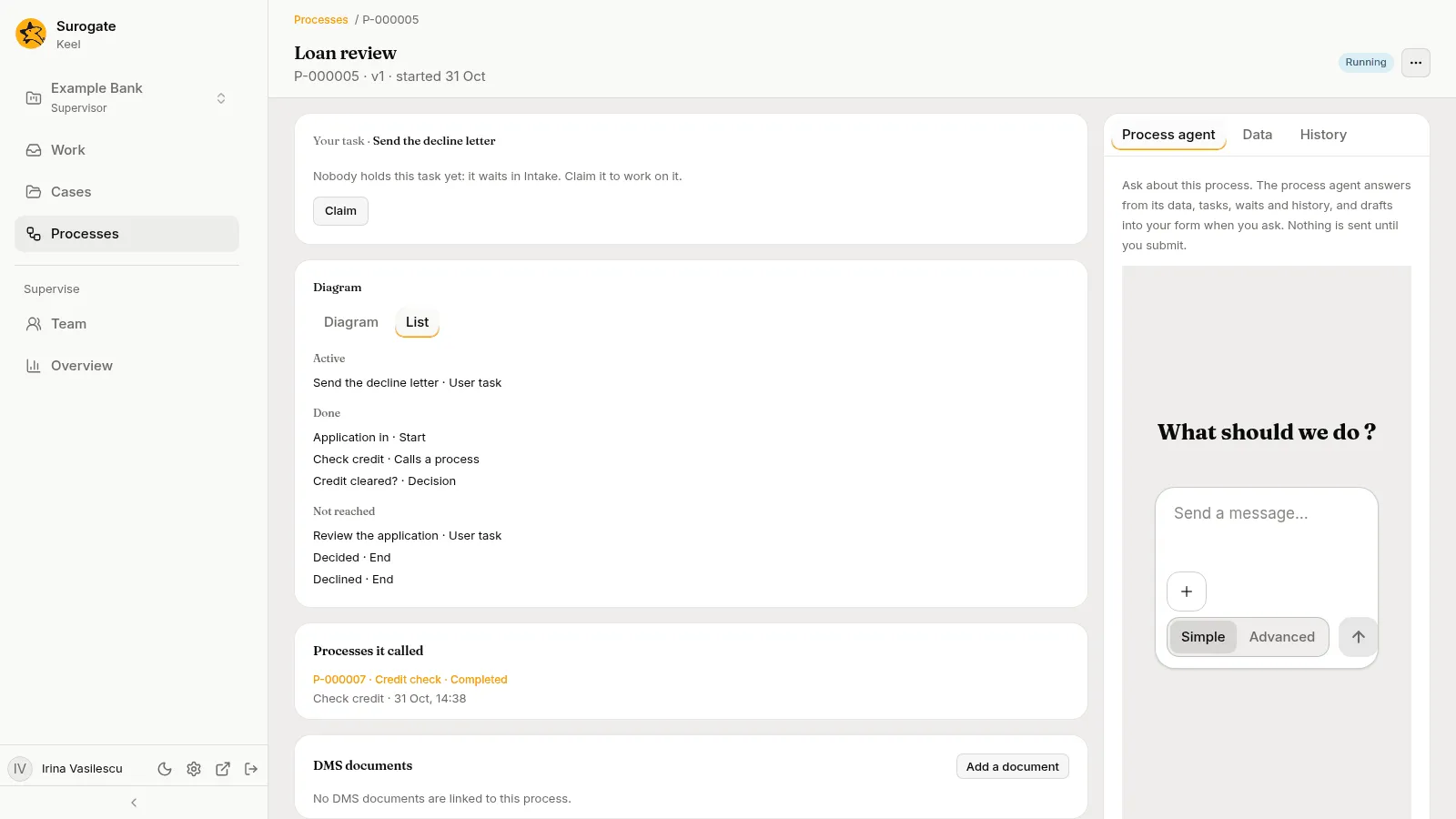
The chat is yours. Each person has their own chat with the agent on each instance; the rest of the staff do not see it. When you come back to the instance, the tab opens on the same chat, and another instance opens its own chat.
Asking
Section titled “Asking”Type a question and send it. The agent reads the instance before it answers, as you read it, and answers only from what it read:
- the instance’s data, each variable by its label;
- its open tasks and who holds them, and the fields of the form of a task you hold;
- what it waits for, the cases it started and the processes it called, by number and name, and what started it;
- its incidents, in Keel’s words;
- its history, as the sentences of History;
- whether it could move to the newest version of its process, and why not.
When the instance does not hold the answer, it says so. It reads no files and no other instance: a case or a process the instance waits on is named, never read. It never reads the payload of a message, a connection’s secret, or the text of an agent’s session that failed.
After each fact it gives, it names where the fact comes from, in square brackets:
- a variable, by its label, such as
[Data: Amount]; - an entry of the history, by its element, when it has one, and day, such as
[History: Review the loan, 12 Oct]; - a task, a wait, a case, a process, an incident or the move check, such as
[Task: Review the loan],[Waiting: Check credit],[Case: CL-000001],[Process: P-000002],[Incident: Check credit]or[Move check].
You can stop the agent while it answers. When it cannot answer, the chat says “The process agent could not answer.” Keel records what the agent reads for you as your own views of the instance, made through the case agent.
Filling in your form
Section titled “Filling in your form”Ask the agent to fill in a form, for example from the instance’s data. It fills in only the form of a task of this instance that you hold, and only the fields that form takes; it leaves out a value it is not sure of, and tells you which fields it filled and where each value came from. It never chooses an outcome: it does not pick Approve the loan or Decline for you. While an agent’s raised hand waits on the task, the task has no form to fill.
The chat marks each draft with a line such as “Drafted into your form: Reviewer’s note”. In the task’s form, each field it filled is marked “Drafted by the process agent at your request. Nothing is sent until you submit.” Check each value, change what you need, choose an outcome and press Submit, as on any task.
- A field you changed is yours. A later draft of the process agent does not fill it again, and its mark goes. A new draft of the task’s own agent fills the form afresh.
- On a task an agent drafts for you, the newer draft of a field wins: the task’s agent’s, or the process agent’s.
- Your draft belongs to you and the task’s work item. When you return or delegate the item, or a supervisor reassigns it, the draft is dropped: whoever holds it next starts with none. When you are away and the item goes to your substitute, the draft goes with it, marked as the process agent’s draft; when it goes back to its queue, the draft is dropped.
- When a supervisor moves the instance to a newer version, your draft keeps the values the newer version’s form still takes and drops the rest.
When you submit, the task’s entry in History names the agent that drafted its fields under it, such as “Case assistant drafted Reviewer’s note”. A field you changed before submitting is recorded as yours.
What it never does
Section titled “What it never does”The process agent reads the instance and fills in your form. It cannot:
- submit a form, complete a task, retry one, cancel the process or move it to another version;
- send a message or a signal, or answer an agent’s raised hand;
- change the instance’s data;
- fill in a task you do not hold;
- read files, or read another case or process.
A process instance holds no files.
When it cannot answer
Section titled “When it cannot answer”| Message | Why |
|---|---|
| The project’s process agent is not set up yet: a builder opens the project in the builder app to set it up. | Keel has no case agent for the project, or it is switched off. Ask an editor or owner to open the project in Keel Builder. |
| The process agent’s session cannot be reached now; try again shortly. | A temporary problem. Send your message again, or press Try again where the tab offers it. |
| The process agent takes no files. | The message had a file or an image. Nothing was sent. |
| A message to the process agent is at most 20,000 characters. | The message is too long. Nothing was sent. |
| The process agent could not answer. | Its turn failed. Ask again. |
Move to the current version
Section titled “Move to the current version”An instance runs on the version of its process that it started on, shown in the header as v1. When the process has a newer version, a supervisor moves a running instance to it from More actions with Move to version 3…. The dialog, Move number to version 3, says “It runs on version 2. Its open tasks keep their work: who holds them, their timers, goals and deadlines, and the cases and processes they wait on. From there on it runs version 3, and its history keeps the move.”
- The dialog checks first: “Checking whether it can move…”.
- When the instance cannot move, it says “It cannot move to version 3:” over each reason, in Keel’s words, such as “Pay is open, and version 3 has no element pay”; Move to version 3 stays off. Moving instances to a newer version lists the reasons. If the check itself fails, the dialog says why, in Keel’s words, with Try again.
- Otherwise press Move to version 3, or Keep it on version 2 to leave the instance as it is.
Keel says “Moved number to version 3.”, closes the dialog and shows the instance on version 3: the header reads v3, the history says who moved it, and the diagram is the new version’s. When a newer version was published while the page was open, the dialog says so, such as “Version 4 was published since this page opened. Close this and move the process to version 4 from More actions.”, and Move to version 3 stays off. If Keel refuses at the last moment, because something changed since the check, the dialog stays open and shows the reasons, or Keel’s message when the version asked for is no longer the current one, and the page reads the instance again. A move cannot be undone: an instance moves only to the process’s current version, never back. A resend of the same move after a failed one is applied once. Builders may move the running instances of an older version together from the Versions tab.
Cancel a process
Section titled “Cancel a process”A supervisor cancels a running instance from More actions with Cancel the process…. The dialog, Cancel number, says “Everything still open in the process is withdrawn, and it ends as cancelled.” It adds “Your reason is kept in its history.” Where the instance waits on a case, it also says “A case it waits on is cancelled, or left running, as the process says.” Where it waits on a process it called, it says “A process it called is cancelled too.”
- Write the Reason. Without one, the dialog says “Say why the process is cancelled.” and sends nothing.
- Press Cancel the process, or Keep it running to leave the instance as it is.
Keel says “Cancelled number.” and the page shows the instance as Cancelled. If the instance ended meanwhile, the dialog stays open and says “This process has ended.”
Not offered on a process
Section titled “Not offered on a process”A process is not a case. An instance has no Follow and no Updates, no files of its own (its DMS documents stay in the DMS), no re-run and no Move by hand… (its Move to version 3… puts it on a newer version of its process, as above), and its history has no Full history with inputs and outputs. Builders see an instance’s agents and runs on the builder’s Agents screen.