Decisions, rules, waits and parallel paths
Besides steps, a stage’s flow holds nodes that Keel works through by itself, and process nodes, which start one of the project’s BPMN processes. Add them with the + on a line of a stage’s flow, or, for a rule, a wait or a process, with Add step under a stage whose nodes run in one line; pick the Kind, and edit the node in its panel. See The Workflow tab for the board and the flow.
A condition in these nodes is a short expression over the case type’s field names, such as amount > 50000.0. The word now stands for the current time. The designer agent can write a condition from a sentence, such as “the amount is over 50,000”. Keel keeps a condition exactly as you type it; the dry run reports one it cannot read.
Decisions
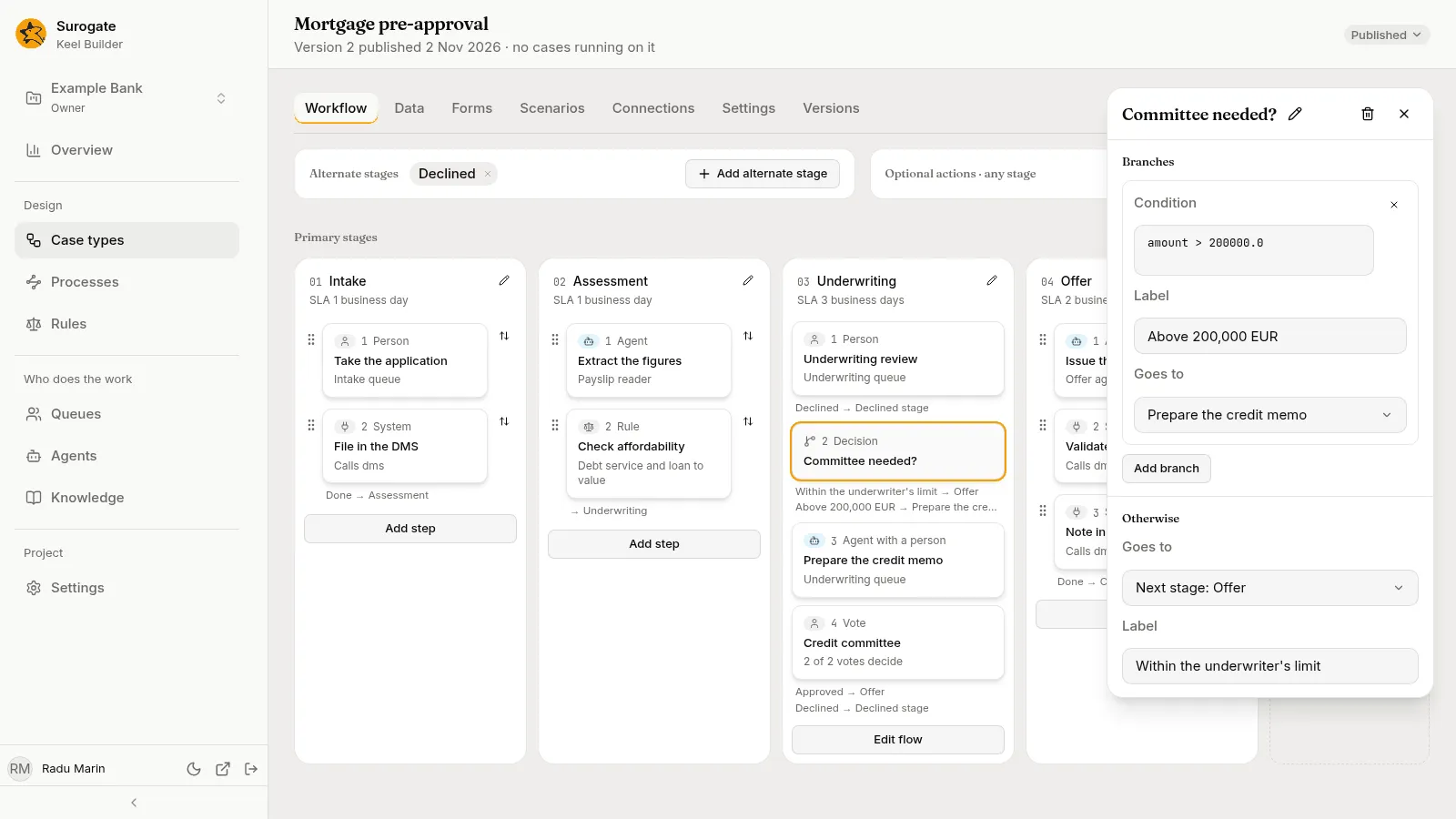
Section titled “Decisions”A decision sends the case down one branch. It never calls a model: it checks its branches’ conditions against the case’s data, in order, and takes the first that holds.
The panel has two sections:
- Branches: each with a Condition, a Label that people read (such as
Over the limit), and Goes to. Add branch adds one; the × removes it. With none, “It has no branches: every case goes the other way.” - Otherwise: where a case goes when no branch holds (Goes to), and its Label, such as
Within the limit.
Goes to offers the same places as a step’s outcome. See Allowed outcomes.
On the board, a decision is a card marked Decision. Under it, the board lists each way out that the next card does not show, as its label and where it goes, such as Above 200,000 EUR → Prepare the credit memo.
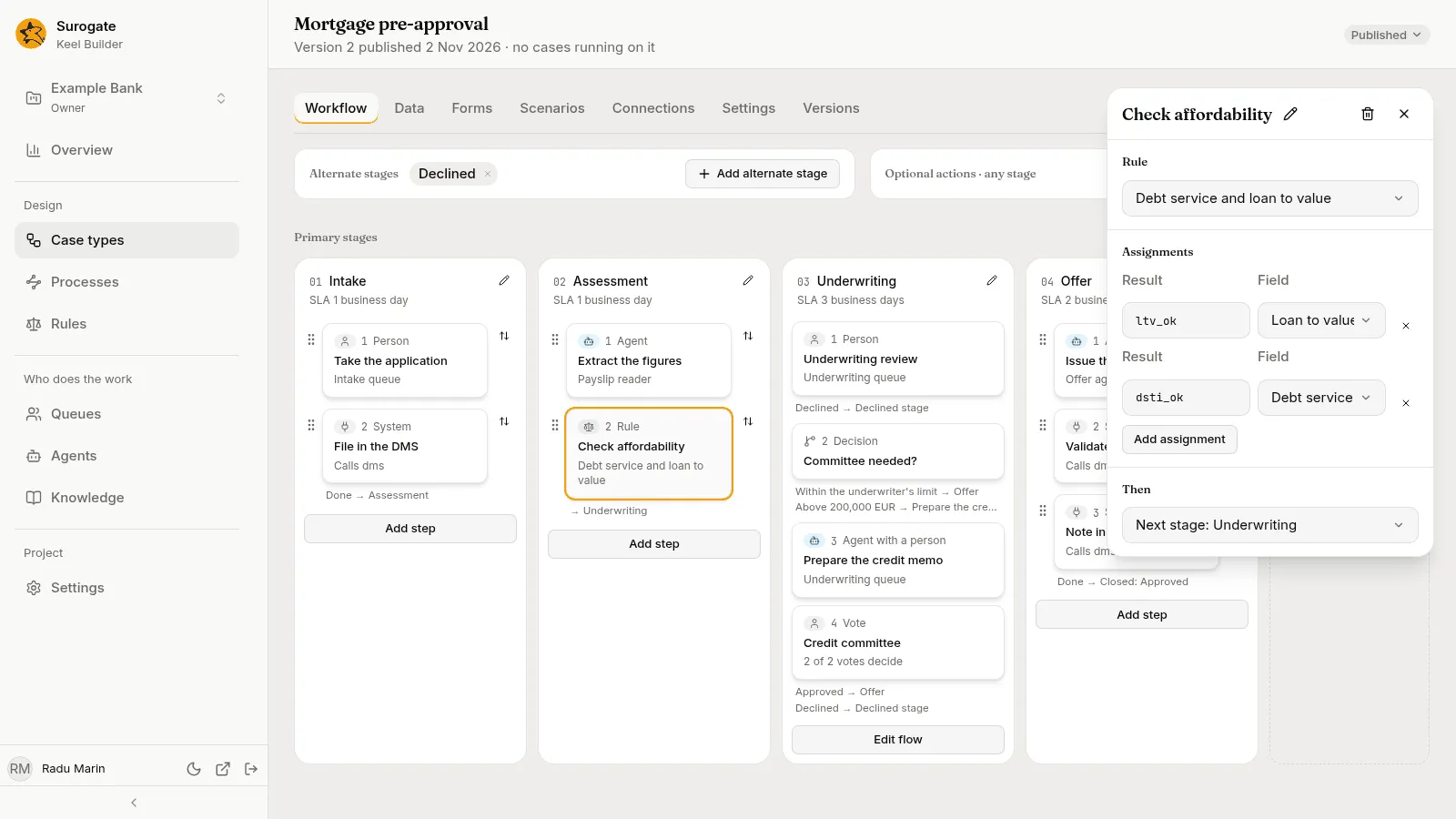
A rule node runs one of the project’s decision tables or scorecards on the case’s data, writes its results into fields, and goes on.
- Rule: pick the rule.
- Assignments: which of the rule’s results goes to which field. Each row has a Result, the result’s key as the rule writes it, and a Field. Add assignment adds a row. A scorecard’s results are
scoreandreasons. - Then: where the case goes next.
The case uses the version of the rule in effect at that moment, unless the case type pins the rule: then each case uses the version in effect when it started.
If the rule cannot give an answer, such as a table with no matching row and no default, Keel refuses whatever led the case to it, such as the completion of the step before. The person sees Keel could not apply a rule on this step. Ask your supervisor.
A wait holds the case until something happens. Its panel has three sections.
Waits for picks what ends the wait:
| Choice | Setting | The outcome it leaves by |
|---|---|---|
| An event | Event, the name of a case event another system sends | Arrived |
| A time | How long, a number and Minutes, Hours or Days | Elapsed |
| A condition | Condition: “It is checked each time the case changes.” | Met |
At most sets a limit. When the limit passes first, the wait leaves by its Deadline outcome. When the case type has a calendar, these durations count business time: “Counted in business time, by the case type’s calendar.”
Waiting on says whom the case waits on: The client, A third party or Inside the bank. It shows in the business app, on the case list’s tabs and on the case page. While a case waits on the client, its own service-level clock is paused.
Outcomes lists one outcome for each thing the wait waits for, each with a Label and where it Leads to. They come and go as you change Waits for and At most.
Parallel splits and joins
Section titled “Parallel splits and joins”A parallel split starts several paths at once. Its panel, Starts in parallel, lists where each path starts; a chip’s × removes one, and the Add menu adds one. With none, it says It starts no paths yet. Steps on parallel paths are open at the same time, and their cards read Parallel with and the other paths. On the board, the split shows as Parallel · and its name, with each path as a branch of cards under it.
A join waits until every path that leads to it has arrived, then goes on to its Then. On the board, it shows as All branches meet at and its name. A join needs at least two paths leading to it; the dry run reports one that could never fire.
A path can also stop on its own, with End of this path: the case goes on along its other paths. A case left open with nothing to do is refused, so every path must end somewhere a case can rest or close.
Processes
Section titled “Processes”A process node starts one of the project’s BPMN processes and passes it values from the case’s fields. It either waits for the process to end, and takes back what the process returns, or goes on at once. A new process node names no process yet, and both its ways lead on to the next stage.
Its panel has these sections:
- Process: the process it starts, among those the project published and those the open draft adds. The card then reads, for example,
Starts KYC check and waits, orStarts KYC checkfor a node that goes on at once. If Keel cannot read the project’s processes, the section says “The project’s processes could not be read.” with Retry. Picking another process clears what the node passed and received. - Waits: Waits until the process ends or Goes on at once. A node that goes on at once receives nothing and leaves by one way, Started. Switching back while the panel is open brings back what it received and where it failed.
- Passes in: a row for each variable the process declares, with its type, such as
Text · required. Pick the case field that fills it, among the fields of the variable’s type, or Not passed. The variables come from the process as the draft would publish it: the draft’s file when the draft adds or changes the process, else its published version.- Without a process, it says “Pick a process to see what it takes.”
- For a process neither published nor in the draft, “This process is not published, and this draft does not add it.”
- When Keel cannot read the variables, it says why, with Retry, and shows each variable the node fills by its name.
- A variable the node fills that the process no longer declares shows by its name, marked “Not declared by the process”. Pick Not passed to remove it.
- Receives, while the node waits: rows of a Field of the case and the Variable of the process it receives when the process ends. Add a field adds a row. With none, “It receives nothing when the process ends.”
- Outcomes: each way the node leaves, with its Label and where it Leads to.
| Way | When the case leaves by it |
|---|---|
| Ended | The process completes or ends. The fields under Receives take the values the process ended with. |
| Failed | The process fails, is cancelled or cannot start, or ends with a value a field cannot hold. |
| Started | At once, for a node that goes on at once. |
When a case leaves a waiting process node another way first, such as by a case event, Keel cancels the process. A process a node does not wait on runs on, whatever the case does.
Publishing checks what each process node passes and receives against its process: see Checking what starts what. The business app shows the process on the case’s page: see An open case.